MOUNTUP Dual Monitor Stand Review
✅ PROS
- Sturdy construction — monitors stay in place without sagging
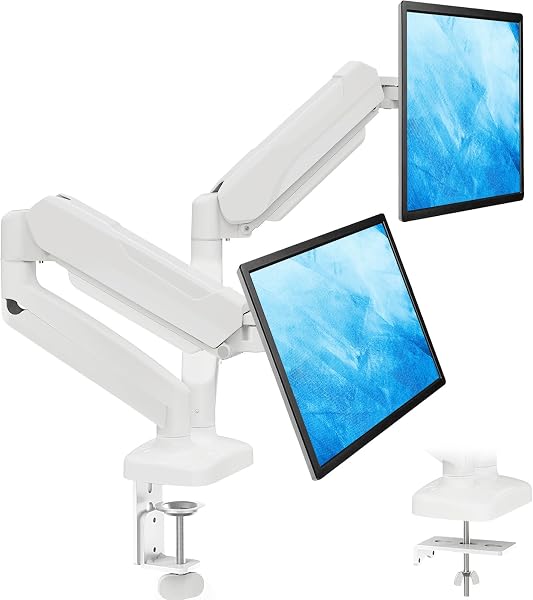
- Full articulation range — tilt, swivel, rotate, extend, and height adjust
- Cleans up desk space significantly
- Easy gas spring tension adjustment for fine-tuning
- Comes with both C-clamp and grommet mounting hardware
❌ CONS
- Installation is a bit fiddly — dialing in gas spring tension takes patience
- Instructions could be clearer in a few places
- Some users find the arms don't retract as flat as they'd like
The Verdict
The MOUNTUP Dual Monitor Stand is one of the most popular monitor arms on Amazon, with over 7,000 reviews and a solid 4.4-star average. At $59.99 for a dual-arm setup, it undercuts competitors like Ergotron and Amazon Basics by a significant margin. But when it comes to holding two monitors steady on your desk, does budget price mean budget performance? Not according to the thousands of buyers who’ve put it to the test.
Build Quality Beyond the Price
The first thing users notice is how solid the MOUNTUP feels once installed. The arms are made from heavy-duty steel, and the gas spring mechanism provides smooth, adjustable support for monitors up to 17.6 pounds. Multiple reviewers specifically note that their monitors stay exactly where they put them — no sagging, no drifting, no readjusting throughout the day.
The range of motion is excellent. Each monitor arm offers tilt, swivel, rotation (portrait/landscape), and extension. The full articulation means you can position your monitors side by side, stacked, angled inward for gaming, or one landscape and one portrait without any awkward compromises.
Desk space recovery is the other major win. A dual-monitor stand that actually works frees up the entire footprint of two monitor bases, which translates to meaningful real estate for papers, keyboards, or — let’s be honest — a larger mouse pad.
Installation: Worth the Patience
The most common criticism is that installation takes longer than expected — about 30 minutes for most users. The gas spring tension adjustment specifically requires some trial and error: too loose and your monitor drops, too tight and it won’t stay down. Once you find the sweet spot, it works perfectly, but there’s a dialing-in period.
The included instructions are functional but not excellent. A few steps could use more detail or better diagrams. Users who’ve installed monitor arms before will breeze through it; first-timers may need to watch a YouTube video.
Both mounting options (C-clamp and grommet) are included, which is appreciated. The C-clamp works well for most desks, while the grommet mount is cleaner for desks that already have cable management holes.
Who Should Buy It
The MOUNTUP Dual Monitor Stand is the right choice for anyone who wants a clean, ergonomic dual-monitor setup without paying a premium. It’s ideal for home offices, remote workers, and gamers who want their monitors off the desk and properly positioned.
If you have ultrawide monitors over 32 inches or each monitor weighs over 17.6 pounds, you’ll need a heavier-duty solution. But for standard 24-27 inch monitors — the most common sizes — this stand delivers everything you need at a fraction of the price of premium alternatives.
Frequently Asked Questions
Will the MOUNTUP stand fit my monitors?
Does this mount work with a curved monitor?
Is installation difficult?
Does it come with both C-clamp and grommet mounting options?
More Home Office Verdicts