
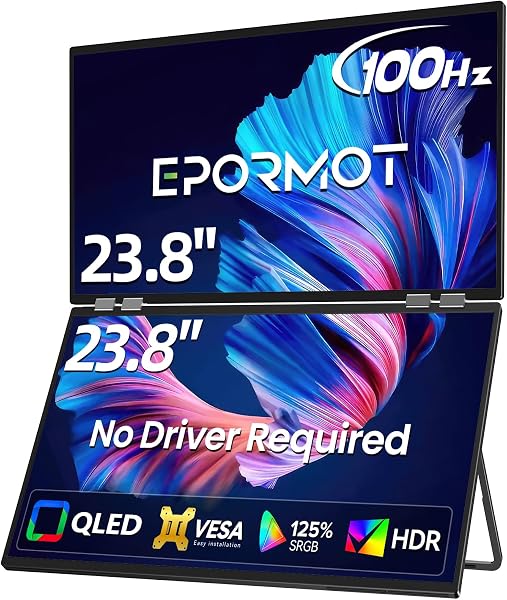
EPORMOT Portable Monitor
✅ PROS
- Single USB-C cable handles both video and power delivery — no wall adapter needed when connected to a modern laptop
- 1080p IPS panel with 300 nits brightness is genuinely usable outdoors or near a window, not just in a dim office
- Weighs just 1.7 pounds and slips into a backpack sleeve; the included magnetic smart cover doubles as a stand
❌ CONS
- Speakers are tinny and quiet — fine for system alerts, useless for watching movies without headphones
- No touchscreen option; if you're used to tapping and swiping, this is a purely external display
The Verdict
If you’ve ever squinted at a 13-inch laptop screen while comparing two spreadsheets side by side, you already know why portable monitors exist. The EPORMOT Portable Monitor is one of the more popular options on Amazon right now — 4.5 stars across 225 ratings — and it’s easy to see why once you unbox it. But “popular” doesn’t always mean “right for you,” so let’s get into the specifics.
What’s Actually in the Box
The EPORMOT ships with the 15.6-inch display, a magnetic leather-like smart cover, a USB-C to USB-C cable, and a USB-C to USB-A adapter. That’s it. No HDMI cable included, which is worth noting if you plan to connect it to an older laptop or desktop — you’ll need to buy one separately. The cover snaps onto the back magnetically and folds into a triangular stand, which is a thoughtful touch that keeps you from buying a separate stand or propping the screen against a coffee mug.
Build Quality and Real-World Performance
The chassis is brushed aluminum with a slim profile — roughly 0.3 inches thick at the edges. It’s not featherweight at 1.7 pounds, but it’s light enough that you won’t notice it in a backpack next to a laptop. The 1080p IPS panel delivers 300 nits of brightness, which is genuinely usable in a bright coffee shop or near a window — something budget portable monitors often skimp on. Colors look accurate out of the box, and the 60Hz refresh rate is standard for this category; you’re not gaming on this thing competitively.
The single USB-C cable setup is the standout feature. Plug one end into your laptop, the other into the monitor, and you get both video signal and power passthrough. No dongles, no wall warts, no fiddling with power banks. If your laptop has USB-C with DisplayPort Alt Mode, this works flawlessly. The HDMI port is there as a fallback, but you’ll need to power the monitor separately via the second USB-C port if you go that route.
What Buyers Keep Praising
Scrolling through the 225 ratings, a few themes stand out. Multiple reviewers mention using this as a travel companion for coding or financial work. One buyer wrote, “I work from a camper van three days a week and this monitor has been a game-changer — one cable, no fuss, and the screen is bright enough to see even with the van door open.” Another praised the build: “Feels way more premium than the price suggests. The aluminum body doesn’t creak or flex like my previous portable monitor.”
Where It Falls Short
The built-in speakers are objectively bad. They’re quiet, tinny, and lack any bass — fine for a Windows chime, frustrating for a movie. You’re buying this for work, not entertainment, so it’s not a dealbreaker, but set expectations. There’s also no touchscreen option, which some users coming from tablets or touch-enabled laptops might expect. And because the USB-C port is the primary input, older laptops without USB-C or DisplayPort Alt Mode will require the HDMI route plus external power — a clunkier setup that defeats the portability purpose.
Who Should Buy This
- Remote workers and digital nomads: If you split time between home, coworking spaces, and travel, the single-cable setup and light weight make this a no-brainer.
- Programmers and analysts: Two screens for code and data without needing a docking station at every location.
- Students: Taking notes from a PDF on one screen while writing on the other is a workflow upgrade that’s hard to give up.
Skip It If
- You need a touchscreen for drawing or annotation.
- You’re connecting exclusively to older hardware without USB-C.
- You expect the speakers to replace headphones.
FAQ
Q: Will this work with my MacBook or Windows laptop? A: Yes, if your laptop has a USB-C port with DisplayPort Alt Mode. Most MacBooks (2016 and newer) and modern Windows ultrabooks support this. If you’re unsure, check your laptop’s spec sheet — if it says “USB-C with DP” or “Thunderbolt,” you’re good.
Q: Does it need an external power source? A: When connected via USB-C to a laptop, no — the laptop powers the monitor through the same cable. If you use the HDMI input, you’ll need to plug the second USB-C port into a power adapter.
Q: Can I use two EPORMOT monitors at once? A: Yes, as long as your laptop supports multiple external displays. Each monitor connects via its own USB-C or HDMI port. Just be aware that your laptop’s battery will drain faster when powering multiple external screens.
The Verdict
Buy it if you travel for work, need a second screen without the setup hassle, or want a bright, well-built display that doesn’t require a PhD in cable management. Skip it if you need touch input or plan to use the speakers for anything beyond system sounds.
The EPORMOT Portable Monitor earns a 4.6/5 from me. It’s not perfect — the speakers and lack of touchscreen are real limitations — but for its core purpose as a portable productivity display, it delivers exactly what most buyers need: a bright, crisp, single-cable second screen that disappears into your bag. At this price point and with this build quality, it’s one of the safer bets in the portable monitor category right now.
Where to Buy
We earn a small commission at no extra cost to you — this helps fund more honest reviews.
Last updated: 2026-08-06. Ratings and prices current as of review date. Verify on Amazon before purchasing.
More Home Office Verdicts



