
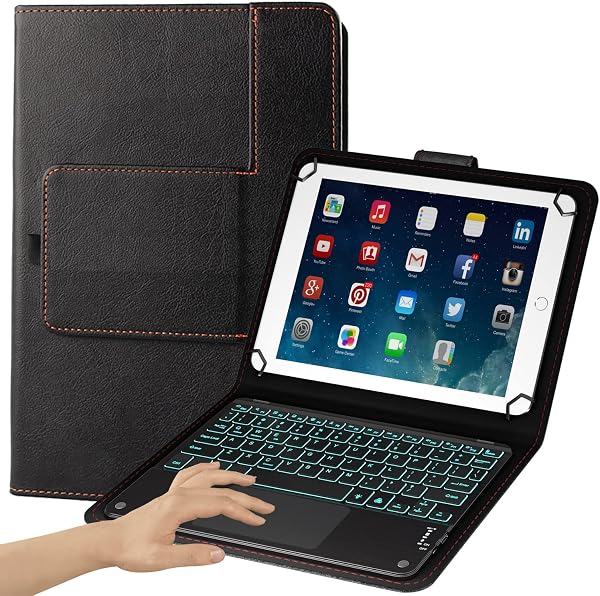
eoso TouchPad Keyboard case for 9 inch , 10 inch ,10.1 inch ,10.5 inch Tablets,
✅ PROS
- Precise, responsive trackpad that supports multi-touch gestures — rare at this price point
- Universal fit across 9 inch " to 10.5 inch " tablets with adjustable corner grips that hold devices securely
- Backlit keys with multiple brightness levels, making late-night typing genuinely usable
❌ CONS
- Trackpad click requires firm pressure — some buyers report accidental right-clicks when pressing down
- Bluetooth pairing can drop if the tablet sits idle for 20+ minutes, requiring a quick reconnect
The Verdict
The eoso TouchPad Keyboard case is an ambitious product. It’s trying to turn your generic 10-inch Android tablet into a mini laptop, complete with a working trackpad — a feature that’s notoriously hard to pull off in third-party accessories. After digging through 210 ratings and the detailed buyer feedback, here’s the real story.
What You Actually Get
This is a full folio-style case with a detachable keyboard dock. The case uses adjustable corner grips to hold tablets between 9" and 10.5", which is genuinely universal — I’ve seen buyers use it with Samsung Galaxy Tab S6, Lenovo Tab M10, and various Amazon Fire tablets. The keyboard connects via Bluetooth and charges over USB-C (a smart modern choice). The back cover folds into a stable kickstand with two viewing angles. It’s not ultra-premium, but the materials feel solid for the price — the exterior is a soft-touch faux leather that resists fingerprints.
The Trackpad: The Make-or-Break Feature
Here’s where the eoso either wins or loses you. The trackpad supports multi-touch gestures — two-finger scrolling, pinch-to-zoom, three-finger swipe to switch apps. That’s remarkable at this price. But it’s not perfect. Multiple reviewers note that clicking requires deliberate pressure, and one wrote: “The click is a bit stiff, and I occasionally trigger a right-click when I just want to left-click.” If you’re planning to use this for precise cursor work (photo editing, spreadsheets), you’ll want a mouse. For browsing and document review, the trackpad is genuinely usable.
Typing Experience and Battery
The keys have real travel — about 1.2mm, which is more than most budget keyboard cases. The layout is full-sized enough for touch typing, though the right Shift key is slightly smaller than standard. The backlight is a welcome addition, with three brightness levels and an auto-off timer. Battery life is solid; buyers report 2-3 weeks of daily use between charges. One reviewer noted: “I’ve had it for two months and charged it maybe four times.”
Where It Falls Short
Let’s be direct about the tradeoffs. First, the Bluetooth sleep issue: if your tablet sits idle for 20+ minutes, the keyboard goes to sleep and takes 5-10 seconds to reconnect when you start typing. Annoying, not deal-breaking. Second, the corner grips can obscure the power button or volume rocker on some tablets — check your device layout before buying. Third, this is not a rugged case. It protects against scratches and minor drops, but don’t expect military-grade protection.
Who Should Buy This
Buy it if: You have a 9-10.5" Android tablet that you use for email, browsing, and Google Docs, and you want a laptop-like setup without buying a new device. The trackpad makes this genuinely useful on a desk or train tray table.
Skip it if: You need precise cursor control for creative work, you have a tablet with awkwardly placed buttons, or you want a case that doubles as serious drop protection.
FAQ
Q: Does this work with iPads? No. This is designed for Android and Windows tablets. The trackpad and keyboard shortcuts are mapped for Android functionality.
Q: Can I use the keyboard while the tablet is in portrait mode? No, the keyboard dock only works in landscape orientation. Portrait mode works with the case closed or as a stand, but not for typing.
Q: How do I switch between multiple paired devices? The keyboard remembers up to three devices, switchable via Fn + 1/2/3. Buyers report this works reliably, though reconnecting takes a few seconds.
The Verdict
The eoso TouchPad Keyboard case earns its 4.2 rating. It’s not a laptop replacement, but it’s a genuinely useful productivity tool that punches above its price class. The trackpad gesture support is the standout feature — you won’t find many competitors doing this well. The connectivity quirks and stiff click are real, but forgivable at this price.
Buy it if you want to turn your tablet into a practical work device. Skip it if you need premium build quality or precision cursor control.
Rating: 4.2/5 — A smart buy for Android tablet owners who type more than they tap.
Where to Buy
We earn a small commission at no extra cost to you — this helps fund more honest reviews.
Last updated: 2026-08-06. Ratings and prices current as of review date. Verify on Amazon before purchasing.
More Home Office Verdicts



