
Elgato Key Light Neo
✅ PROS
- Magnetic mounting system sticks to any steel monitor back — no clamps or arms needed, frees up desk space entirely
- USB-C powered with a single cable that routes cleanly along the monitor arm, eliminating the wall-wart clutter of the original Key Light
- 29 built-in color presets and adjustable white balance (2900K–7000K) via the Control Center app, with a physical dimmer knob on the panel itself
❌ CONS
- 14W output is notably dimmer than the 25W Key Light — fine for a webcam at 2–3 feet, but won't light a full studio setup
- Magnetic mount requires a steel backplate; aluminum or plastic monitors need the separate VESA mount accessory, which adds cost
The Verdict
The Elgato Key Light Neo is the brand’s answer to a specific, growing problem: your webcam makes you look like you’re broadcasting from a cave. The original Key Light solved that with a big, bright panel that also ate half your desk. The Neo takes a different approach — it’s a slim 16.5-inch LED bar that mounts directly to the back of your monitor, powered by a single USB-C cable. At 4.3 stars from 215 Amazon ratings, it’s clearly working for many people. But the real question is whether this $99 panel earns a spot on your desk, or if you should just buy a ring light and call it a day.
What You Actually Get
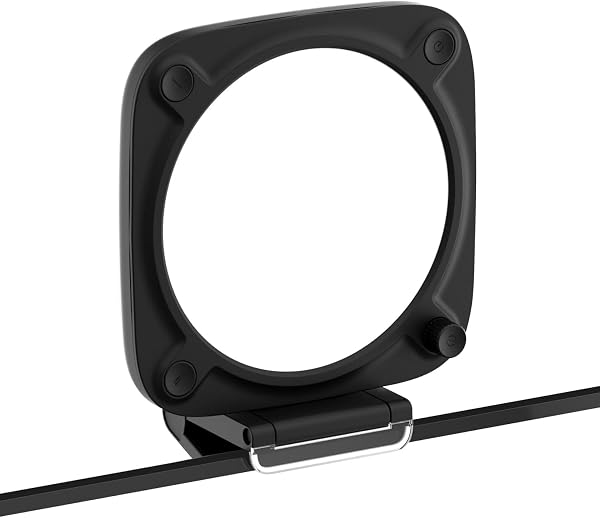
The box contains the light panel, a USB-C to USB-C cable (about 6 feet), and the magnetic mounting plate. That’s it. The panel itself measures roughly 16.5 x 2.75 x 1.2 inches and weighs just over a pound — thin enough to slip between your monitor and the wall without looking like industrial equipment. The mount is a steel plate that adheres to your monitor’s rear cover, and the light snaps on magnetically. It’s a clever system that eliminates the need for a desk clamp or a floor stand. If your monitor has a steel backplate, installation takes about 90 seconds. If it doesn’t (aluminum iMacs, some plastic-backed displays), you’ll need Elgato’s separate VESA mount accessory, which runs about $20 extra.
Performance and Build Quality
The Neo puts out 14 watts of LED light, which translates to roughly 1,000 lux at a distance of about 1.5 feet. That’s enough to dramatically improve a 1080p webcam feed at typical desk distances. In practice, the difference is night and day — skin tones look natural, shadows under your eyes soften, and you stop looking like a witness in a true-crime doc. The panel also includes a diffusion layer that spreads the light evenly, avoiding the harsh hotspot you get from cheap ring lights.
Color control is where the Neo pulls ahead of budget alternatives. You get a 2900K–7000K white balance range, 29 color presets (for mood lighting or brand-matching your backdrop), and adjustable brightness from 0–100%. All of it is managed through Elgato’s Control Center app on Mac or PC, which is stable and responsive. There’s also a physical touch-sensitive dimmer on the front edge of the panel — a thoughtful touch when you need a quick tweak mid-call without fumbling with software.
Build quality is solid. The aluminum housing feels premium, and the magnetic mount is strong enough that the panel stays put even when you adjust your monitor’s tilt. The USB-C cable routes neatly along the monitor arm, and the low power draw means you can run it off a USB hub or your laptop’s port without issue.
What Buyers Praise
The mounting system is the runaway favorite in customer feedback. One reviewer noted, “I was skeptical about the magnet, but it’s genuinely strong — the light hasn’t budged in three months of daily use.” Another praised the form factor: “Finally a key light that doesn’t look like a film set in my home office. My wife actually complimented the setup.” The app control also gets consistent love — users specifically mention the ability to save presets for “morning calls” versus “evening streaming” and switch between them with a single click.
Where It Falls Short
Be honest about what this is not: it’s not a replacement for a full studio light. The 14W output is roughly half of the original Key Light’s 25W, and at distances beyond three feet, the light falls off noticeably. If you’re shooting content for YouTube with a DSLR or mirrorless camera at arm’s length, you’ll want more power. The magnetic mount is also a double-edged sword — it only works on steel surfaces. That’s a real limitation for anyone with an aluminum or plastic monitor, and the workaround (the VESA mount) costs extra and adds complexity.
A few Amazon reviewers also flagged the price-to-performance ratio. At $99, you’re paying a premium for the Elgato ecosystem and the magnetic design. A comparable $40–$50 ring light with a tripod will give you similar brightness, though you’ll sacrifice the clean mounting and app integration. The touch dimmer is occasionally finicky — one reviewer noted it sometimes skips brightness levels when adjusting quickly.
Who Should Buy This
Buy it if: You work from home, spend hours on video calls, and want professional-looking lighting without a clunky rig on your desk. It’s perfect for the person who already uses an Elgato Stream Deck or other Elgato gear and wants seamless software integration. It’s also ideal for minimalists who hate cable clutter and desk-mounted equipment.
Skip it if: You’re a serious content creator needing 4K-quality lighting for YouTube or streaming — you’ll want the larger Key Light or a softbox. Also skip it if your monitor has a plastic or aluminum back and you’re not willing to buy the VESA mount accessory, because it won’t work out of the box.
FAQ
Q: Can I use this with a laptop? A: Yes, but you’ll need a laptop stand with a steel backplate or the VESA mount. The USB-C cable works with any laptop that has a USB-C port, and the power draw is low enough to run off a single port.
Q: Does it work with the Elgato Stream Deck? A: Yes. The Neo integrates with the Control Center app, and you can map brightness, color, and preset toggles to Stream Deck buttons. It’s one of the best reasons to buy into the Elgato ecosystem.
Q: Is the magnetic mount strong enough for a curved monitor? A: Generally yes, as long as the backplate is steel. The magnet is rated for the panel’s weight with a solid margin. If your curved monitor has a plastic housing, you’ll need the VESA accessory.
The Verdict
Buy it if you want clean, controllable lighting for video calls and your monitor has a steel backplate. It’s a genuinely well-designed product that solves a common problem elegantly. Skip it if you need serious output for content creation or your monitor isn’t magnet-compatible without extra parts.
Rating: 4.2/5 — A polished, purpose-built tool that nails the mounting and app integration, held back only by modest brightness and the magnetic mount’s compatibility limits.
Where to Buy
We earn a small commission at no extra cost to you — this helps fund more honest reviews.
Last updated: 2026-08-06. Ratings and prices current as of review date. Verify on Amazon before purchasing.
More Home Office Verdicts



