
DYMO Monochrome LabelWriter 450 Twin Turbo
✅ PROS
- Dual-roll design lets you load two label sizes simultaneously — no swapping rolls for address vs. shipping labels
- Thermal printing means zero ink or toner costs; the 300 dpi output is crisp and smudge-proof
- Blazing fast at 51 labels per minute — genuinely one of the quickest desktop label printers available
❌ CONS
- Windows-only driver support — Mac users need workarounds, and DYMO's software has gotten more bloated over the years
- Proprietary label cartridges are pricey, and the printer refuses third-party rolls unless you hack the sensor
- USB-only connectivity — no Wi-Fi, no Ethernet, so it's tethered to one machine unless you set up sharing
The Verdict
If you’re printing more than a dozen shipping labels a week, you already know the pain of peeling, folding, and wrestling with a standard inkjet. The DYMO LabelWriter 450 Twin Turbo exists to eliminate that chore entirely — and it does, mostly. But “mostly” carries some asterisks worth understanding before you hand over your money.
What You Actually Get
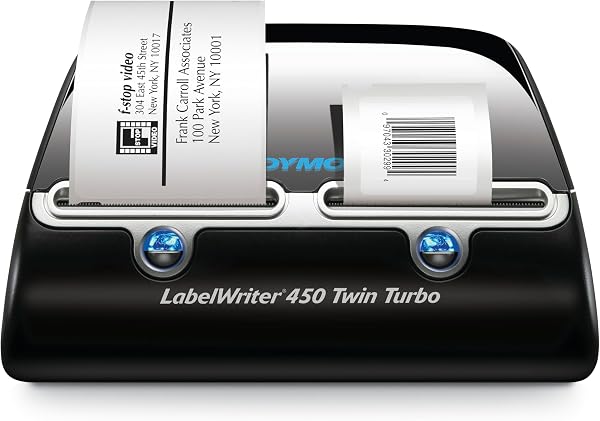
The Twin Turbo is a dual-bay thermal printer. Unlike the single-roll LabelWriter 450, this unit ships with two label bays side by side, letting you keep address labels loaded in one slot and shipping labels in the other. You get the printer, a USB cable, a starter roll of address labels, and the DYMO Label software on a disc (though you’ll want to download the current version — the bundled one is dated).
The unit itself is compact: roughly 7.5 inches deep and 6 inches wide, weighing just over 2.5 pounds. It’s genuinely desktop-friendly, and the build feels solid enough for daily office use. The front-loading bays are easy to access, and loading new rolls takes about 15 seconds once you’ve done it once.
Performance and Real-World Use
Here’s where the Twin Turbo earns its name. It prints at 51 labels per minute — roughly one per second. In practice, that means a batch of 50 address labels is done before you’ve finished filling your coffee mug. The 300 dpi thermal printhead delivers sharp, crisp text that won’t smudge, smear, or fade. There’s no ink to buy, no toner to replace, no printhead cleaning cycles. It just works.
Setup is straightforward for Windows users. Plug in the USB cable, install the software, and you’re printing in under ten minutes. The DYMO Label software is functional but cluttered — it’s clearly been updated over many years and carries some legacy baggage. For basic address and shipping labels, it’s fine. For complex custom layouts, you’ll hit its limits quickly.
What Buyers Consistently Praise
The speed and convenience factor is the dominant theme in positive reviews. One buyer put it simply: “I’ve had mine for three years and it still prints perfectly every time.” Another noted, “The dual roll feature is a lifesaver — I keep 4x6 shipping labels in one side and standard address labels in the other.” Reliability and the absence of ink costs come up repeatedly. When it works, it’s genuinely set-and-forget hardware.
Where It Falls Short
The 3.9-star rating isn’t an accident, and the complaints cluster around three areas.
Software and compatibility. DYMO’s driver support has historically been Windows-first. Mac users report mixed results — some get it working with the DYMO Connect app, others find the drivers flaky or incompatible with newer macOS versions. If you’re on a Mac, check current compatibility before buying, not after.
Label costs. DYMO uses proprietary cartridges with a sensor chip that rejects third-party rolls. Genuine labels run roughly $20–30 per roll, and while each roll contains 250–750 labels depending on size, the per-label cost adds up if you’re a high-volume shipper. Some users have found workarounds to trick the sensor, but they’re not reliable and void the warranty.
Connectivity. It’s USB-only. No Wi-Fi, no Ethernet, no Bluetooth. On a modern office network, that’s restrictive. You can share the printer through Windows, but the designated print server needs to stay on.
Who Should Buy This
The Twin Turbo makes sense for three specific buyer types:
- Home-based Etsy or eBay sellers printing 20–100 shipping labels a week who want speed and no ink costs
- Small office admin staff handling mailing lists, file folders, and shipping tasks in a Windows environment
- Anyone already committed to DYMO label formats who needs a faster, dual-bay upgrade from a single-roll model
Skip it if you’re a Mac-only household, need network printing, or want to use inexpensive generic labels.
FAQ
Q: Can I use off-brand labels with this printer? A: Technically no. The printer detects the DYMO chip in genuine cartridges and rejects most third-party rolls. Some users report success covering the sensor with tape, but it’s unreliable and can damage the printer.
Q: Does it work with a Mac? A: It can, but it’s not guaranteed. DYMO’s Windows drivers are solid; Mac support has historically been inconsistent. Check DYMO’s site for current macOS compatibility before purchasing.
Q: What label sizes does it support? A: The two bays accept any DYMO LabelWriter roll up to 2.4 inches wide, including standard address labels, 4x6 shipping labels, file folder labels, and name badges.
The Verdict
Buy it if: You’re a Windows-based small business or home office user printing labels in volume and value speed plus zero ink costs over a low upfront price.
Skip it if: You’re on a Mac, need wireless printing, or balk at the ongoing cost of proprietary label rolls.
The DYMO LabelWriter 450 Twin Turbo is fast, reliable, and genuinely useful — it just demands loyalty to DYMO’s label ecosystem and a Windows-friendly setup. At its price point, that’s a fair trade for many users, but it’s not the universal solution the marketing suggests. 3.7/5 stars — a strong tool with real caveats.
Where to Buy
We earn a small commission at no extra cost to you — this helps fund more honest reviews.
Last updated: 2026-08-06. Ratings and prices current as of review date. Verify on Amazon before purchasing.
More Home Office Verdicts



