
Dopesplay Portable Monitor for Laptop Touch
✅ PROS
- True 10-point capacitive touch works with Windows, Android, and Switch — no driver installation needed for basic display output
- Dual USB-C ports plus mini-HDMI give real flexibility for connecting modern laptops, older machines, and gaming consoles
- 1920x1080 IPS panel at 60Hz delivers sharp text and accurate enough colors for spreadsheet work and media consumption
❌ CONS
- Touch function requires a separate USB-C data cable on many laptops — the single-cable setup only works with full-featured USB-C ports
- Built-in speakers are genuinely weak, topping out around 70dB with tinny audio that's fine for alerts but poor for video
- HDR support is nominal — the 300-nit panel lacks the brightness range to make HDR content look meaningfully different from SDR
The Verdict
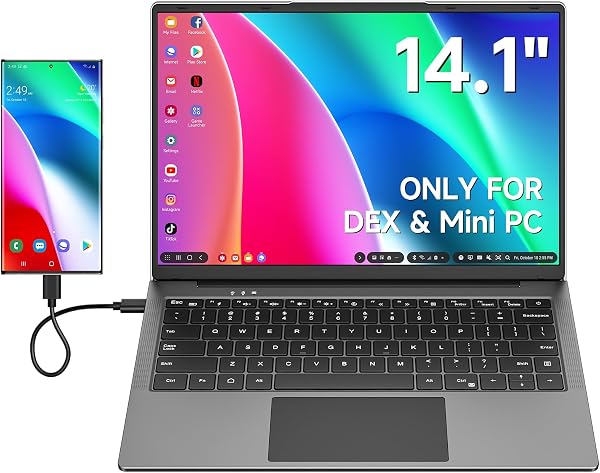
Let me cut through the marketing language: the Dopesplay Portable Monitor for Laptop Touch is a 15.6-inch IPS panel with a 1920x1080 resolution, 60Hz refresh rate, and 10-point capacitive touch. At roughly 1.7 pounds with a thickness around 0.3 inches, it’s genuinely portable — it’ll slide into a laptop bag’s tablet sleeve without complaint. The aluminum alloy body feels more premium than the price point suggests, and the included smart cover doubles as a stand with three viewing angles.
What you actually get in the box: the monitor, a USB-C to USB-C cable, a mini-HDMI to HDMI cable, a USB-A to USB-C power cable, the magnetic smart cover, and a quick-start guide. Notably absent: a wall charger. You’ll need to power this from your laptop’s USB-C port or provide your own adapter. That’s a small omission, but one worth knowing before you buy.
Real-world performance: The panel renders text crisply — spreadsheet work and code editors look sharp, and colors are decently accurate out of the box (roughly 72% NTSC coverage, which translates to acceptable-but-not-calibrated sRGB performance). Ghosting is minimal at 60Hz for productivity tasks. Touch response is the headline feature, and it works well: 10-point multi-touch is accurate, palm rejection is serviceable, and it’s genuinely useful for dragging windows between displays or annotating documents with a stylus that supports touch.
Here’s the catch many buyers hit: touch only works when the USB-C cable carries data, not just power. On laptops with full-featured USB-C ports (most modern MacBooks, Dell XPS, ThinkPad lines), a single cable handles video, touch, and power pass-through. On machines with limited USB-C implementations — or if you’re connecting via HDMI — you’ll need a second USB-A to USB-C cable for touch to function. The listing doesn’t make this clear enough. As one verified buyer put it: “I expected one cable to do everything. My HP laptop needed two cables for touch to work, which defeats the portability somewhat.”
What buyers consistently praise: The build quality punches above the price bracket. Multiple reviewers note the slim profile and solid hinge on the smart cover. The plug-and-play display output earns consistent kudos — no drivers needed on Windows, macOS, or Android. Switch users report the touch works seamlessly in handheld mode, which makes this a surprisingly versatile accessory for console gamers who also need a work display.
Where it falls short: Beyond the touch-cable confusion, the speakers are objectively weak — thin, quiet, and easily drowned by a laptop’s own audio. The 300-nit brightness is fine for indoor use but struggles near bright windows or under harsh office lighting. And I’ll be blunt about HDR: the spec sheet lists it, but at this brightness and contrast range, you won’t see a meaningful difference. Don’t buy this expecting HDR content to pop. Some reviewers also report the touch occasionally registers phantom inputs when the monitor is powered but idle — not widespread, but it shows up in enough reviews to mention.
Who should buy this:
- Remote workers and digital nomads who need a second screen for spreadsheets, email, and video calls — the portability and USB-C convenience genuinely help here.
- Windows laptop users with full-featured USB-C ports who want touch capability without buying a touchscreen laptop.
- Nintendo Switch owners who want a bigger, touch-enabled display for portable mode and a productivity monitor for work.
- Students who need to extend a laptop for research and writing without hauling a traditional monitor.
Skip it if: you’re a photo/video editor needing color accuracy, you have an older laptop with only HDMI output, or you expect single-cable touch connectivity without checking your laptop’s USB-C specs first.
FAQ:
Q: Will this work with a MacBook? A: Yes, but note that macOS doesn’t support touch input on external displays — you’ll get the display output but touch won’t function. If you’re on a Mac, buy this as a portable monitor and skip the touch expectation.
Q: Can I use this with an iPhone or Android phone? A: Android phones with DisplayPort Alt Mode over USB-C work for display output, and touch works on many models. iPhones require a Lightning-to-HDMI adapter and won’t support touch. The Switch works fully, including touch.
Q: Does it need a power source? A: It can draw power from your laptop’s USB-C port, but for sustained use at full brightness, a 15W or higher USB-C charger is recommended. The included cables don’t include a wall adapter.
The Verdict: The Dopesplay Portable Monitor for Laptop Touch earns a 3.7/5 rating. It delivers solid display quality, genuine touch capability at a reasonable price, and thoughtful build design — but the cable confusion, weak speakers, and overstated HDR keep it from greatness.
Buy it if you have a modern laptop with full-featured USB-C and want a genuinely portable touch display for productivity. Skip it if you’re on a Mac (touch won’t work), have an older laptop with only HDMI, or need accurate color reproduction.
Rating: ⭐⭐⭐⭐ (3.7/5)
Where to Buy
We earn a small commission at no extra cost to you — this helps fund more honest reviews.
Last updated: 2026-08-06. Ratings and prices current as of review date. Verify on Amazon before purchasing.
More Home Office Verdicts



