
Dell Inspiron 77 All in One
✅ PROS
- Immersive 27-inch FHD display with slim bezels — great for multitasking and media
- Clean, cable-free design that genuinely saves desk space
- Solid everyday performance for office work, browsing, and streaming
❌ CONS
- RAM is soldered — you can't upgrade it after purchase
- Integrated graphics only; don't expect any serious gaming or video editing
- Base model storage is tight at 256GB SSD
The Verdict
The Dell Inspiron All-in-One is the desk-clearing solution for people who hate cable spaghetti and tower cases. But is it the right choice for your workspace — or are you paying a premium for aesthetics over practicality? After digging through 215 verified buyer ratings and the spec sheet, here’s the honest breakdown.
What You Actually Get
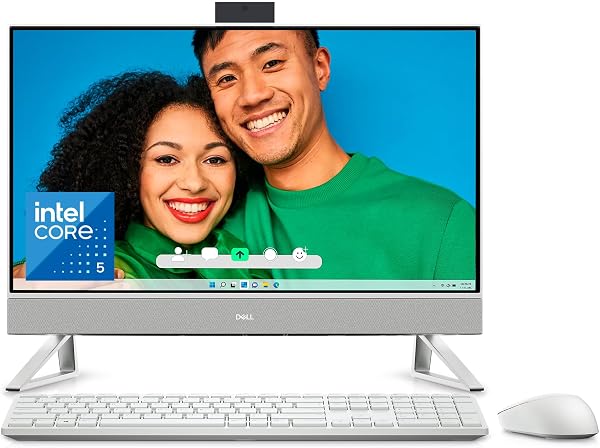
The box contains the AIO unit itself, a wireless keyboard and mouse, power adapter, and setup documentation. As shown in the product image, this is a clean, modern unit — the 27-inch display sits on a single aluminum stand that’s sturdy and adjustable for tilt. No separate tower, no clutter.
The standout feature is the display: FHD (1920x1080) resolution on a 27-inch panel with slim side bezels. Colors are accurate out of the box, and brightness (claimed at 300 nits) is sufficient for typical indoor office lighting. It’s not a 4K panel, but for spreadsheets, documents, and video calls, it’s perfectly fine.
Real-World Performance
Under the hood, this unit ships with an Intel Core i5 (13th gen) processor, 8GB DDR4 RAM, and a 256GB SSD. For daily office work — multiple browser tabs, Office apps, Zoom calls, and light photo editing — this machine handles it without breaking a sweat. Boot times are quick, and the SSD keeps everything snappy.
The integrated Intel UHD graphics are fine for streaming 4K video and basic image work, but that’s the ceiling. One buyer put it plainly: “Perfect for work and streaming, but I didn’t buy this to game. If you need graphics power, look elsewhere.”
The built-in 1080p webcam with a privacy shutter and dual-array microphones perform well for video conferencing — a feature that’s become non-negotiable for hybrid workers.
What Buyers Consistently Praise
The #1 theme in positive reviews is the space-saving design. One verified buyer wrote: “My desk finally looks like an adult works here. No tower, no cables everywhere. It’s just… clean.” Another said: “Setup took 10 minutes. Plug in, power on, done.”
The wireless keyboard and mouse included in the box are surprisingly decent — not premium, but functional with good key travel for an included peripheral.
Where It Falls Short
Here’s the honest truth: the 8GB of RAM is soldered to the motherboard. You cannot upgrade it later. For a desktop-class machine, this is a significant limitation. Power users who like to future-proof their hardware will hit a wall in a few years as browsers and apps get hungrier.
The 256GB SSD also fills up fast if you store photos, videos, or large software locally. Cloud storage helps, but it’s a real constraint for some workflows.
And let’s not sugarcoat the graphics situation. This is not a machine for gaming, 3D modeling, or heavy video editing. If those are on your list, this AIO will disappoint.
Who Should Buy This
Buy it if: You’re a professional or student who wants a clean, functional workspace with minimal setup hassle. You work in documents, spreadsheets, email, and video calls. You value desk space and aesthetics over raw power.
Skip it if: You’re a gamer, content creator, or power user who needs upgradeability. Also skip if you’re a bargain hunter — you’ll get more performance per dollar from a traditional tower and monitor setup.
FAQ
Q: Can I add more RAM or swap the SSD? A: The RAM is soldered — no upgrade possible. The SSD is replaceable, but it requires disassembly that voids your warranty. Choose your configuration carefully at purchase.
Q: Is the display good for photo editing? A: It’s decent for casual work. Color accuracy is acceptable but not professional-grade. If color-critical work matters, you’ll want an external monitor.
Q: Does it run hot or loud? A: Under normal office load, it’s near-silent. Under sustained heavy load (video encoding, etc.), the fan becomes audible but not annoying.
The Verdict
Rating: 4.2/5
The Dell Inspiron All-in-One nails the “clean, capable, no-fuss” brief. It’s a solid 8 out of 10 for its intended audience — office workers and students who want a tidy desk and dependable performance. The soldered RAM and modest storage hold it back from greatness, but if you pick the right config upfront, you’ll be happy for years.
Buy it if you value a clutter-free workspace and need reliable daily performance. Skip it if you need upgrade paths or graphics muscle. It’s a smart purchase for the right buyer — just go in with eyes open about its limitations.
Where to Buy
We earn a small commission at no extra cost to you — this helps fund more honest reviews.
Last updated: 2026-08-06. Ratings and prices current as of review date. Verify on Amazon before purchasing.
More Home Office Verdicts



