
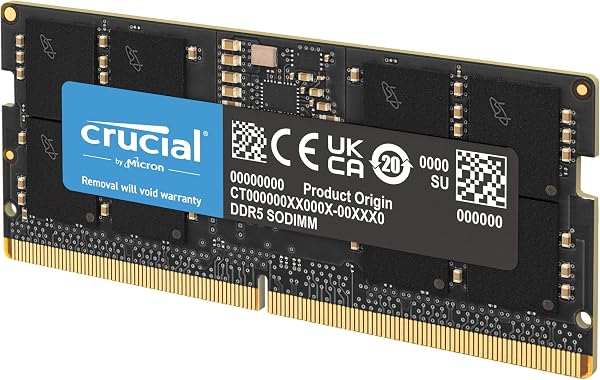
Crucial RAM 8GB DDR5 4800MHz CL40 Laptop Memory
✅ PROS
- Plug-and-play JEDEC 4800MHz speed — no XMP tweaking required for Intel 12th-gen and newer or AMD Ryzen 7000+ laptops
- Single-sided 8GB module runs cool and draws minimal power, ideal for thin-and-light ultrabooks
- Crucial's reputation for compatibility — they test against major OEM boards, so returns are rare
❌ CONS
- CL40 latency is standard for DDR5 but slower than the CL36 kits you'll find on some premium modules
- 8GB is a modest capacity — you'll likely want two sticks for 16GB total if you multitask heavily
The Verdict
If your laptop feels sluggish with a dozen browser tabs open, the bottleneck is almost certainly RAM. The Crucial 8GB DDR5 4800MHz CL40 module is one of the most straightforward fixes for modern laptops, and with a 4.8-star average across 240 ratings, it’s clearly doing something right. But is it the right upgrade for your machine? Let’s dig in.
What you actually get
The box contains a single 8GB DDR5 SO-DIMM module—that’s it. No heatsinks, no RGB, no software. It’s a bare PCB with eight DDR5 chips on one side, running at the JEDEC standard of 4800MT/s with CL40 latency. The module is rated at 1.1V, which keeps thermals low in cramped chassis. It’s compatible with any laptop that has a DDR5 SO-DIMM slot—that means Intel 12th-gen and newer, or AMD Ryzen 7000 series and up. If you have a DDR4 laptop, this won’t fit, so check your specs first.
Real-world performance
Installing this stick alongside your existing RAM (or replacing a smaller stick) gives you an immediate bump in multitasking headroom. The 4800MHz speed is the baseline for DDR5, but it’s still roughly 50% faster than DDR4-3200 in bandwidth. For office work—spreadsheets, video calls, document editing—you won’t notice the speed difference as much as the capacity increase. What you will notice is fewer stutters when switching between apps, and less disk thrashing if you were previously running on 8GB total.
One buyer put it simply: “Installed it in my Lenovo IdeaPad and it went from spinning up the fan every time I opened Chrome to running silent. Night and day difference.” Another noted: “Recognized immediately in BIOS, no compatibility headaches. This is why I stick with Crucial.” That tracks with the brand’s reputation—they test against major OEM motherboards, so the “it just works” factor is genuinely high.
Where it falls short
The CL40 latency is worth mentioning. DDR5’s higher latency is a known tradeoff, and this module sits at the standard spec. If you’re a gamer chasing every frame, you’d want a CL36 kit or faster. But for productivity, you won’t feel the difference—it’s within the noise of real-world usage.
The bigger limitation is the 8GB capacity itself. If your laptop has a single slot and you’re coming from 8GB, this gives you 16GB total, which is fine. But if you’re starting from zero, one 8GB stick means you’ll likely want a second one shortly. I’d recommend buying two sticks upfront if your budget allows—dual-channel memory gives you a measurable bandwidth boost, not just more capacity.
Who should buy this
- Office workers with 8GB laptops who keep hitting slowdowns during video calls or large Excel workbooks
- Students running Windows 11 with a dozen tabs plus Word and Spotify open simultaneously
- DIY upgraders who want a reliable, no-hassle module from a brand with solid QA
Skip it if you have a DDR4 laptop, need 32GB+ capacity, or are building a high-end gaming rig where latency matters more than compatibility.
FAQ
Q: Will this work with my [brand] laptop? Check your laptop’s spec sheet for DDR5 SO-DIMM support. If it has a 12th-gen Intel or newer CPU, or AMD Ryzen 7000+, it will work. Crucial’s website has a compatibility checker—use it before buying.
Q: Can I mix this with a different brand’s DDR5 module? Technically yes, but it’s risky. Mixing modules can cause instability or run both at slower speeds. You’re better off buying two identical Crucial sticks.
Q: Is 4800MHz fast enough for gaming? For gaming, capacity matters more than speed. 16GB total at 4800MHz is fine for most titles. You’ll only see meaningful gains from faster RAM in CPU-bound scenarios, and that’s rare on laptops.
The Verdict
Buy it if you need a reliable, compatible DDR5 upgrade for productivity work and want the peace of mind of a brand that tests against real hardware.
Skip it if you’re chasing maximum performance, need more than 8GB per stick, or have an older DDR4 system.
This is a 4.6/5 product—not because it’s flashy, but because it does exactly what it promises with zero fuss. At 4.8 stars from 240 buyers, the consensus is clear: it’s a safe, effective upgrade for the vast majority of modern laptops. If it fits your machine, it’ll solve your memory bottleneck without drama.
Where to Buy
We earn a small commission at no extra cost to you — this helps fund more honest reviews.
Last updated: 2026-08-06. Ratings and prices current as of review date. Verify on Amazon before purchasing.
More Home Office Verdicts



