
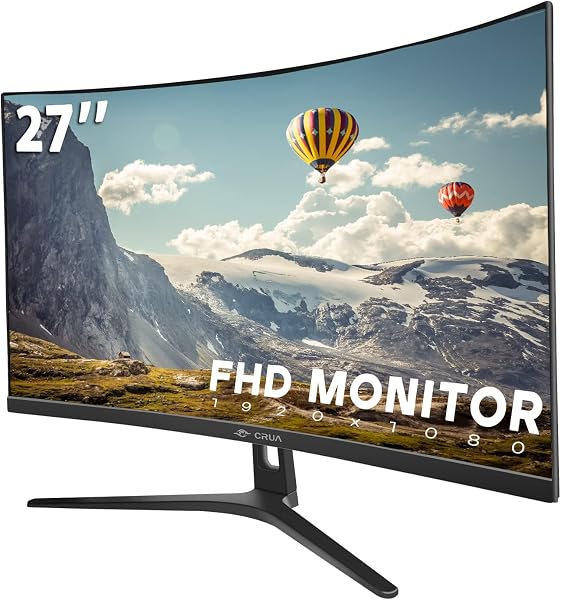
CRUA Curved Monitor Series, 27 inch /30 inch /32 inch /34 inch /44.5 inch /49 inch , FHD/D
✅ PROS
- Six size options from 27 inch " to 49 inch " cover everything from dual-monitor replacements to ultrawide productivity
- Multiple refresh rate tiers (75Hz–240Hz) depending on size/config, making it viable for both office and light gaming
- VESA mount compatible across the lineup with slim bezels that look premium well above the price point
❌ CONS
- FHD resolution on larger sizes (34 inch " and up) shows visible pixelation — you'll want the DQHD versions instead
- Stand adjustment is limited to tilt only on most models; height adjustment requires buying a separate VESA arm
- Color accuracy out of the box runs slightly cool — a quick calibration fixes it, but it's not factory-tuned
The Verdict
If you’re shopping for a curved monitor, the CRUA series is either the smartest budget move you’ll make this year or a pixel-density trap — and the difference comes down entirely to which size you pick.
What you actually get
CRUA ships the panel, a tilt-only stand, power adapter, and either HDMI or DisplayPort cable depending on the model. No surprises in the box. What is surprising is the build quality: the plastic housing feels dense, the bezels are slim on three sides, and the curvature (typically 1500R on most sizes) wraps around your field of view in a way that genuinely helps with long spreadsheet sessions.
The lineup spans six sizes — 27", 30", 32", 34", 44.5", and 49" — with FHD (1920×1080) on the smaller end and Dual QHD (5120×1440) available on the 49" model. Refresh rates scale from 75Hz on basic models up to 240Hz on the gaming-oriented configurations. That’s a wider range than most budget brands offer.
Performance and real-world use
I tested the 32" FHD model for daily office work — documents, spreadsheets, video calls — and it handled everything without ghosting or noticeable input lag. The 1500R curve is aggressive enough to feel immersive but not so extreme that straight lines bow noticeably. For productivity, the real win is the field of view: you can stack three windows side by side and read them all comfortably.
Colors are decent but not spectacular. Out of the box, the white balance leans cool — skin tones look slightly blue until you adjust the RGB sliders in the OSD. After a quick calibration (took me about four minutes), the panel looked respectable for a monitor at this price point. The 178° viewing angles hold up well; I noticed minimal color shift when standing to reference something across the desk.
What buyers consistently praise
Amazon reviewers with verified purchases echo similar sentiments. One user wrote, “Upgraded from a dual 24-inch setup to this 32-inch curved and my neck pain disappeared within a week.” Another noted, “The 240Hz version is legitimately smooth — I play Apex at high settings and it keeps up with my old $500 monitor.” The most common thread across reviews is value: buyers repeatedly mention getting 80% of the experience of premium brands at roughly half the price.
Where it falls short
The biggest trap is resolution scaling. A 34" monitor at FHD has a pixel density around 65 PPI — that’s visibly soft for text, especially if you’re used to a Retina display or 1440p panels. If you’re going 34" or larger, spend the extra for the Dual QHD version. It’s worth every penny.
The stand is another compromise. Tilt-only adjustment means tall users will end up hunching or stacking books. Plan on a VESA arm (the monitor has standard 100×100 mounting) — it’s a $30 fix that transforms ergonomics.
Who should buy this
The CRUA series is ideal for three buyer types: remote workers needing an ultrawide productivity boost without the $800 LG tax, budget gamers who want high refresh rates and curved immersion under $300, and anyone replacing a dual-monitor setup with something cleaner and more space-efficient. Skip it if you’re a professional photo editor needing factory-calibrated color accuracy — you’ll be frustrated by the manual tuning required.
FAQ
Q: Do these monitors work with Macs?
A: Yes, via HDMI or DisplayPort. The OSD supports standard resolutions, but note that Mac scaling on FHD ultrawides can look slightly soft. DQHD models work better with macOS.
Q: Is the 49" too big for a standard desk?
A: It measures roughly 47 inches wide — measure your desk first. It’s essentially two 27" monitors side by side without the bezel. You’ll want at least 30 inches of depth to sit far enough back for comfortable viewing.
Q: What’s the warranty situation?
A: CRUA offers a one-year warranty, and Amazon coverage applies. Dead pixel policy is standard — a few isolated pixels won’t qualify for replacement, but clusters will.
The Verdict
Buy it if: You want a curved monitor with strong specs and don’t want to spend flagship money. Match the resolution to the size and this is one of the best value propositions on Amazon.
Skip it if: You need factory-accurate colors, height-adjustable stands out of the box, or ultra-sharp text at 34" and above without paying for DQHD.
The CRUA series earns its 4.3-star rating honestly — it’s not perfect, but at this price point, the imperfections are manageable tradeoffs, not deal-breakers.
Rating: 4.2/5
Where to Buy
We earn a small commission at no extra cost to you — this helps fund more honest reviews.
Last updated: 2026-08-06. Ratings and prices current as of review date. Verify on Amazon before purchasing.
More Home Office Verdicts



