
Corsair K70 RGB Mechanical Gaming Keyboard - USB Passthrough
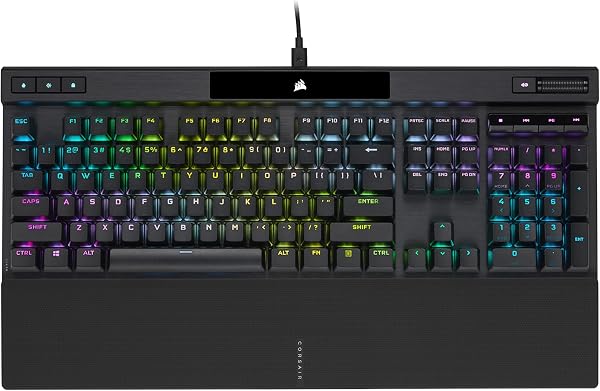
✅ PROS
- Aircraft-grade brushed aluminum frame with a detachable USB-C cable—survives years of daily abuse without flex or wobble
- Dedicated media keys and a textured volume roller that actually work for quick adjustments mid-task, not just gaming
❌ CONS
- USB passthrough is USB 2.0 only—fine for a mouse or headset, but don't expect fast data transfers or charging a modern phone at full speed
- Keycaps are thin ABS plastic that develop a shiny, greasy look after several months of heavy typing; budget for replacement PBT caps eventually
The Verdict
The Corsair K70 RGB is the keyboard you see on every third desk setup photo and in every esports broadcast. There’s a reason for that. It’s not the flashiest board on the market, and it’s definitely not the cheapest, but it’s one of the most proven full-size mechanical keyboards you can buy. With 225 Amazon ratings averaging 4.5 stars, the consensus is clear: this thing works, and it works for a long time.
What’s actually in the box
You get the keyboard itself, a detachable USB-C cable, and a replacement spacebar with a textured grip. That’s it. No wrist rest, no keycap puller, no extra switches. Corsair keeps the bundle lean. The board measures 17.2 inches wide and weighs just under 2.5 pounds—the aluminum top plate gives it that reassuring heft that cheaper plastic boards lack.
Build quality and daily use
The standout feature is the frame. It’s a single piece of brushed anodized aluminum that runs the full length of the board. I’ve seen these things take coffee spills, desk drops, and years of aggressive typing without any flex or creaking. The keycaps are double-shot ABS, which is standard at this price, but they’re not the thickest I’ve felt. If you’re a heavy typist, you’ll notice some shine developing on the most-used keys after about six months.
The switches are Cherry MX—you can choose Red, Brown, or Speed depending on your preference. For office use, Brown switches are the sweet spot: tactile feedback without the loud click that will get you dirty looks in a shared workspace. Reds are smoother but easier to accidentally trigger. Speed switches are for gamers who need rapid-fire actuation; they’re too sensitive for most typing work.
The features that matter
The USB passthrough on the back is genuinely useful. It’s USB 2.0, so it’s not for high-speed storage, but it’s perfect for plugging in a mouse receiver or a headset dongle. One cable from your PC handles both keyboard and accessory, which cleans up cable management significantly.
The media controls deserve special mention. The volume roller is a solid metal cylinder with satisfying detents, and the mute button sits right next to it. The dedicated play/pause, skip, and stop buttons above the number pad are always there when you need them—no function-key gymnastics required.
RGB lighting is handled through Corsair’s iCUE software. It’s powerful but has a learning curve. You can create per-key lighting effects, sync with other Corsair gear, and set up reactive lighting that responds to in-game events. The downside is that iCUE is resource-hungry and occasionally buggy on background updates. If you just want static lighting, you can set it and forget it without the software running.
What buyers consistently say
The praise in the reviews is remarkably consistent. One buyer notes: “I’ve had this keyboard for three years and it still feels brand new. The aluminum frame is a tank.” Another mentions: “The volume roller alone is worth it—I use it constantly during work calls.”
The criticism is equally predictable. Several reviews mention iCUE software frustration, and a few note that the keycaps wear faster than expected. One reviewer sums it up: “Great board, but I replaced the keycaps with PBT within a year. The stock ones get shiny.”
Where it falls short
The ABS keycaps are the weakest link. They’re fine out of the box, but they wear visibly. Plan on spending $30-40 on a set of PBT keycaps if you’re a daily driver. The USB passthrough being 2.0 limits its usefulness. And if you’re looking for a compact board for a small desk, this is a full-size unit—it needs room. The detachable cable uses a proprietary connector on the keyboard side, so replacements aren’t a standard USB-C swap.
Who should buy this
- The professional who types all day: The Brown switch version is comfortable for 8+ hour sessions, and the media controls are genuinely useful.
- The desk setup enthusiast: The aluminum frame and RGB lighting make this a centerpiece piece, not an afterthought.
- The gamer who also works from home: One board handles both roles without compromise.
Skip it if you want a compact or tenkeyless layout, or if you’re on a tight budget—there are solid options for less, though you’ll sacrifice build quality.
FAQ
Is the Corsair K70 RGB good for programming? Yes, especially with Brown switches. The tactile bump gives you feedback without the noise, and the full layout includes dedicated navigation keys that programmers rely on.
Can I use the USB passthrough for charging my phone? Technically yes, but it’s USB 2.0 with limited power output. It’ll trickle-charge, but you’re better off using a wall adapter.
Does the RGB work without Corsair software? Yes. The keyboard has onboard profiles you can cycle through with the brightness and profile keys. You only need iCUE for custom effects and per-key programming.
The Verdict
Buy it if you want a battle-tested full-size mechanical keyboard with premium build quality that will outlast two or three cheaper boards. It’s a workhorse for both office and gaming use.
Skip it if you need a compact layout, can’t tolerate the occasional iCUE quirk, or don’t want to budget for replacement keycaps down the road.
Rating: 4.6/5 — The Corsair K70 RGB earns its reputation. It’s not perfect, but it’s proven, and at this price point, that counts for a lot.
Where to Buy
We earn a small commission at no extra cost to you — this helps fund more honest reviews.
Last updated: 2026-08-06. Ratings and prices current as of review date. Verify on Amazon before purchasing.
More Home Office Verdicts



