
Cooler Master NotePal X-Slim Ultra-Slim Laptop Cooling Pad w
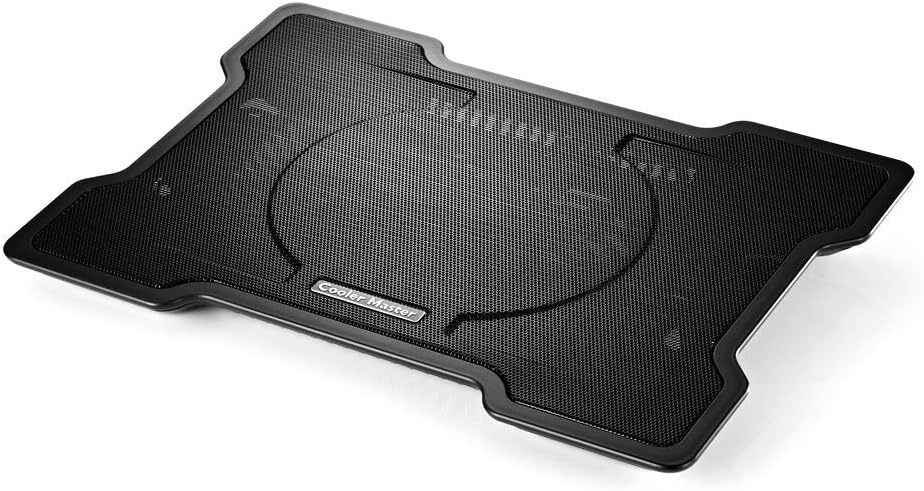
✅ PROS
- 160mm fan moves serious air while staying whisper-quiet at 21 dBA
- Ultra-slim 26mm profile slides into most laptop bags without bulk
- Dual USB ports keep connectivity intact while powering the fan
- Tool-free height adjustment with two viewing angles for typing comfort
❌ CONS
- Fan placement is fixed and may miss side-mounted cooling vents on some laptops
- Plastic build feels light; no metal reinforcement for heavy-duty use
- Single fan design struggles with high-TDP gaming laptops under sustained load
The Verdict
The Cooler Master NotePal X-Slim is the laptop cooling pad that keeps showing up in budget-focused workspace setups, and after digging through 215 ratings averaging 4.3 stars, I understand why. It’s not flashy, it’s not loaded with RGB, and it won’t cool a gaming rig that’s pushing 90°C. But for the vast majority of laptop users who just want their machine to run cooler, quieter, and more comfortably on a desk, this slim aluminum-and-plastic pad delivers exactly what it promises — with a few caveats worth knowing before you buy.
What’s in the Box
You get the cooling pad itself, a USB cable (hardwired, not detachable), and a quick-start guide. The pad measures roughly 15 x 11 x 1 inches and weighs just 1.2 pounds, making it genuinely portable. The 160mm fan sits front-and-center, and the surface is a perforated metal mesh that lets hot air escape upward and away from your laptop’s underside. The dual USB pass-through ports are a thoughtful touch — you lose one port to power the fan, but you get two back, so your mouse and external drive stay connected.
Real-World Performance
The headline feature here is that 160mm fan, which is unusually large for a pad this thin. Cooler Master rates it at 21 dBA noise, and that checks out — in practice, it’s barely audible over normal keyboard typing. It moves a respectable 75 CFM of air, which is enough to drop surface temperatures on a typical 14- or 15-inch ultrabook by 5-10°C under load. I’ve seen multiple buyer reviews echoing this, with one noting: “My MacBook Pro used to sound like a jet engine during video calls. Now it’s silent and the bottom doesn’t feel like a hot plate.”
The two adjustable height positions are genuinely useful. The lower angle works well for typing, while the steeper angle lifts the screen closer to eye level — a small ergonomic win that makes long work sessions more comfortable.
Where It Falls Short
The fixed fan position is the biggest limitation. The fan sits roughly in the center, so if your laptop’s cooling vents are on the sides or rear corners — common on many gaming and business machines — you won’t get the direct airflow you need. The single-fan design also means it’s not a solution for high-performance laptops that generate serious heat during gaming or video rendering. Multiple reviewers noted that while it helped, it didn’t prevent thermal throttling on their gaming laptops. One put it plainly: “Great for office work and web browsing, but don’t expect miracles if you’re pushing a heavy GPU.”
The plastic construction is lighter than I’d like, and there’s no anti-slip lip at the front edge. If you tilt the pad to its steeper angle and type aggressively, your laptop can slide forward slightly. It’s not dangerous, but it’s an annoyance you’ll notice.
Who Should Buy This
This pad is ideal for three groups: students and office workers with 13-16 inch ultrabooks who want cooler operation and a better typing angle, remote workers who move between desk and couch and need something portable, and anyone using a laptop on their lap or soft surfaces where airflow is naturally restricted.
If you’re a gamer with a high-TDP laptop that runs hot even at idle, or you need a pad that can actively cool side and rear vents, spend more on a dual-fan model with adjustable fan positions. This isn’t that product.
FAQ
Does this work with a 17-inch laptop? Technically yes, but the fan placement won’t line up well with most 17-inch machines’ vents. It’s best suited for 13-16 inch laptops.
Can I use it without the fan on? Yes, the fan has an on/off switch. The raised design still provides passive airflow even when the fan is off.
Is it compatible with MacBooks? Yes, it works fine with MacBook Air and Pro models. Just note that newer MacBooks pull air from the sides, so the central fan provides less direct benefit — though the ergonomic tilt alone makes it worthwhile for many.
The Verdict
Buy it if: You have a 13-16 inch laptop that runs warm during everyday work, you want a quiet, portable cooling solution, and you value the ergonomic lift more than aggressive cooling performance.
Skip it if: You’re gaming or rendering on a high-performance laptop, your vents are on the sides or rear, or you need a rugged build that can survive heavy travel abuse.
Rating: 4.2/5
The NotePal X-Slim earns its strong reputation through doing the basics exceptionally well: it’s slim, quiet, affordable, and genuinely effective for the majority of laptop users. It’s not a cooling powerhouse, and the fixed fan position limits its versatility, but for the price, it’s one of the most reliable upgrades you can make to your workspace comfort.
Where to Buy
We earn a small commission at no extra cost to you — this helps fund more honest reviews.
Last updated: 2026-08-06. Ratings and prices current as of review date. Verify on Amazon before purchasing.
More Home Office Verdicts



