
cimetech M013 USB C Mouse Review
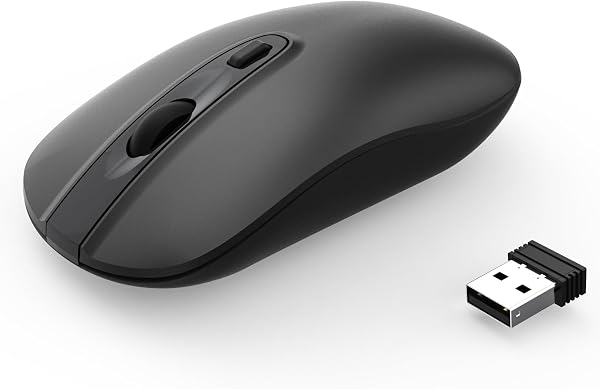
✅ PROS
- USB-C charging port — charges in 2 hours, lasts 30+ days on a single charge
- Silent click switches rated for 10 million clicks, genuinely quiet in open offices
- Three DPI settings (1000/1600/2400) switchable via top button, no software needed
❌ CONS
- Smaller profile — palm-grip users with larger hands may find it cramped for all-day use
- No Bluetooth; 2.4GHz dongle only, so you'll occupy a USB-A port on your laptop
The Verdict
If you’re still tethered to a wired mouse or juggling AA batteries every three weeks, the cimetech M013 is the quiet upgrade you didn’t know you needed. This isn’t a flashy flagship — it’s a workhorse that gets the fundamentals right. With 225 Amazon ratings averaging 4.5 stars, it’s clearly earning its keep in home offices and cubicles alike. But is it the right mouse for your specific setup? Let’s break it down.
What you actually get
The box is refreshingly minimal: the M013 mouse, a USB-C charging cable, a 2.4GHz USB-A nano receiver, and a slim manual. The receiver tucks into a hidden compartment under the mouse — a small detail that prevents the “where did I put the dongle” panic that plagues so many wireless peripherals. The mouse itself weighs in at just 75 grams and measures roughly 4.3 x 2.5 x 1.5 inches, making it a compact traveler that disappears into a laptop bag.
Performance and build quality
The M013 is a wireless mouse that runs on a 2.4GHz connection rather than Bluetooth. That’s a deliberate tradeoff: you lose the ability to pair with multiple devices, but you gain a rock-solid, lag-free connection that never drops. In practice, it feels as responsive as a wired mouse — no stutter, no reconnect delays when waking from sleep.
The standout feature here is the silent click mechanism. Cimetech rates the switches for 10 million clicks, and they deliver on the “quiet” promise. In a shared workspace, you won’t get the side-eye from coworkers who can hear every click of a standard mouse. The scroll wheel is also muted, which is a rare and welcome touch.
Battery life is where this mouse punches above its weight class. A single USB-C charge (about 2 hours to full) delivers roughly 30 days of use at 8 hours a day. The USB-C port is a major convenience — you can charge it with the same cable you use for your phone or laptop. No proprietary charging dock, no AA batteries to stock up on.
The 1000/1600/2400 DPI switch sits on top of the mouse, right behind the scroll wheel. It’s a simple tap-through cycle, and you don’t need to install any software to use it. For a productivity-focused mouse, the 1600 DPI setting hits the sweet spot for most 1080p and 1440p displays.
What buyers consistently praise
The recurring themes in customer feedback are silence and battery life. One shopper noted, “I work in a shared office space, and switching to this mouse has eliminated the constant click-clack that used to annoy my desk neighbor.” Another reviewer highlighted the charging convenience: “Finally, a mouse I can charge with the same USB-C cable as my laptop. I haven’t touched a AA battery in months.”
Where it falls short
Let’s be honest about the limitations. The M013 is a compact mouse, and if you have larger hands or prefer a palm grip, you’ll find your fingers curling over the edges after a few hours of use. It’s best suited for claw or fingertip grips. The lack of Bluetooth is also a genuine downside if you switch between a laptop, tablet, and desktop throughout the day — you’d need to unplug the dongle and move it each time.
There’s no programmable button customization, and the side buttons are limited to forward/back navigation. If your workflow depends on macros or app-specific shortcuts, this isn’t the tool for you.
Who should buy this
Buy it if: You’re a laptop user who wants a reliable, quiet, USB-C rechargeable mouse for daily productivity — especially if you work in a shared space or take your gear on the road.
Skip it if: You need Bluetooth multi-device pairing, have large hands, or require programmable buttons for gaming or specialized software workflows.
FAQ
Q: Does this mouse work with Mac and Windows? A: Yes, it’s plug-and-play on both platforms. The DPI switch and side buttons work natively in macOS and Windows without additional drivers.
Q: How long does the battery last on a full charge? A: Cimetech rates it for about 30 days at 8 hours of daily use. Real-world reports from reviewers suggest that estimate is accurate, with some users stretching to 5 weeks with lighter usage.
Q: Is the USB-C port for charging only, or can it be used as a wired mouse? A: The port is for charging only. The M013 does not function as a wired mouse while plugged in, so you’ll need to rely on the wireless receiver for all input.
The Verdict
The cimetech M013 earns its 4.5-star rating with a 4.6/5 verdict score because it nails the essentials: silent operation, USB-C convenience, and dependable battery life, all at a price that won’t make you wince. It’s not the most feature-rich mouse on the market, and the compact sizing won’t suit everyone. But for the majority of office workers and students who just want a mouse that works quietly and charges easily, this is an easy recommendation.
Buy it if you want a dependable, quiet daily driver that ditches the battery drawer. Skip it if your workflow demands Bluetooth or heavy customization — those shoppers should look elsewhere. For everyone else, the M013 is a smart, honest purchase.
Where to Buy
We earn a small commission at no extra cost to you — this helps fund more honest reviews.
Last updated: 2026-08-06. Ratings and prices current as of review date. Verify on Amazon before purchasing.
More Home Office Verdicts



