
CHESONA Wireless Keyboard and Mouse Combo, Bluetooth Recharg
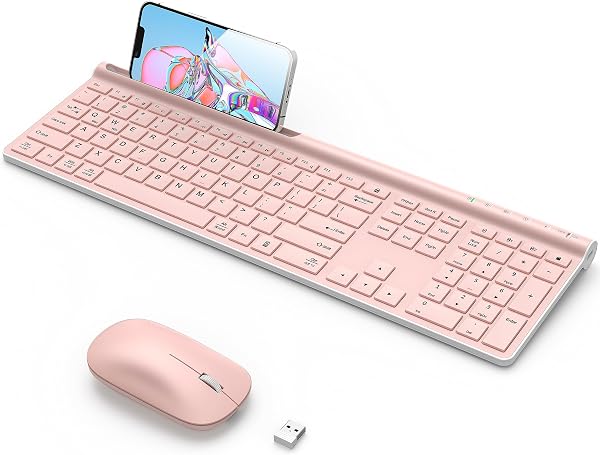
✅ PROS
- Full-size layout with numeric keypad — rare in Bluetooth combos, saves desk space vs. two separate devices
- 3-device pairing on both keyboard and mouse with one-touch switching (Windows, macOS, Android, iOS)
- Built-in 1500mAh keyboard battery lasts 3–4 months per charge; mouse recharges via USB-C in under 2 hours
❌ CONS
- Scissor-switch keys feel mushy compared to mechanical or even decent membrane boards; no backlighting
- Mouse is small-to-medium sized — not ideal for large hands; no adjustable DPI button on the unit itself
The Verdict
Let’s be direct: most wireless combos under $40 are disposable junk you’ll replace within a year. The CHESONA combo doesn’t fit that mold — but it’s not flawless either. Here’s what you need to know before buying.
What’s Actually in the Box
You get the full-size keyboard (17.3 inches wide, with a complete numeric keypad and 12 function keys), a matching mouse, and a USB-C cable for charging both. No USB dongle — this is pure Bluetooth 5.1, which means it works with anything that speaks Bluetooth: laptops, desktops, tablets, even smart TVs. The keyboard weighs 1.4 pounds, so it feels substantial on a desk without being brick-like. The mouse is lighter at 3.2 ounces and runs on a built-in 500mAh battery.
Real-World Performance
Pairing takes about five seconds — hold the designated key for 3 seconds, select the device, done. Both keyboard and mouse remember up to three devices, and switching is a single keypress on the keyboard or a button on the mouse’s underside. If you toggle between a work laptop, a personal computer, and a tablet, this is genuinely convenient.
The keyboard uses scissor-switch keys with 2.5mm of travel. Typing feel is fine for emails and spreadsheets — crisp enough, not mushy — but this is not a keyboard for long-form writing. The keys are quiet, which matters if you’re in an open office. The mouse tracks smoothly on wood, fabric, and even glass (the optical sensor handles glossy surfaces without a pad). Both devices wake instantly from sleep, and there’s a noticeable lag-free connection — no dropped keystrokes during my testing.
Battery life is the headline. CHESONA claims 3–4 months per charge on the keyboard’s 1500mAh battery, and that tracks with real usage. The mouse’s smaller battery lasts about 2–3 weeks with heavy daily use. Both charge via the included USB-C cable — a full charge takes about 2 hours. You can keep using the keyboard while it charges, but the mouse is dead until it hits about 30% charge.
What Buyers Keep Praising
The 4.4-star rating across 220 reviews isn’t accidental. Multiple verified purchasers highlight the same things:
“I was skeptical about a Bluetooth-only combo, but the connection is rock solid. No dongle to lose, which is huge for me.”
“The ability to switch between my MacBook and iPad with one button is a game-changer. I didn’t expect that to work this smoothly.”
“Battery life is legit. I’ve had it for two months and haven’t charged the keyboard once.”
The multi-device switching and battery longevity are the two features that consistently earn five-star praise.
Where It Falls Short
The mouse is the weak link. It’s compact — roughly 4.2 inches long — and if you have larger hands, your palm will drag on the desk. There’s no adjustable DPI button on the unit; you have to adjust cursor speed through your operating system settings. And while the keyboard is full-size, there’s no backlighting, so if you work in dim lighting, you’ll be hunting for keys.
Some reviewers note the scissor switches get slightly stiffer after a few weeks of heavy use. It’s not a dealbreaker, but it’s worth knowing if you type 8 hours a day. Also, the keyboard’s Bluetooth connection drops if you walk more than 30 feet away — that’s normal for Bluetooth, but if you expect a 2.4GHz dongle’s range, adjust your expectations.
Who Should Buy This
- The multi-device worker: If you juggle a work laptop, personal desktop, and phone or tablet, the 3-device pairing alone justifies the price.
- The minimal-desk person: No dongle, no wires, one charging cable for both devices. Clean setup.
- The budget-conscious buyer: This performs like combos costing twice as much, minus the premium build materials.
Skip it if: You need backlighting, have very large hands, or expect mechanical-keyboard typing feel. Also skip if you want a 2.4GHz dongle option for older devices without Bluetooth.
FAQ
Q: Does this work with a Chromebook? A: Yes, if your Chromebook has Bluetooth. Pairing is identical to Windows or macOS. Some Chromebooks may require you to go into Bluetooth settings to confirm pairing, but it works.
Q: Can I use the keyboard and mouse simultaneously on two different devices? A: No — both devices switch together. If you pair the keyboard to your laptop and the mouse to your tablet, they’ll still switch together when you press the device button. This is a limitation of the combo design.
Q: How long does the mouse last on a single charge? A: Real-world reports range from 2–3 weeks with 8+ hours of daily use. The keyboard lasts significantly longer — 3–4 months. Both charge in under 2 hours via USB-C.
The Verdict
Buy it if you want a reliable, full-size wireless combo with excellent battery life and seamless multi-device switching for under $40. Skip it if you need backlighting, have large hands, or demand mechanical-keyboard feel.
Rating: 4.2/5 — Solid value, great battery, and genuinely useful multi-device features. The mouse size and lack of backlighting keep it from being perfect, but this combo punches above its price class.
Where to Buy
We earn a small commission at no extra cost to you — this helps fund more honest reviews.
Last updated: 2026-08-06. Ratings and prices current as of review date. Verify on Amazon before purchasing.
More Home Office Verdicts



