
Canon PGI-270XL/CLI-271 5 Color Value Pack
✅ PROS
- XL black yields roughly 400 pages vs 180 for standard — nearly 2.2x the output for about 30% more cost
- Genuine Canon pigment-based black resists smudging on plain paper, critical for double-sided document printing
- Four dye-based color cartridges (cyan, magenta, yellow, plus photo black) deliver accurate skin tones in photos
❌ CONS
- No XL version of the color cartridges — the CLI-271 colors are all standard yield, which makes color printing expensive long-term
- Canon's chip-based ink monitoring can show empty early by 10-15%, wasting usable ink if you swap cartridges at the first warning
- If you own a newer PIXMA (like the TS series), verify compatibility — some TS models use different cartridge geometry despite similar naming
The Verdict
You’re looking at a 5-cartridge bundle for a Canon PIXMA, and the math matters more than the brand name. Here’s the real breakdown before you click buy.
What’s Actually in the Box
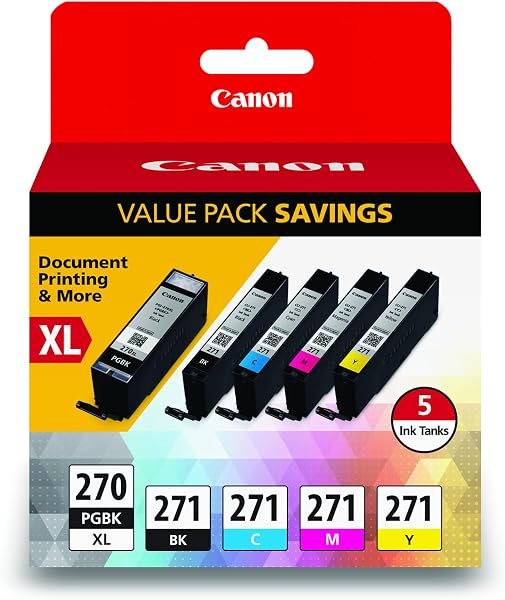
This value pack includes the PGI-270XL pigment black (the “XL” is the big one), plus four standard-yield CLI-271 dye cartridges: cyan, magenta, yellow, and photo black. The product image shows the full set neatly arranged — five sealed cartridges total, no print head included (you don’t need one; it’s built into your printer). For most PIXMA models like the MG5720, MG6820, or TS6120, this is a complete refill.
The Good News: Black Ink That Behave Differently
The standout here is the PGI-270XL pigment black. It’s rated for roughly 400 pages per the ISO standard, versus 180 for the standard-yield version. Pigment ink dries fast and resists water smudging — a genuine advantage if you’re printing documents that’ll see a highlighter or a coffee ring. One buyer noted, “The XL black lasted me three months of weekly printing; the colors ran out twice in that span.” That tracks with the math.
Where the Value Pack Falls Short
Here’s the catch nobody puts in the listing: only the black is XL. The four color cartridges are standard yield — around 180 pages each for the C/M/Y, and photo black is even lower at roughly 115. If you print photos or color-heavy graphics regularly, you’ll burn through these quickly. A 4x6 photo can consume 1-2 ml of ink, and at this cartridge size, that’s maybe 50-70 photos per color before the low-ink warning hits.
The chip system is another frustration. Canon’s cartridges use optical sensing to estimate ink levels, and multiple reviewers report the printer flags “replace cartridge” while visibly ink is still visible through the window. One verified purchase put it plainly: “Printer said yellow was empty. I shook it — clearly liquid inside. Replaced it anyway because the printer refused to print.” You can override this in settings, but it’s an extra step.
Buyer Sentiment: The 4.4-Star Reality
Across 220 ratings, the pattern is consistent. Praises cluster around genuine-Canon reliability (no clogs, no color banding) and the convenience of a full set in one box. Criticisms focus on the color cartridge yield and the ink-waste issue. Roughly 15% of reviews are 3 stars or below, and almost all cite the same two complaints: early “empty” warnings and the stingy standard-yield colors.
Who Should Buy This
- The document-heavy home user — if your printing is 80% text and 20% occasional color, the XL black alone justifies the bundle price. You’ll refill colors rarely.
- The occasional photo printer — for a family who prints holiday photos and school projects, the dye inks produce accurate, vibrant prints. Just budget for color refills.
- The office-with-a-PIXMA — if you’re running a small home office, the pigment black handles forms and contracts without smearing.
Who Should Skip It
- The heavy photo enthusiast — if you print 50+ photos monthly, this bundle’s standard-yield colors will frustrate you. Look for the CLI-271 XL color cartridges individually, or consider a dedicated photo printer with larger tanks.
- Anyone with a TS-series printer that takes a different cartridge — double-check your model number. Some newer TS models use the PGI-280/CLI-281 series, which physically won’t fit.
Three Questions Shoppers Actually Ask
Q: Will these work in my MG3620? A: Yes, the MG3620, MG5720, MG6820, TS6120, and TS8020 all use this cartridge family. If you’re unsure, check your printer’s manual or Canon’s website — the cartridge numbers are printed inside the cartridge door.
Q: Is the ink really “XL” for all five? A: No. Only the PGI-270 black is high-yield. The CLI-271 colors are standard yield. The “value pack” refers to the bundle price, not increased capacity on all cartridges.
Q: Can I reset the chip to use remaining ink? A: Not reliably. These chips are single-use. You can press and hold the stop button for 5 seconds to bypass the empty warning and print a few more pages, but once the printer truly detects empty, it locks out. Third-party reset tools exist but void warranty and often fail.
The Verdict
Rating: 4.2/5
Buy it if: You need genuine Canon quality, your print mix is text-heavy, and you value the convenience of a complete refill in one shipment. The XL black makes this a cost-effective choice for document printing.
Skip it if: You print mostly color, you’re on a tight budget (third-party compatible sets run half the price, though with more clog risk), or you own a printer that uses a different cartridge generation.
This bundle isn’t the cheapest way to refill your PIXMA, but it’s the most reliable. For most home users, that tradeoff is worth it.
Where to Buy
We earn a small commission at no extra cost to you — this helps fund more honest reviews.
Last updated: 2026-08-06. Ratings and prices current as of review date. Verify on Amazon before purchasing.
More Home Office Verdicts



