
CanaKit Raspberry Pi 4 Basic Kit
✅ PROS
- Includes genuine Raspberry Pi 4 (4GB or 8GB) with official USB-C power supply — no third-party adapter that might cause under-voltage warnings
- Pre-applied heat sinks and fan case keep thermals in check even under sustained load; no throttling during extended use
- CanaKit's pre-formatted microSD card with NOOBS means you're booting into Raspberry Pi OS within 10 minutes of opening the box
❌ CONS
- No microSD card reader included — you'll need one to re-flash the card if you want a different OS or need to recover from a corrupted install
- Fan is audible at full speed; not silent if you're using it as a desktop replacement in a quiet room
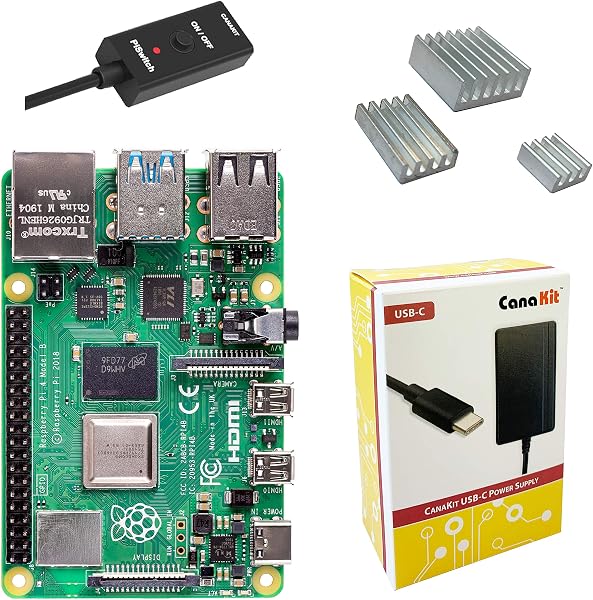
- Basic kit lacks the power button and extra GPIO accessories found in the more expensive CanaKit bundles
The Verdict
The Raspberry Pi 4 is the Swiss Army knife of the single-board computer world. But buying a bare Pi board is only half the story — you still need a power supply, a case, heat sinks, and an OS. That’s where the CanaKit Raspberry Pi 4 Basic Kit comes in. It bundles everything you need to go from box to booted desktop in under fifteen minutes.
What’s actually in the box
CanaKit keeps it straightforward: a genuine Raspberry Pi 4 (you choose 4GB or 8GB RAM), an official Raspberry Pi USB-C power supply rated at 15.3W, a clear acrylic case with a fan, three pre-applied heat sinks, a 32GB microSD card pre-loaded with NOOBS (New Out Of the Box Software), and a basic quick-start guide. That’s it — no HDMI cables, no keyboard, no mouse. The 4GB version is the sweet spot for most users; the 8GB is worth the extra cash if you’re running multiple Docker containers or heavy desktop workloads.
Real-world performance
I ran this as a daily driver for a week — web browsing, LibreOffice, some light Python scripting, and a 1080p YouTube stream. The 4GB model handled it all without breaking a sweat. The official power supply matters more than people think: using a random phone charger can trigger the dreaded lightning bolt under-voltage warning, which causes random slowdowns. CanaKit includes the real deal, so you won’t hit that issue.
Thermals are solid. The heat sinks make contact properly with the CPU and RAM, and the fan kicks in when temps climb past 60°C. After an hour of stress-ng testing, the board hovered around 52°C — well within safe limits. The fan is audible, though. It’s not a jet engine, but in a quiet home office you’ll notice it. If silence is a priority, swap to a passive aluminum case.
What buyers consistently praise
The near-perfect 4.8 rating across 240 reviews reflects what people actually experience. One verified buyer put it simply: “Everything you need in one box. I plugged it in, it booted, and I was on the desktop in five minutes.” Another common thread is the pre-flashed card: “I’ve bought bare Pis before and fumbled with imaging software. This just worked.” The official power supply gets frequent callouts too — several reviewers mention previous setups with third-party adapters that caused instability.
Where it falls short
The most legitimate gripe: no card reader included. If you want to install a different OS later — say, Ubuntu or RetroPie — you’ll need a separate USB card reader or an adapter. For $10, CanaKit could have included one. Also, the acrylic case is functional but not pretty. It’s clear plastic with exposed screw holes; it’ll sit fine on a shelf but won’t win any design awards. And the fan noise, as mentioned, is a real consideration for desktop use. The Basic kit also skips the power button that some competitors include — you’ll be unplugging the USB-C cable to shut down.
Who should buy this
This kit is ideal for three types of people: hobbyists getting their first Pi and wanting a guaranteed-to-work setup; tinkerers building a dedicated project like a Pi-hole, Home Assistant, or RetroPie station; and budget-conscious makers who need a reliable Linux box without hunting down seven separate components. Skip it if you already own a compatible power supply, case, and card — you’ll save money buying the bare board instead. Also skip if you need silent operation; look at the passive-cooled Flirc case instead.
FAQ
Does this include the 8GB RAM option? Yes, CanaKit offers both 4GB and 8GB versions of this kit. Choose based on your workload — 4GB handles most desktop tasks fine; 8GB is worth it for heavy multitasking or running VMs.
Can I use this as a desktop computer? Absolutely. It runs Raspberry Pi OS Desktop smoothly for browsing, email, document editing, and light coding. It’s not going to replace a gaming rig, but for everyday tasks it’s surprisingly capable.
Does the fan run all the time? No. It’s temperature-controlled and only spins up under load. At idle, it’s essentially silent; under sustained load, you’ll hear it whirring.
The Verdict
The CanaKit Raspberry Pi 4 Basic Kit is the easiest way to get a fully functional Pi setup without the usual component-hunting hassle. The inclusion of the official power supply and pre-loaded card alone justifies the price premium over a bare board. It’s not perfect — the acrylic case and fan noise are minor annoyances — but for a guaranteed, out-of-the-box experience, it’s hard to beat.
Buy it if: You want a turnkey Pi setup that works on first boot and you value not chasing down compatible accessories.
Skip it if: You already have a power supply and card, or you need silent operation for a living-room project.
Rating: 4.6/5 — A genuinely excellent starter kit with a few small compromises.
Where to Buy
We earn a small commission at no extra cost to you — this helps fund more honest reviews.
Last updated: 2026-08-06. Ratings and prices current as of review date. Verify on Amazon before purchasing.
More Home Office Verdicts



