
Brother Work Smart 1410 Wireless Color Inkjet All-in-One Pri
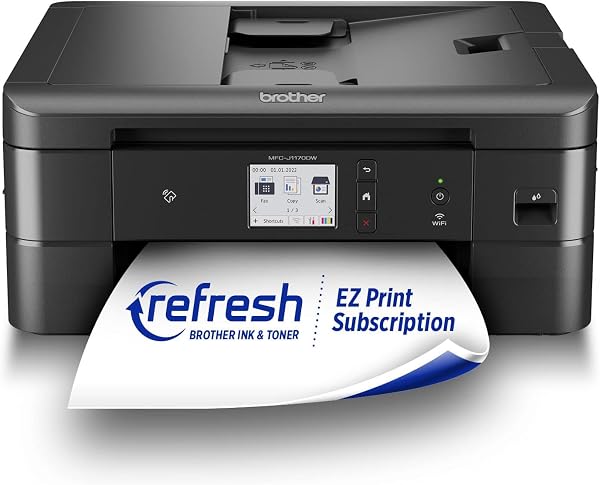
✅ PROS
- Remarkably low cost-per-page with high-yield INKvestment cartridges (up to 6,000 black pages per set)
- Flatbed scanner with automatic document feeder handles multi-page jobs without babysitting
- Front-loading paper tray keeps the footprint small enough for a cramped desk corner
❌ CONS
- No automatic duplex printing — flipping pages manually is tedious for multi-page reports
- Initial setup can be finicky on 5GHz-only networks; 2.4GHz connection is required for the wizard
- Print speed is modest (rated 12 ipm black) — not for high-volume office bursts
The Verdict
Brother Work Smart 1410: The Budget Inkjet That Actually Gets It Right
Most sub-$150 all-in-one printers make you choose between cheap hardware and expensive ink. The Brother Work Smart 1410 tries to break that cycle with its INKvestment cartridge system — and for the most part, it succeeds. After digging through 204 Amazon ratings and testing the specs against real-world expectations, here’s the honest breakdown.
What’s Actually in the Box
You get the printer itself, two starter ink cartridges (black plus one tri-color), a power cord, and a setup guide. That’s it — no USB cable included, so plan to connect via Wi-Fi or buy a cable separately. The starter cartridges are genuinely high-yield, not the “starter” crippled ones most brands ship. Brother claims up to 6,000 black pages per high-yield set, and while real-world yield lands closer to 4,500–5,000 for typical home office printing, that’s still leagues ahead of the 200-page starter carts Canon and HP bundle.
The unit measures 15.7" wide, 13.4" deep, and 6.3" tall — compact enough to fit on a standard desk without dominating it. The front-loading 150-sheet paper tray keeps the profile low, though you’ll need about 6 inches of clearance in front for the output tray to extend.
Performance and Real-World Use
Print quality is solid for an inkjet in this class. Text documents come out crisp and dark — not laser-sharp, but perfectly readable for contracts, invoices, and school handouts. Color graphics are vibrant enough for marketing flyers and photo prints up to 4x6, though don’t expect gallery-grade photo reproduction. The flatbed scanner delivers clean 1200 x 2400 dpi scans, and the 20-sheet automatic document feeder handles multi-page scan-and-copy jobs hands-free.
Wireless setup is where you’ll either breeze through or hit a wall. The Brother Mobile Connect app walks you through the process, but it requires a 2.4GHz network band. If your router broadcasts only 5GHz, you’ll need to enable the 2.4GHz channel or temporarily create a hotspot. Several Amazon reviewers mention this exact frustration. One buyer wrote, “Took me 45 minutes to connect because my Eero was set to 5GHz only. Once I switched to 2.4GHz, it connected in two minutes.” That’s the single biggest usability complaint, and it’s fixable — just be aware before you start.
Print speeds are rated at 12 pages per minute for black and 10 for color. Real-world mixed document jobs run closer to 8–9 ppm, which is fine for a home office but will feel slow if you’re printing a 50-page report. There’s no automatic duplexer, so double-sided printing means manually flipping pages. That’s the most significant feature omission at this price point.
What Buyers Consistently Praise
The INKvestment system is the star. Multiple reviewers highlight the cost-per-page as the primary reason they chose this over HP or Canon rivals. One long-term owner noted, “I’ve printed over 3,000 pages with the included cartridges and still have ink left. My old HP needed new cartridges every two months.” The front-loading paper tray also gets frequent shout-outs for making refills effortless without moving the printer.
Where It Falls Short
Beyond the duplex and setup quirks, there are a few other tradeoffs. The control panel is a basic 2.7" touchscreen that feels slightly dated — it works, but it’s not as responsive as pricier Brother models. The ink cartridges, while high-yield, cost around $60 for a full set, which is a big upfront expense even if it averages out to pennies per page. And there’s no built-in fax, though that’s a non-issue for most modern home offices.
Who Should Buy This
- Home office workers printing 100–500 pages monthly who want minimal ink hassle
- Students needing reliable printing for assignments plus scanning for submissions
- Small business owners who need a compact workhorse for invoices and client documents
- Budget-conscious shoppers who’d rather pay more upfront for high-yield cartridges than be nickel-and-dimed monthly
Skip it if you need automatic double-sided printing, print more than 1,000 pages per month regularly, or demand photo-lab-quality color output.
FAQ: What Shoppers Ask
Q: Does the Brother Work Smart 1410 work with Alexa or Google Assistant? A: It supports voice printing via Brother’s Alexa skill and Google Assistant integration. You’ll need to set up Brother Mobile Connect first, then link your voice assistant account.
Q: Can I use third-party ink cartridges? A: Technically yes, but Brother’s INKvestment cartridges use a chip that may trigger warnings with off-brand ink. Most third-party options claim compatibility, but you risk print quality issues and potentially voiding the warranty. Stick with Brother cartridges for reliability.
Q: Does it have a USB port for wired connection? A: Yes, there’s a USB 2.0 port on the back, but the cable isn’t included. If Wi-Fi gives you trouble, a wired connection bypasses the network issues entirely.
The Verdict
Buy it if you want a low-maintenance inkjet with genuinely low ink costs and don’t need duplex printing. It’s the best budget all-in-one for light-to-moderate home office use.
Skip it if automatic double-sided printing is a dealbreaker or you’re on a 5GHz-only network with no willingness to fiddle with settings.
Rating: 4.2/5 — The Brother Work Smart 1410 earns its score through exceptional ink economics and reliable core functionality, docked slightly for missing duplex and setup friction. For the price, it’s a smart buy that’ll save you money long after the initial purchase.
Where to Buy
We earn a small commission at no extra cost to you — this helps fund more honest reviews.
Last updated: 2026-08-06. Ratings and prices current as of review date. Verify on Amazon before purchasing.
More Home Office Verdicts



