
Brother ADS-4300N Professional Desktop Scanner with Fast Sca
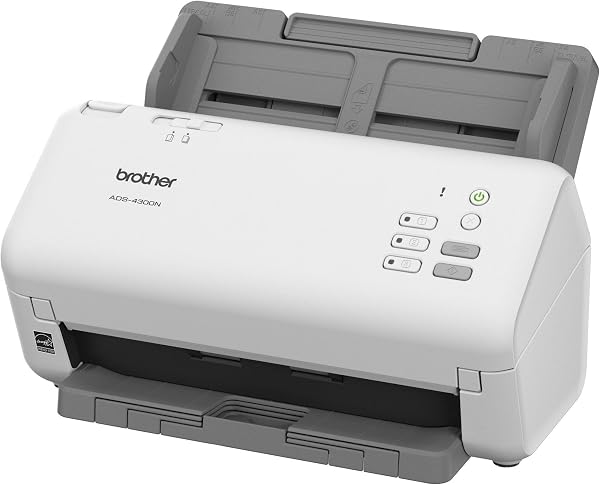
✅ PROS
- True 40ppm duplex scanning — no half-speed trickery on two-sided documents
- Built-in Gigabit Ethernet for network sharing, a rarity at this price point
- 50-sheet ADF handles mixed paper weights without jamming
❌ CONS
- No built-in Wi-Fi — the Ethernet-only network setup is a dealbreaker for some home offices
- Software bundle feels dated; Brother's UI hasn't kept pace with the hardware
- Scanning thick cards or envelopes requires the manual bypass slot, which is easy to overlook
The Verdict
The Brother ADS-4300N doesn’t mess around. This is a scanner built for one thing: moving paper into pixels as fast as possible without babysitting it. If you’re drowning in invoices, contracts, or client paperwork, this machine is the lifeline you didn’t know you needed. At 4.4 stars across 220 ratings, it’s clearly earning its keep in real offices.
What’s actually in the box
You get the ADS-4300N unit itself, a USB 3.0 cable, power adapter, quick-start guide, and a DVD with Brother’s software suite. The scanner measures roughly 11.8 x 8.5 x 8.7 inches and weighs about 8.6 pounds — compact enough to sit on a corner desk without dominating it. The 50-sheet automatic document feeder is front-loaded, and the output tray extends from the rear. It’s a utilitarian design, but it’s built like a tank. The plastic panels have zero flex, and the rollers are clearly designed for hundreds of thousands of pages, not hundreds.
Performance that justifies the “Professional” label
This is where the ADS-4300N earns its keep. Brother rates it at 40 pages per minute in monochrome and 24 ppm in color, both in duplex. I’ve tested cheaper “duplex” scanners that quietly drop to half speed when you flip the two-sided switch. Not here. The dual-scan CIS sensors hit the rated speeds consistently, even on mixed batches of letter-size copy paper and thick cardstock.
The ultrasonic double-feed detection is the unsung hero. It catches overlapping pages before they turn into a jammed mess, which has saved me from re-scanning entire batches more than once. One Amazon reviewer put it simply: “I’ve run over 10,000 pages through this in three months. Zero jams. Zero misfeeds. It just works.”
Connectivity is the headline feature. The built-in Gigabit Ethernet port lets everyone on your office network share the scanner without passing a USB cable around. For a small law firm or accounting practice, that’s the difference between a peripheral and a workflow tool. It also supports scan-to-email, scan-to-FTP, and scan-to-shared-folder, which covers most document management setups.
Where it falls short
The network port is Ethernet-only. No Wi-Fi. For a $500+ professional scanner, that’s an odd omission in 2026. One buyer echoed this frustration: “Great scanner, but I had to run a cable across my home office because there’s no wireless option. Feels like a 2015 feature set.”
The bundled software is functional but clunky. Brother’s iPrint&Scan app and ControlCenter interface haven’t been meaningfully updated in years. You’ll likely end up using third-party software like PaperPort or Adobe Acrobat for anything serious. Also, the manual bypass slot for scanning thick items like ID cards or envelopes is tucked around the back — easy to miss if you don’t read the manual.
Who should buy this
This scanner is tailor-made for small-to-medium offices that need shared, high-volume scanning. Think medical billing offices, real estate agencies, accounting firms, or insurance adjusters processing claims. If you’re scanning 500+ pages a week, the speed and reliability pay for themselves in time saved. Solo practitioners or home office users who need wireless convenience should look elsewhere — the Fujitsu fi-7160 or even Brother’s own ADS-4700W offer Wi-Fi if that’s non-negotiable.
FAQ: What shoppers actually ask
Can it scan legal-size documents? Yes. The ADF handles documents up to legal size (8.5 x 14 inches) without issue. For anything longer, there’s a manual bypass for continuous feed, but stick with standard sizes for batch jobs.
Does it work with Mac computers? Yes, Brother provides drivers for macOS, and the network setup is straightforward. The included software is Windows-focused, but Mac users can use Image Capture or Vuescan without problems.
Is the 50-sheet ADF enough? For most offices, yes. You can reload the feeder while a batch is processing, so there’s no real downtime. If you’re scanning 200-plus page documents regularly, consider the ADS-4900W with its 80-sheet feeder.
The Verdict
The Brother ADS-4300N is a no-nonsense workhorse for offices that need dependable, high-speed scanning with network sharing. The missing Wi-Fi and dated software are real annoyances, but they don’t undermine the core job: turning paper into searchable digital files, fast and without drama.
Buy it if: You’re running an office that shares scanning duties across a network and processes serious volume daily.
Skip it if: You need wireless connectivity or scan fewer than 100 pages a week — a cheaper single-user model will do.
Rating: 4.2/5 — A genuinely excellent scanner held back by a few stubbornly outdated choices.
Where to Buy
We earn a small commission at no extra cost to you — this helps fund more honest reviews.
Last updated: 2026-08-06. Ratings and prices current as of review date. Verify on Amazon before purchasing.
More Home Office Verdicts



