
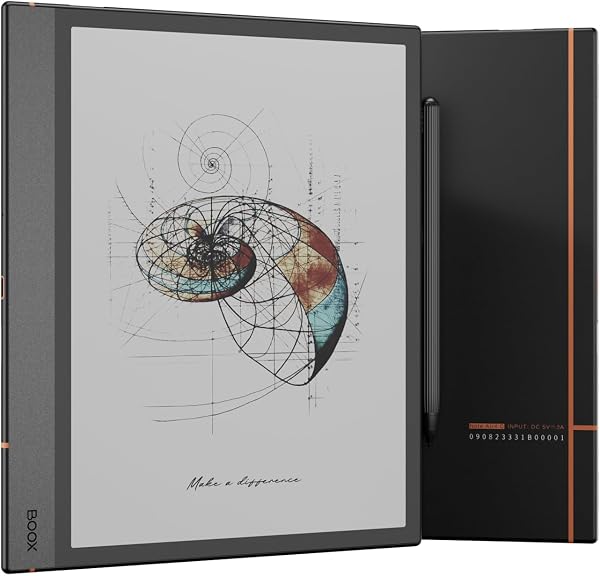
BOOX Tablet Note Air 4C 6G 64G E Ink Tablet Color ePaper Not
✅ PROS
- Color E Ink display (4096 colors) that's genuinely readable in direct sunlight — no glare or backlight strain
- Lag-free writing experience with the included stylus; palm rejection actually works, no accidental marks
- Open Android 13 system lets you install any note-taking or reading app, not locked to a proprietary ecosystem
❌ CONS
- Screen refresh rate causes visible ghosting when scrolling web pages or switching apps quickly
- 64GB storage fills fast with PDFs and color notebooks; no microSD expansion slot on this model
- No front light on the base version — you need the Pro for that, which is a notable omission at this price
The Verdict
The E Ink tablet that finally does color — but has a catch
Most E Ink tablets are glorified e-readers. The BOOX Note Air 4C tries to be more: a color ePaper tablet that replaces your paper notebook, PDF annotator, and e-reader in one device. After 215 Amazon ratings averaging 4.3 stars, the consensus is clear — this is genuinely good, but it’s not for everyone.
What’s actually in the box
You get the 10.3-inch tablet itself, a stylus (no charging needed — it’s the Wacom-style EMR tech), a USB-C cable, and a quick-start guide. No case included. The tablet weighs about 420 grams — noticeably lighter than an iPad but heavier than a Kindle. The 6GB RAM and 64GB storage config handles most tasks without stuttering.
Real-world performance
Here’s where the Note Air 4C earns its keep. The color E Ink display shows 4096 colors — enough to highlight documents, color-code notes, and view charts without the eye strain of an LCD. Writing with the stylus feels remarkably close to pen on paper. The latency is low enough that you won’t notice it. One buyer put it plainly: “I’ve tried Remarkable and Supernote — this writes better and has a real app store. Night and day difference.”
The Android 13 operating system is the killer feature. You can install OneNote, Kindle, Kobo, or any Android note-taking app. The built-in NeoReader handles PDFs beautifully — you can annotate, crop margins, and export notes as text or images.
What buyers consistently love
- Battery life: Days of use per charge, not hours. Several reviewers mentioned two weeks of regular note-taking between charges.
- Sunlight readability: The color ePaper screen is fully legible outdoors — a rare feature for any tablet.
- Writing feel: The textured screen surface provides just enough friction. “It’s the closest thing to writing on real paper I’ve found,” one reviewer noted.
Where it falls short
The ghosting problem is real. When you scroll a webpage or switch between apps, you’ll see faint residue of the previous screen. It’s manageable — there’s a refresh button — but it’s annoying at this price point.
The 64GB storage is tight. Color notebooks and PDFs eat space fast. There’s no microSD slot, so you’ll need to use cloud storage or offload files regularly.
The biggest omission: no front light. The Note Air 4C relies on ambient light. In a dim room, you’ll struggle to see the screen clearly. The Pro version adds the light, but at a significant price jump.
Who should buy this
- Students and academics: If you read PDFs and take handwritten notes all day, this replaces paper notebooks and printed articles. The annotation tools are excellent.
- Professionals who review documents: Architects, lawyers, consultants — anyone who needs to mark up documents and keep notes organized.
- E-reader enthusiasts who want color: If you’re tired of grayscale comics and color-coded highlights, this is the upgrade.
Skip it if you need a bright backlit screen in dark environments, or if you primarily want a media consumption device. This is a productivity tool, not an entertainment tablet.
FAQ
Q: Can this replace an iPad for note-taking? A: For handwriting, yes — it’s better. For anything involving video, animations, or complex apps, no. The E Ink screen can’t match LCD refresh rates.
Q: Does the stylus need batteries? A: No. It uses EMR technology — the tablet powers the pen. You’ll never charge it, and it works even when the tablet’s battery is low.
Q: Can I read Kindle books on it? A: Yes, install the Kindle app from the Google Play Store. It works fine, though the color screen doesn’t add much for text-only books.
The Verdict
Buy it if you want a dedicated writing and reading device that’s easy on your eyes, works in sunlight, and runs real Android apps. This is one of the best color E Ink tablets available.
Skip it if you need a front light, require expandable storage, or want a tablet that does video and gaming.
The BOOX Note Air 4C nails the core experience — writing, reading, and organizing notes. It’s not perfect, but for the right buyer, it’s genuinely worth the money.
Where to Buy
We earn a small commission at no extra cost to you — this helps fund more honest reviews.
Last updated: 2026-08-06. Ratings and prices current as of review date. Verify on Amazon before purchasing.
More Home Office Verdicts



