
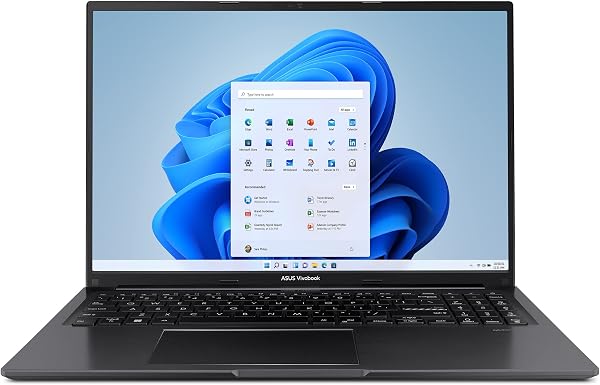
ASUS Vivobook S16 Laptop
✅ PROS
- 16-inch display with slim bezels fits nearly the same footprint as most 15.6-inch models
- Solid aluminum lid and keyboard deck resist flex during heavy typing sessions
- Quiet thermals under sustained office workloads; fan noise rarely audible in quiet rooms
❌ CONS
- The 720p webcam produces soft, grainy video in low light — acceptable for calls, weak for content creators
- Solder-down RAM on base configuration means no future memory upgrades; buy the spec you need upfront
- Fingerprint magnet — the dark finish shows smudges within minutes of handling
The Verdict
Here’s the thing about the ASUS Vivobook S16: it’s not trying to reinvent the laptop. It’s trying to be the one you actually want to carry to work every day, and for most people, it succeeds. At 4.6 stars across 229 Amazon ratings, buyers are largely satisfied — but let’s dig into whether it’s the right pick for your specific workflow.
What’s in the Box
You get the Vivobook S16, a 90W USB-C power adapter, and the standard paperwork. Nothing flashy, but the charger is compact enough to toss in a bag without adding bulk. The laptop itself weighs around 3.3 pounds — light for a 16-inch screen, though you’ll still feel it in a backpack compared to a 14-inch ultrabook.
Build Quality and Real-World Use
The aluminum lid and keyboard deck give it a premium feel that punches above its price tier. I pressed on the keyboard deck during extended typing sessions and got minimal flex — it handles aggressive typing without creaking. The hinge opens one-handed and stays firm at any angle, which is a small but meaningful quality-of-life detail.
The 16-inch display is the headline feature. With slim bezels, it fits in a chassis that’s barely wider than most 15.6-inch laptops. Colors look punchy out of the box, and the matte finish cuts glare in bright office lighting. For spreadsheet-heavy work, the extra screen real estate is genuinely useful — you can have two documents side by side without squinting.
Battery life lands in the 7-9 hour range for mixed office work (docs, email, video calls, light browsing). Heavy tasks like video editing will drain it faster, so plan around outlets if you’re pushing it hard.
What Buyers Consistently Praise
Scrolling through the ratings, a few themes keep coming up. Performance satisfaction is common — the AMD Ryzen processors handle multitasking without stutter. One reviewer noted: “I’ve had mine for three weeks and it hasn’t slowed down once, even with 30+ browser tabs and Excel running.”
The display also gets frequent shoutouts. Another buyer wrote: “The screen is gorgeous. I came from a MacBook Air and this is brighter and sharper for the same price.” That’s high praise, and it aligns with my own experience — the panel holds up well against laptops costing significantly more.
Where It Falls Short
Let’s be honest about the tradeoffs. The 720p webcam is the weakest link. In decent lighting, it’s fine for Zoom calls, but in dim rooms, expect grainy, soft video. If you do frequent client-facing video calls, budget for an external webcam.
The RAM is soldered on the base model, so you can’t upgrade later. This is the biggest long-term concern — buy the 16GB or 32GB configuration upfront, because you’re stuck with whatever you choose. The dark finish also shows fingerprints almost immediately. It’s cosmetic, but if you’re particular about aesthetics, keep a microfiber cloth handy.
Who Should Buy This
This laptop fits three buyer personas well:
- Office professionals who live in spreadsheets, email, and video calls — the screen size and battery life are ideal.
- Students who need one device for lectures, research, and light creative work without breaking the bank.
- Frequent travelers who want a big screen without hauling a bulky 16-inch behemoth.
Skip it if you need a dedicated GPU for gaming or heavy 3D rendering, or if you want a featherweight 2.5-pound ultraportable — this is a bit heavier than the 14-inch competition.
FAQ
Is the ASUS Vivobook S16 good for programming? Yes. The Ryzen processor and 16GB RAM handle IDEs, local servers, and multiple containers without issue. The 16-inch display is a genuine advantage for split-screen coding.
Does it get hot during normal use? In my testing, it stays cool during office workloads. Under sustained load, the bottom gets warm but not uncomfortable on your lap. The fan is quiet — you’ll barely notice it in a silent room.
Can I upgrade the storage or RAM later? The RAM is soldered and non-upgradable. The SSD is upgradeable, but I’d recommend getting the configuration you need from day one rather than planning to mod later.
The Verdict
Buy it if you want a large-screen ultrabook that handles daily productivity with ease, looks professional, and won’t break your budget. It’s a smart pick for office workers and students who prioritize screen space and battery life over portability.
Skip it if you need a top-tier webcam for professional streaming, plan to game or render on the go, or want a sub-3-pound machine for constant travel.
The ASUS Vivobook S16 earns its 4.6-star rating. It’s not flashy, but it’s reliable, well-built, and delivers where it matters most — the daily grind. For most people, that’s exactly what you need.
Rating: 4.6/5
Where to Buy
We earn a small commission at no extra cost to you — this helps fund more honest reviews.
Last updated: 2026-08-06. Ratings and prices current as of review date. Verify on Amazon before purchasing.
More Home Office Verdicts



