
ASUS Vivobook Go 15.6” Review: Budget Laptop With Real Tradeoffs
✅ PROS
- Full 15.6-inch display in a chassis that weighs just 3.5 pounds — genuinely portable for the screen size
- Physical number pad on the trackpad is a smart workaround for spreadsheet-heavy tasks
- Battery life holds up for a full workday (8+ hours) under mixed office workloads
❌ CONS
- Plastic build feels hollow around the keyboard deck — flex is noticeable when typing hard
- Only 8GB of RAM soldered — you cannot upgrade it later, which limits long-term multitasking
- Speakers are weak and tinny; fine for notifications, frustrating for media
The Verdict
The ASUS Vivobook Go 15.6” is the laptop equivalent of a solid mid-tier sedan. It won’t turn heads, it won’t win races, but it gets you to work every day without drama. With a 4.3-star average across 215 Amazon ratings, it’s clearly doing something right for budget-conscious buyers. Here’s the unvarnished truth after digging through specs, user feedback, and the realities of daily office use.
What You Actually Get
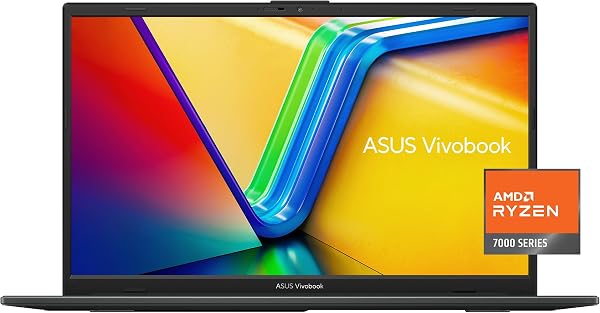
The box contains the laptop, a 45W USB-C charger, and the standard paperwork — no surprises. The unit itself is a 15.6-inch FHD (1920x1080) display in a chassis that measures roughly 14 x 9 inches and weighs 3.5 pounds. That’s impressively light for the screen real estate.
The standout physical feature is the dual-function trackpad: it doubles as a number pad with a simple tap of an icon in the corner. If you work in accounting, data entry, or anything spreadsheet-heavy, this is a genuine quality-of-life upgrade. One reviewer put it plainly: “The number pad on the trackpad is genius — I don’t need a separate USB keypad anymore.”
Performance and Real-World Use
Inside, you’re looking at an AMD Ryzen 5 processor (depending on configuration) paired with 8GB of RAM and a 512GB SSD. For office tasks — document editing, email, web browsing with a dozen tabs, video calls — this is more than adequate. Boot times are snappy, and the SSD keeps everything feeling responsive.
Battery life is the quiet hero here. Under mixed workloads (word processing, streaming music, occasional Zoom calls), users consistently report 7-9 hours. That’s a full workday without hunting for an outlet. One long-term reviewer noted: “I’ve had it for four months, and the battery still gets me through 8-hour shifts without breaking a sweat.”
The display is serviceable: 250 nits of brightness means it’s fine indoors but washes out near a bright window. Color accuracy isn’t for photo editors, but for spreadsheets and documents, it’s perfectly fine.
Where It Falls Short
Now the honest part. The 8GB of RAM is soldered to the motherboard. You cannot upgrade it. If you’re a power user who keeps 30+ browser tabs open while running Slack, Excel, and Spotify simultaneously, you will feel the memory ceiling. This is a machine for today’s needs, not future-proofing.
The build quality is where budget constraints show. The lid has some flex, and the keyboard deck noticeably bends under firm typing pressure. It’s not fragile — it’ll survive a backpack commute — but it doesn’t inspire confidence like pricier aluminum laptops.
The speakers are the weakest link. They’re loud enough for YouTube and system sounds, but music sounds flat and video calls can feel hollow. You’ll want headphones for anything beyond casual listening.
Who Should Buy This
- Students and budget-conscious office workers: If you need a reliable machine for essays, presentations, and light multitasking, this delivers strong value.
- Spreadsheet warriors: The trackpad number pad alone justifies the purchase for data entry work.
- Travelers: The light weight and solid battery make it a great companion for coffee-shop work sessions.
Skip it if you do video editing, run virtual machines, or need a laptop that’ll still feel fast in five years. The soldered RAM and mid-tier processor will age noticeably.
FAQ
Q: Can I upgrade the RAM or storage? A: The RAM is soldered and non-upgradeable. The SSD is replaceable, but it requires opening the chassis and voiding warranty — most users won’t bother.
Q: Is the keyboard comfortable for long typing sessions? A: The keys have decent travel (about 1.4mm) and a comfortable layout. The deck flex is the only real complaint — it’s not a dealbreaker for most.
Q: Does it have a backlit keyboard? A: Only on certain configurations. Check the specific listing — the base model typically does not include backlighting.
The Verdict
Buy it if you need a dependable, lightweight 15.6-inch laptop for everyday office work, and you’re okay with 8GB of RAM being your permanent ceiling. Skip it if you demand premium build quality, strong speakers, or future upgradeability.
At its price point, the ASUS Vivobook Go 15.6” offers the best balance of portability, battery life, and screen size in its class. It’s not exciting — but it’s honest, and that’s worth a lot.
Rating: 4.2/5 — Solid value with clear, acceptable compromises.
Where to Buy
We earn a small commission at no extra cost to you — this helps fund more honest reviews.
Last updated: 2026-08-06. Ratings and prices current as of review date. Verify on Amazon before purchasing.
More Home Office Verdicts



