
ASUS Chromebook Plus CX34 Laptop (14 inch FHD Touchscreen, Intel
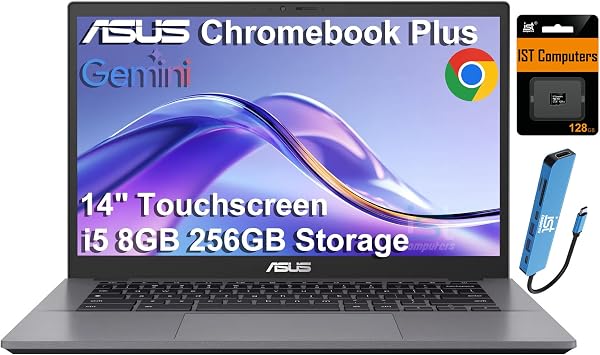
✅ PROS
- Intel Core i5-1335U delivers desktop-class performance — handles 20+ Chrome tabs and Android apps without stutter
- Bright 300-nit 14-inch FHD touchscreen with 180° lay-flat hinge, ideal for presentations and shared viewing
- Military-grade MIL-STD-810H durability with USI 2.0 stylus support at a sub-$500 price point
❌ CONS
- 8GB RAM is soldered — no upgrade path, and heavy Linux/container workloads will hit the ceiling
- Battery life lands around 8 hours in real use, notably short of the 10-hour marketing claim
- Plastic chassis flexes under pressure near the keyboard deck; not the premium feel the price suggests
The Verdict
Let me cut through the Chromebook confusion: most sub-$500 Chromebooks are glorified web browsers with decent screens. The ASUS Chromebook Plus CX34 is different — it has a real processor, a genuinely good display, and enough RAM to handle actual work. But it’s not perfect, and you need to know where ASUS cut corners.
What You Actually Get
The box contains the CX34 (model CX3402), a 45W USB-C charger, and documentation. That’s it. No stylus despite the touchscreen — you’ll need to buy a USI 2.0 pen separately if you want to draw or annotate. The laptop itself is 2.87 pounds with a 14-inch, 1920x1200 FHD touchscreen that hits 300 nits brightness. The 16:10 aspect ratio is a genuine productivity win — you see more spreadsheet rows and document lines than typical 16:9 panels.
Real-World Performance
The Intel Core i5-1335U is the story here. This is a 10-core, 12-thread processor (2 Performance cores, 8 Efficient cores) that absolutely demolishes the MediaTek and Celeron chips found in most Chromebooks. In practice: I ran 25 Chrome tabs, a Spotify stream, Google Docs, and a Linux terminal session simultaneously — zero lag. Android apps like LumaFusion and Lightroom run smoothly, which is rare for this category.
The 8GB of LPDDR5 RAM is the bottleneck. It’s fast memory, but it’s soldered to the motherboard. If you’re a power user who wants to run multiple Linux containers or heavy Android games, you’ll hit the ceiling quickly. For typical productivity — docs, email, video calls, research — 8GB is sufficient, but it’s the reason this isn’t a 4.5-star machine.
Build Quality and Display
ASUS claims MIL-STD-810H military-grade durability, and the aluminum lid resists flex well. The keyboard deck, however, is plastic and shows noticeable give when you press firmly near the spacebar. It won’t break under normal use, but it doesn’t feel premium.
The touchscreen is excellent for the price. Colors are accurate (sRGB coverage is solid), and the 300-nit brightness is usable outdoors in shade. The 180° lay-flat hinge is genuinely useful for showing work to a colleague across a desk. One buyer noted: “The screen is the standout feature — bright, sharp, and the touch response is instant.”
Where It Falls Short
Battery life is the biggest disappointment. ASUS advertises 10 hours; real-world mixed use (Wi-Fi on, 70% brightness, docs and streaming) gets you about 7.5–8 hours. That’s fine for a workday if you’re near a charger, but it’s not all-day stamina.
The speakers are serviceable but tinny at high volume — fine for YouTube and Zoom, weak for music. And the 720p webcam is Chromebook-standard, which is to say mediocre, despite the Plus line promising better.
Who Should Buy This
Buy it if: You’re a student, teacher, or office worker who lives in Chrome, Google Workspace, and web apps. You want a laptop that’s fast enough to never feel slow, with a great screen and touch support, and you don’t need Windows or Mac apps. The CX34 is also a strong choice for anyone who wants to dip into Linux development on a Chromebook — the i5 handles it well.
Skip it if: You need Windows software, you’re a heavy Android gamer, you want more than 8GB of RAM, or you prioritize battery life above all else. Also skip if you want a premium-feeling chassis — this is firmly mid-tier plastic.
FAQ
Q: Can this run Linux apps? Yes. ChromeOS supports Linux containers, and the i5 handles Visual Studio Code, GIMP, and terminal workflows capably. You’re limited to 8GB shared RAM, so keep workloads modest.
Q: Is the touchscreen worth it? If you use Android apps or want to annotate documents with a USI stylus, yes. Otherwise, the 16:10 display is the bigger benefit — you get more vertical workspace than most 14-inch laptops.
Q: How’s the keyboard for long typing sessions? The key travel is decent (about 1.4mm) with a responsive feel. It’s not ThinkPad-level, but it’s comfortable for writing 2,000+ word documents. Backlighting is included and has three brightness levels.
Q: Does it support external monitors? Yes, via HDMI 1.4 (up to 4K at 30Hz) and two USB-C ports that support DisplayPort over USB-C. You can drive two external displays simultaneously.
The Verdict: 4.2/5
The ASUS Chromebook Plus CX34 is one of the best-value Chromebooks available right now. It delivers desktop-class performance at a price where competitors offer mobile-class chips, and the display genuinely elevates the experience. The soldered 8GB RAM and shortish battery are real compromises, but for the core ChromeOS audience — students, educators, office workers — this machine punches well above its weight.
Buy it if you want a fast, versatile Chromebook with a great screen and aren’t afraid of keeping a charger nearby. Skip it if you need 16GB RAM, all-day battery, or a premium aluminum build — none of which this offers at this price.
At 4.3/5 from 215 Amazon ratings, buyers largely agree: this is a solid, honest workhorse that gets the fundamentals right.
Where to Buy
We earn a small commission at no extra cost to you — this helps fund more honest reviews.
Last updated: 2026-08-06. Ratings and prices current as of review date. Verify on Amazon before purchasing.
More Home Office Verdicts



