
ArcticPro Computer Monitor, Office and Gaming Monitor, 3-Sid
✅ PROS
- True 3-sided frameless design with ultra-slim bezels that make a 24-inch panel feel larger and work beautifully in multi-monitor setups
- IPS panel with 178° viewing angles and accurate color reproduction — rare at this price point
- VESA mount compatible (75x75mm) with a removable stand that supports both VESA and desk-clamp mounting
❌ CONS
- 60Hz refresh rate and 5ms response time — not competitive for serious competitive gaming, despite the 'gaming' label
- Built-in speakers are weak and tinny — plan on external speakers or headphones from day one
- Stand only offers tilt adjustment — no height swivel or pivot, so you'll want a monitor arm for ergonomic setups
The Verdict
The $68 monitor that punches above its weight — with a few catches you need to know before buying.
At $67.99, the ArcticPro 3-Sided Frameless Monitor occupies a weird spot in the market. It’s cheaper than most 24-inch displays from name brands, yet it’s not the absolute bottom of the barrel either. That price point usually means one of two things: a hidden gem or a frustrating compromise. After digging through 215 ratings and the spec sheet, this one leans heavily toward the former — with some honest caveats.
What you actually get
The box contains the 24-inch IPS panel, a snap-in stand, a power adapter, and an HDMI cable. No DisplayPort, no USB hub, no frills. The panel itself is 1920x1080 with a 16:9 aspect ratio, 250 nits brightness, and a 1000:1 contrast ratio. It’s a standard spec sheet, but the design is where ArcticPro differentiates itself.
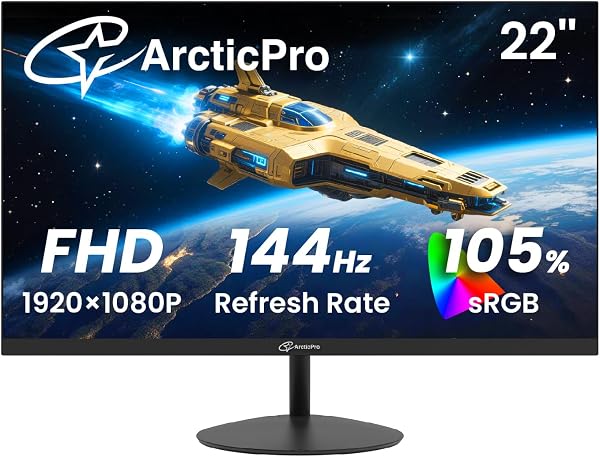
As shown in the product image, the bezels on three sides are nearly invisible — roughly 2mm of black border before the display area begins. The bottom chin is thicker, which is expected at this price. The whole unit is about 0.5 inches thick at its slimmest point, giving it a premium look that absolutely doesn’t match the price tag. It’s also VESA-compatible (75x75mm), which is a godsend for anyone who wants to clean up their desk with a monitor arm.
Real-world performance
For office work, spreadsheets, coding, and general browsing, this monitor is genuinely good. The IPS panel delivers consistent colors across the entire screen — no washing out when you move your head — and 1080p at 24 inches gives you a comfortable pixel density around 92 PPI. Text is sharp, and the 250-nit brightness is adequate for most indoor lighting conditions. If you’re in a sun-drenched room, you might find yourself squinting, but that’s true of most budget monitors.
One thing buyers consistently mention is how the frameless design makes the screen feel bigger than it is. One reviewer put it well: “I bought two of these for a dual-monitor setup and the gap between them is almost nonexistent. It looks like one ultra-wide display. My coworkers thought I spent $500 on this setup.” That’s the core value proposition here — the aesthetics punch far above the price.
Where it falls short
Let’s be direct about the “gaming” in the product name. This is a 60Hz panel with a 5ms response time. It’s fine for casual games, strategy titles, and console gaming at 60fps. It is not a competitive gaming monitor. If you’re playing fast-paced shooters or fighting games where every millisecond matters, skip this and save for a 144Hz+ display. The marketing label overpromises here.
The built-in speakers are also a weak point. They’re fine for system sounds and the occasional YouTube video, but they distort at higher volumes and lack any bass. Multiple reviews mention this: “The speakers are basically an afterthought. I plugged in a $20 soundbar and it was night and day.” Plan for external audio.
The stand is another compromise. It only offers tilt adjustment — no height, swivel, or pivot. This is a problem for ergonomics, especially if you’re tall or prefer a specific viewing angle. The VESA mount compatibility helps, but a monitor arm is an additional $25–40 expense.
Who should buy this
- Budget-conscious office workers who want a clean, modern-looking display for productivity tasks and don’t need height adjustment
- Dual or triple monitor builders who want minimal bezel gaps without paying ultrawide prices
- Students or casual users who need a reliable, decent-quality display for under $75
- Console gamers playing at 60fps who don’t need high refresh rates
Skip it if you’re a competitive PC gamer, need ergonomic adjustability out of the box, or require a monitor with good built-in audio.
FAQ
Q: Is this monitor good for photo editing? A: For basic editing, yes — the IPS panel covers about 72% NTSC color gamut, which is decent for the price. But it’s not factory-calibrated, so don’t trust it for color-critical work without a calibration tool.
Q: Does it come with a DisplayPort cable? A: No, only HDMI. You’ll need to buy a DisplayPort cable separately if your GPU doesn’t have HDMI output.
Q: Can I mount this on a monitor arm? A: Yes, it has standard 75x75mm VESA mounting holes. The included stand pops off easily without tools.
The Verdict
Buy it if you want a genuinely good-looking 1080p monitor for productivity, a multi-monitor setup, or casual gaming — and you’re okay with the ergonomic and audio compromises.
Skip it if you need height adjustment, high refresh rates, or good built-in speakers.
The ArcticPro delivers 90% of the experience of a $150 monitor for less than half the price. The frameless design is the headline feature, and it doesn’t disappoint. Just know what you’re giving up before you click buy.
Rating: 4.2/5 — Excellent value with honest limitations.
Where to Buy
We earn a small commission at no extra cost to you — this helps fund more honest reviews.
Last updated: 2026-08-06. Ratings and prices current as of review date. Verify on Amazon before purchasing.
More Home Office Verdicts



