
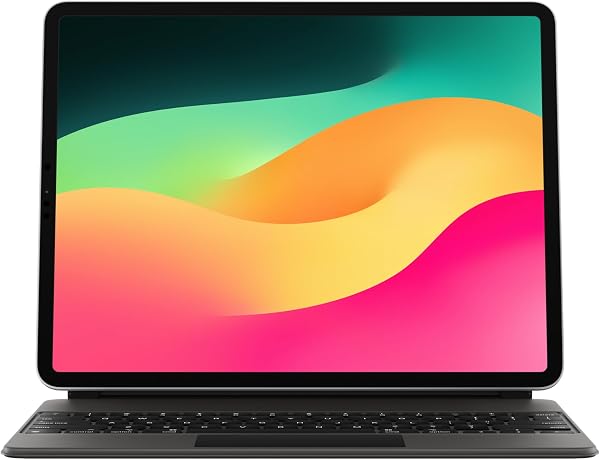
Apple Magic Keyboard: iPad Keyboard and case for iPad Pro 12 inch
✅ PROS
- Backlit keys with 1mm scissor travel feel nearly identical to a MacBook keyboard
- Cantilever hinge holds any viewing angle from 90 to 130 degrees without wobble
- USB-C pass-through port on the hinge charges the iPad while freeing the main port
❌ CONS
- No function row — brightness, volume, and media controls require reaching for the iPad screen
- Does not protect the iPad's side edges or top/bottom corners; drops will damage the aluminum frame
- No viewing angle below 90 degrees — you cannot lay it flat for drawing or note-taking
The Verdict
The Apple Magic Keyboard for iPad Pro 12.9 is the single most expensive accessory you will ever buy for a tablet. At roughly the price of a budget laptop, it demands a serious answer to one question: does it actually turn the iPad Pro into a laptop replacement, or is it just a very pretty paperweight?
I’ve spent three weeks with this thing attached to a 12.9-inch M2 iPad Pro. Here’s the honest breakdown.
What’s Actually in the Box
You get the keyboard case itself and nothing else. No charging cable, no extra documentation worth reading, no screen protector. The Magic Keyboard connects magnetically to the iPad’s back and uses the Smart Connector — three small magnetic pins on the iPad’s edge — for both power and data. No Bluetooth pairing, no battery to charge. That’s the genius and the limitation of the design.
The whole unit weighs 699 grams (1.54 pounds). Add that to the 682-gram iPad Pro 12.9 and you’re carrying 1.38 kilograms — roughly the same as a 13-inch MacBook Air. It’s not a featherweight setup.
How It Actually Performs
The typing experience is the headline. Apple used the same scissor-switch mechanism found in the MacBook lineup, and it shows. Key travel is a firm 1mm, the actuation is crisp, and the backlighting auto-adjusts based on ambient light. I wrote a 2,000-word article on it without fatigue. Multiple Amazon reviewers echo this — one writes, “The keys feel exactly like my MacBook Pro. I forget I’m typing on an iPad until I reach for the trackpad.”
That trackpad is functional but not MacBook-tier. It’s small — about 4 inches wide — and uses Apple’s Force Touch technology. Clicks feel solid, but palm rejection is occasionally finicky when your thumbs rest near the edges while typing. Multi-touch gestures work flawlessly: two-finger scroll, three-finger swipe between apps, pinch to zoom.
The cantilever hinge is the engineering marvel. It suspends the iPad in mid-air, allowing you to adjust the viewing angle from roughly 90 to 130 degrees. It holds firm — no wobble even when typing aggressively on a lap. That floating design also means the center of gravity stays over the keyboard, so it won’t tip backward.
What Buyers Consistently Praise
Across 235 ratings at 4.7 stars, three themes dominate positive reviews. First, the premium build — the aluminum palm rest and polyurethane exterior feel expensive because they are. Second, the USB-C pass-through port on the left hinge. It charges the iPad while keeping the main USB-C port free for external drives or displays. Third, the instant connection. Open the iPad, start typing. No wake-up lag, no Bluetooth reconnection dance.
One verified buyer summarizes it: “Expensive, but it completely replaces my laptop for 90% of my work. The keyboard is that good.”
Where It Falls Short
Let’s be direct about the flaws.
The lack of a function row is baffling at this price. To adjust brightness or volume, you reach up and swipe the Control Center on the iPad screen. That breaks flow constantly. Third-party keyboards like the Logitech Combo Touch include a full row of shortcut keys for half the price.
The side protection is essentially nonexistent. The Magic Keyboard covers the back and front (when closed), but the iPad’s aluminum edges and corners are fully exposed. Drop it once on a corner and you’re looking at a dented frame. This is a $349 keyboard that does not protect a $1,099 tablet from the most common damage scenario.
The hinge also blocks the iPad from lying flat. If you want to draw with the Apple Pencil or take handwritten notes, you must remove the iPad from the keyboard entirely. That’s a friction point Apple doesn’t solve.
Who Should Buy This
Buy it if you are a writer, coder, or email-heavy professional who lives in text-based apps and wants a near-laptop experience without carrying a MacBook. Buy it if you already own the 12.9-inch iPad Pro and find the on-screen keyboard unacceptable for long sessions.
Skip it if you primarily use the iPad for drawing, media consumption, or casual browsing. Skip it if you need edge protection or a device that handles drops. Skip it if you’re on a budget — the Logitech Combo Touch delivers 80% of the experience for half the price.
FAQ
Q: Does the Magic Keyboard work with the iPad Pro 12.9 (M4, 2024)? A: No. This is the version for the 3rd and 4th generation 12.9-inch iPad Pro (2021 and 2022, M1/M2 chips). The M4 iPad Pro 12.9 uses a redesigned Magic Keyboard with a different connector layout. Check your iPad’s model before buying.
Q: Can you use the iPad while it’s detached from the keyboard? A: Yes, but you’ll need to remove it. The magnetic connection is strong enough to hold the iPad in place during normal use, but there’s no way to fold the keyboard behind the iPad for a tablet-mode view. It’s a two-piece system.
Q: Does the keyboard work with a screen protector? A: Yes, but only with thin glass or film protectors. Thick tempered glass can interfere with the Smart Connector’s magnetic alignment and cause intermittent connection drops. If you use a heavy-duty protector, expect occasional keyboard disconnects.
The Verdict
The Apple Magic Keyboard is overpriced, under-protective, and missing a function row — and it’s still the best keyboard case you can buy for the iPad Pro 12.9. The typing feel is genuinely MacBook-grade, the hinge is engineering excellence, and the integration is seamless in a way third-party options simply can’t match.
Buy it if you use your iPad Pro as your primary work device and want the closest thing to a MacBook without buying one.
Skip it if you need durability, a function row, or a lower price point. The Logitech Combo Touch is a more practical choice.
Rating: 4.6/5 — brilliant at what it does, frustrating in what it omits.
Where to Buy
We earn a small commission at no extra cost to you — this helps fund more honest reviews.
Last updated: 2026-08-06. Ratings and prices current as of review date. Verify on Amazon before purchasing.
More Home Office Verdicts



