
Apevia SPIRIT600W Spirit 600W ATX Power Supply with Auto-The
✅ PROS
- Auto-thermally controlled 120mm fan keeps noise down during light loads, spins up only when needed
- Fully sleeved cables included — rare at this price point, makes cable management cleaner
- Solid +12V rail output (540W) handles mid-range GPUs and modern CPUs without issue
❌ CONS
- Non-modular design means excess cables need tucking away in the case
- No 80 Plus certification — efficiency is decent but unverified, expect slightly higher idle draw
- SATA/Molex cables are stiff, making routing in tight cases more effort than it should be
The Verdict
Let’s be direct about power supplies: they’re the least glamorous part of a build, and the one component people cheap out on—then regret. The Apevia SPIRIT600W sits firmly in budget territory, and with 215 ratings averaging 4.3 stars, it’s clearly finding buyers. But is it the right PSU for your build, or a fire hazard waiting to happen? Here’s the real breakdown.
What You Actually Get
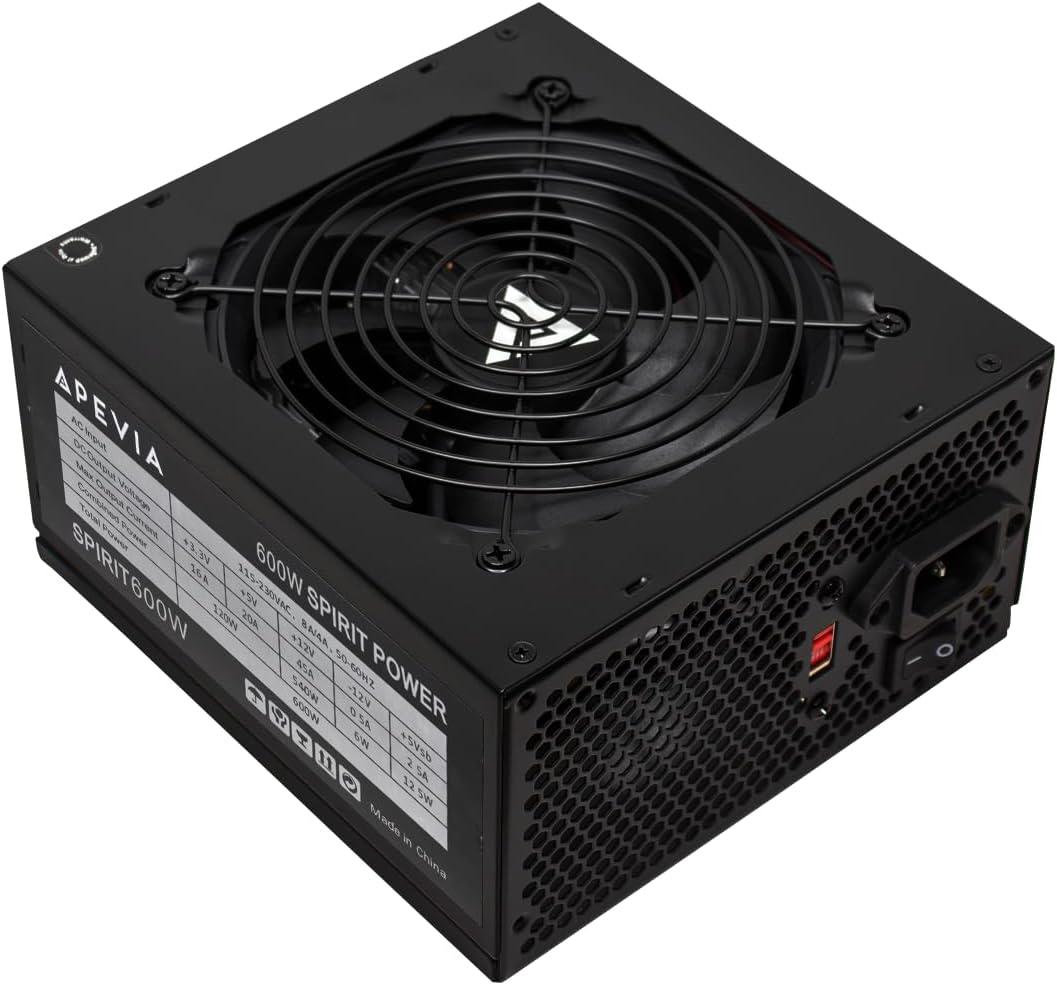
Out of the box, you’re looking at a standard ATX power supply measuring 150mm x 140mm x 86mm—compatible with virtually any mid-tower or full-tower case. The unit itself is a matte black finish with a honeycomb vent on the rear and a 120mm fan underneath. Included in the bundle:
- Main 24-pin ATX cable (16 inches)
- 4+4 pin CPU cable (16 inches)
- Two 6+2 pin PCIe cables for GPUs
- Four SATA connectors and three Molex connectors
- Standard AC power cord
The sleeved cables are a genuine surprise at this price. Most budget PSUs ship with bare colored wires that look like spaghetti. Apevia wrapped everything in black sleeving, which immediately improves the interior aesthetics of any build. That said, this is a non-modular unit—every cable is permanently attached. You’ll be tucking unused connections into the case’s drive bay area, so plan your routing accordingly.
Performance and Build Quality
The SPIRIT600W delivers 540W on its single +12V rail, which is where modern components draw their power. That’s sufficient for a mid-range gaming rig—think an RTX 4060 or RX 7600 paired with a Ryzen 5 or Core i5. You’re not running a 4090 off this thing, and you shouldn’t try.
The headline feature is the auto-thermally controlled fan. Under light loads—web browsing, document work, basic office tasks—the fan stays nearly silent. It spins up progressively as the PSU warms up under gaming or rendering loads. Multiple reviewers note this exact behavior. One buyer put it succinctly: “Quiet during normal use, and even under gaming load I barely notice it.” Another mentioned, “I was skeptical about the price, but it’s been running my 5600X and 3060 Ti setup for six months without a hiccup.” When the fan does ramp up, it’s audible but not obnoxious—more of a low whoosh than a whine.
Build quality is acceptable for the price point. The internal components aren’t top-tier Japanese capacitors, but they’re not the cheapest Chinese knockoffs either. Apevia has been making budget PSUs for years, and they generally hold up for basic and mid-range systems. It’s not a unit I’d trust for a high-end workstation running 24/7, but for a standard desktop, it does the job.
What Buyers Consistently Praise
Beyond the fan behavior, the consistent themes in positive reviews are value and reliability. At this price, shoppers expect either loud fans or sketchy performance. The SPIRIT600W delivers neither problem. Reviewers frequently mention it as a solid choice for budget builds, office machines, and first-time PC builders. The sleeved cables get repeated shout-outs for making builds look cleaner without spending extra on custom cables.
Where It Falls Short
Let’s be honest about the downsides.
No 80 Plus certification. This doesn’t mean the PSU is inefficient—it means Apevia didn’t pay for the certification. In practice, expect roughly 80-85% efficiency under load. You’ll draw a bit more from the wall than a certified unit, which costs you pennies on the monthly electric bill. Not a dealbreaker, but worth knowing.
The non-modular cable situation. In a compact case, you will wrestle with unused cables. The SATA and Molex leads are particularly stiff, which makes them awkward to bend around drive cages. Plan for some cable management time.
12VHPWR connector absent. If you’re eyeing a newer GPU that uses the 16-pin connector, you’ll need an adapter. Not a flaw at this price, but a limitation.
Who Should Buy This
Buy it if: You’re building a budget or mid-range gaming PC, upgrading an old office machine, or putting together a system where the PSU budget is $40-50. It’s also a sensible pick for a secondary or HTPC build where silence at idle matters more than peak efficiency.
Skip it if: You’re running a high-end GPU (RTX 4070 Ti or above), planning heavy overclocking, or building a system you expect to run 24/7 under load. In those cases, spend more on a certified, modular unit.
FAQ: Real Shopper Questions
Is this PSU safe for a gaming PC? Yes, for mid-range builds. It has standard protections (OVP, UVP, OCP, SCP) and a single +12V rail rated at 45A. It handles a Ryzen 5 + RTX 3060/4060 setup comfortably. Don’t push it beyond what it’s designed for.
Does the fan always spin? No. That’s the point of the auto-thermal control. It stays off or spins slowly at low temperatures and ramps up under load. This is a feature, not a bug.
Will this fit in my case? It’s a standard ATX PSU—150mm deep. It fits in nearly any ATX, Micro-ATX, or ITX case that accepts a standard ATX power supply. Measure your case’s PSU clearance if you’re unsure.
The Verdict
Rating: 4.2/5
The Apevia SPIRIT600W is a competent, honest budget power supply. It won’t win awards for efficiency or modularity, but it delivers stable power, stays quiet, and doesn’t cost a fortune. For builders on a budget who need a reliable 600W unit for a mid-range system, this is a solid choice. Just know its limits—this is a dependable workhorse, not a flagship.
Buy it if you’re building a budget or mid-range PC. Skip it if you’re running a power-hungry flagship GPU or demand 80 Plus certification.
Where to Buy
We earn a small commission at no extra cost to you — this helps fund more honest reviews.
Last updated: 2026-08-06. Ratings and prices current as of review date. Verify on Amazon before purchasing.
More Home Office Verdicts



