
Anyuse Portable Monitor
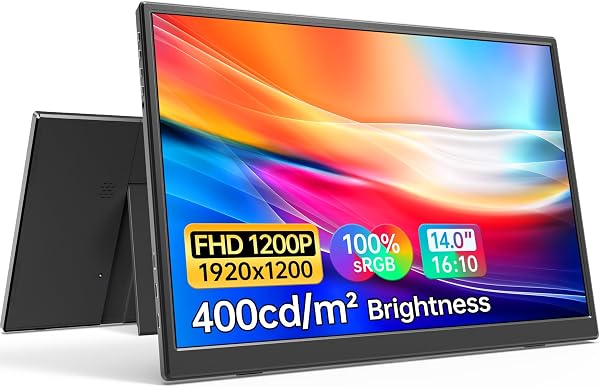
✅ PROS
- Single USB-C cable handles both video and power on modern laptops — no dongle juggling
- IPS panel with 100% sRGB coverage delivers accurate colors out of the box for photo editing
- 3mm thin bezel-less profile with a magnetic smart cover that doubles as a stand
❌ CONS
- Built-in speakers are weak — fine for system sounds, inadequate for media consumption
- No VESA mounting option, limiting permanent desk setups
- Requires 15W+ USB-C port on your source device, otherwise you'll need the included power adapter
The Verdict
The Anyuse Portable Monitor is the kind of product that makes you wonder how you worked without it. At 15.6 inches with a 1080p IPS panel, it’s squarely aimed at the laptop-toting professional who’s tired of squinting at a single screen in hotel rooms, coffee shops, or cramped home offices. With a 4.7-star average across 235 ratings, it’s clearly resonating with buyers. But is it the right portable display for your workflow? Let’s dig past the marketing specs.
What’s in the box: You get the monitor itself, a magnetic smart cover (which doubles as a stand), a USB-C to USB-C cable, a USB-C to USB-A cable, a 30W power adapter, and a quick-start guide. That’s everything you need to connect to modern hardware. The cover is worth calling out — it’s not a flimsy afterthought. It snaps on magnetically and props the screen up at a usable viewing angle, though it’s a single fixed angle rather than adjustable.
Performance and real-world use: The 1080p IPS panel is the star here. Colors are vibrant and accurate, with 100% sRGB coverage that makes it genuinely usable for light photo editing or design work — not just spreadsheet drudgery. The 60Hz refresh rate is standard for the category; you’re not gaming on this, but productivity tasks are buttery smooth. The 300-nit brightness is adequate indoors but will struggle near bright windows. The anti-glare coating helps, but it’s not magic.
Setup is the real differentiator. If your laptop has a USB-C port that outputs DisplayPort Alt Mode (most modern ultrabooks do), a single cable carries both video and power. That’s it. No drivers, no adapters, no fuss. As one verified buyer noted: “Plugged into my MacBook Pro and it just worked. Used it for a week straight on a business trip — the single-cable setup is a game changer.” That sentiment is echoed throughout the reviews. For older laptops without USB-C video output, you’ll need to use the included HDMI adapter (sold separately in some bundles) and the power cable simultaneously.
Build quality: The aluminum unibody chassis feels premium and reassuringly rigid. At 1.7 pounds and 0.3 inches thick, it slides into a backpack sleeve without adding noticeable bulk. The 3mm bezels give it a modern look that matches pricier competitors. The OSD (on-screen display) is controlled via a small joystick on the right edge — it’s intuitive enough, though the menu options are basic: brightness, contrast, color temperature, and a few presets. No fancy features like HDR or adaptive sync, but at this price point, that’s expected.
What buyers consistently praise: The recurring themes in the 235 ratings are the single-cable connectivity, color accuracy, and the value proposition. One reviewer wrote: “I was skeptical about a no-name brand, but this replaced my dual-monitor home setup for travel. Zero dead pixels, great color.” Another mentioned: “The magnetic cover is genius — it’s a stand and screen protector in one.” The build quality gets frequent shout-outs too, with multiple buyers noting it feels more expensive than it is.
Where it falls short: Let’s be honest about the tradeoffs. The built-in speakers are genuinely weak — tinny and quiet. If you plan to watch Netflix or take video calls through the monitor’s audio, budget for earbuds or external speakers. The single stand angle isn’t adjustable, so if you need a specific ergonomic tilt, you’ll be propping it up with a book. And there’s no VESA mounting, so permanent desk setups are out of the question. Finally, the 300-nit brightness is fine for most indoor use but won’t hold up in bright, sunlit rooms.
Who should buy this:
- The road warrior: If you travel for work and need a second screen for presentations, spreadsheets, or coding, this is a no-brainer.
- The home office optimizer: If you’re working from a kitchen table or small desk and can’t justify a full dual-monitor setup, this gives you the real estate without the commitment.
- The budget-conscious creator: If you’re doing light photo editing or design work on a laptop, the color accuracy at this price is genuinely impressive.
Skip it if: You need a monitor for gaming (60Hz, no adaptive sync), you require adjustable ergonomics, or your laptop lacks USB-C video output and you don’t want to deal with the adapter dance.
FAQ:
Does this work with a MacBook? Yes. Any MacBook with USB-C (2016 or newer) will work with a single cable. The monitor supports both macOS and Windows, plus it works with the Nintendo Switch, PS5, and Xbox Series X/S.
Can I use it as a second monitor for a desktop PC? Yes, if your desktop GPU has a USB-C port with DisplayPort Alt Mode. If not, you’ll need an HDMI-to-USB-C adapter, and you’ll have to plug in the power cable separately.
Does it charge my laptop while connected? No — it draws power from your laptop when using a single cable. It has a passthrough charging feature via the second USB-C port, but that requires a separate power source.
The Verdict:
Buy it if: You want a genuinely portable, single-cable second screen with accurate colors and a premium feel, without paying a premium price. It’s the best value in the 15.6-inch portable monitor category right now.
Skip it if: You need built-in speakers that sound decent, adjustable stand angles, or you’re shopping for a gaming display.
Rating: 4.6/5 — Deducting a half-star for the weak speakers and the non-adjustable stand, but for pure productivity value, this is a winner. For a direct competitor, consider the ViewSonic TD1655 if you need touch input, or the ASUS ZenScreen MB16ACV for a slightly brighter panel — but expect to pay more for both.
Where to Buy
We earn a small commission at no extra cost to you — this helps fund more honest reviews.
Last updated: 2026-08-06. Ratings and prices current as of review date. Verify on Amazon before purchasing.
More Home Office Verdicts



