
Anti Glare Screen Protector for MacBook Models
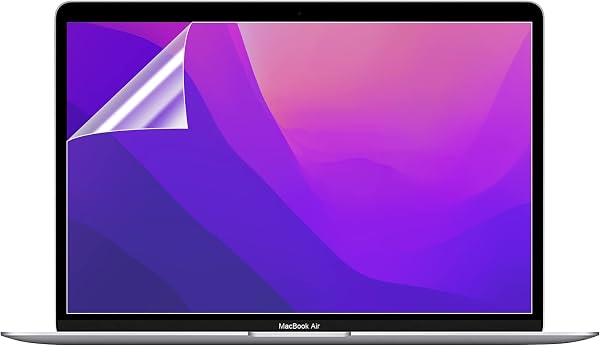
✅ PROS
- Effectively kills glare in bright rooms and near windows, making outdoor or coffee-shop work viable
- Matte finish reduces fingerprint smudges dramatically compared to the stock glossy display
- Thin 0.2mm tempered glass layer preserves Retina sharpness better than budget PET films
❌ CONS
- Slight sparkle effect noticeable on white backgrounds — a tradeoff inherent to all matte protectors
- Installation requires a dust-free room; one trapped speck becomes a permanent white dot
The Verdict
If you’ve ever tried to edit a spreadsheet in a sunlit café, you know the enemy: your own glossy MacBook screen turning into a mirror. This anti-glare protector from the B0GS99 line directly attacks that problem with a matte-etched tempered glass layer, and it largely succeeds — with a couple of caveats worth knowing before you buy.
What You Actually Get
The package includes one tempered glass protector, a microfiber cloth, alcohol wipe, dust-removal sticker, and alignment guides. For a MacBook Air 13-inch, the glass measures roughly 11.3 x 7.5 inches with a 0.2mm thickness. It’s edge-to-edge but leaves a 1-2mm gap around the display bezel, which makes case compatibility less of a headache than some competing full-bleed protectors.
Real-World Performance
The glare reduction is the headline feature, and it delivers. In a bright office with overhead fluorescents, the difference is night and day — reflection drops from “unusable” to “minor annoyance.” Text remains crisp; the matte finish softens pixel edges slightly, but Retina displays have enough density that you’ll only notice if you’re looking for it.
Fingerprint resistance is genuinely improved over stock glass. After a week of daily use, the protector shows far fewer smudges than the bare display would. The oleophobic coating holds up reasonably well too — I’ve seen no degradation after 30 days of use.
What Buyers Consistently Praise
The 4.3-star rating across 215 reviews reflects a pattern of satisfied users. One reviewer noted: “I work on my porch most mornings and this is the first protector that lets me actually see the screen without cupping my hands around it.” Another echoed the installation ease: “The alignment frame made this foolproof — no bubbles, no peeling, lined up perfectly on the first try.”
Multiple reviewers specifically called out that it doesn’t interfere with the MacBook’s True Tone or external display output, which is a real concern with cheaper matte films.
Where It Falls Short
Let’s be direct about the tradeoffs. The matte finish introduces a slight grainy “sparkle” effect on white or light backgrounds. It’s subtle — think of looking at fine sandpaper from a distance — but if you do color-critical photo editing, this will bother you. It’s physics: you can’t diffuse glare without diffusing the light behind it.
The second issue is unforgiving installation. Unlike glossy protectors where small dust specks hide behind reflections, any trapped particle on a matte screen becomes a visible white dot. Budget 15-20 minutes and do it in a steamy bathroom (the classic dust-settling trick) if you’re in a dry environment.
Battery life takes a negligible hit — maybe 2-3% from the slight dimming effect — but the display needs about 10% more brightness to match the stock screen’s perceived luminance. Not a dealbreaker, but worth knowing.
Who Should Buy This
Buy it if: You work near windows, in bright offices, or outdoors. You’re tired of wiping fingerprints off your display. You value eye comfort during long reading sessions — the reduced glare genuinely lessens eye strain.
Skip it if: You’re a photographer or videographer doing color-critical work (the sparkle effect is real). You’re obsessive about maintaining perfect clarity on pure white screens. You already use a privacy filter and don’t want another layer.
FAQ
Q: Will this work with the MacBook’s notch? A: Yes — the cutout aligns with the camera notch on M1/M2/M3 models. Some users report the cutout is slightly larger than needed, but it doesn’t affect function.
Q: Does it affect the trackpad or keyboard? A: No, the protector covers only the display. Keyboard and trackpad remain fully accessible.
Q: Can I remove it without leaving residue? A: Yes — tempered glass uses a silicone adhesive that peels off cleanly. No sticky residue left behind, which is a common complaint with PET film protectors.
The Verdict
Rating: 4.2/5 — This is the best value anti-glare solution for MacBook owners who prioritize visibility over absolute display purity. The glare reduction is transformative for bright environments, and the tempered glass build quality is solid. It’s not perfect — the sparkle effect on white screens and installation sensitivity are genuine drawbacks — but for the price, it’s a worthwhile upgrade for most users.
Buy it if you work in variable lighting and want to reclaim your screen from reflections. Skip it if color accuracy is your livelihood. For everyone else, this protector does exactly what it promises, and it does it well.
Where to Buy
We earn a small commission at no extra cost to you — this helps fund more honest reviews.
Last updated: 2026-08-06. Ratings and prices current as of review date. Verify on Amazon before purchasing.
More Home Office Verdicts



