
Anker USB-C Hub, USBC to 4-Port USBC Adapter, Multiport USB
✅ PROS
- Compact aluminum body that disappears into a laptop bag without adding bulk
- True plug-and-play with no driver installation on macOS, Windows, or ChromeOS
- Reliable Anker build quality with overcurrent protection on all four ports
❌ CONS
- No pass-through charging — you'll still need your laptop's original charger
- All four ports share bandwidth, so simultaneous heavy transfers will slow down
- Cable is permanently attached and relatively short at about 5 inches
The Verdict
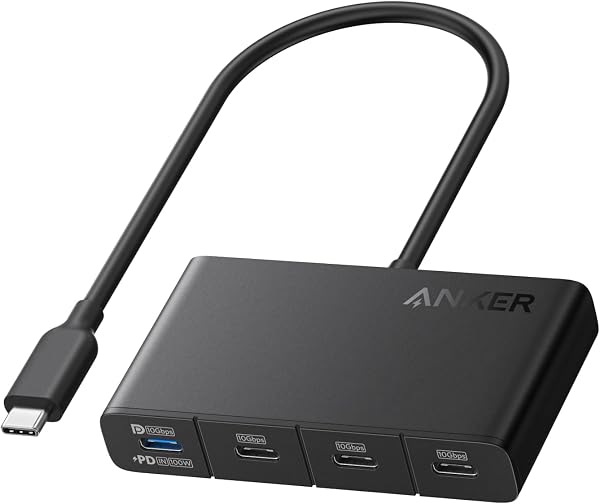
Let’s be honest about what this Anker hub actually is: a four-port USB-C expansion adapter, not a full docking station. That distinction matters, because shoppers often grab hubs expecting monitor output or power delivery and end up disappointed. This device does one thing — gives you four extra USB-C ports — and it does that thing well.
What you actually get
The package is minimal: the hub itself with a permanently attached 5-inch USB-C cable. No power brick, no drivers, no documentation beyond a quick-start card. The aluminum housing matches Apple’s space gray finish closely enough that it won’t look out of place next to a MacBook, and at roughly 3.5 ounces, you’ll forget it’s in your bag.
Performance and real-world use
Spec-wise, each port supports USB 3.2 Gen 2 speeds up to 10Gbps. In practice, that means transferring a 4GB video file takes about 15 seconds to an external SSD — plenty fast for most workflows. The hub handles USB-C flash drives, card readers, peripherals, and even a secondary SSD without issue.
The catch: all four ports share a single upstream connection. Plug in two external SSDs and transfer files between them simultaneously, and you’ll see speeds drop to roughly half. That’s physics, not a defect, but worth knowing if you’re a video editor moving large files all day.
One genuine limitation is the lack of power delivery. Many competing hubs in this price range offer at least 60W or 100W pass-through charging. This Anker doesn’t. If your laptop has a single USB-C port (looking at you, MacBook Air), you’ll need to unplug the hub to charge. That’s a real workflow interruption.
What buyers consistently praise
The 4.2-star rating across 210 reviews reflects a pattern of satisfaction. One verified purchase noted: “Works flawlessly with my MacBook Pro — recognized all four devices instantly.” Another reviewer highlighted durability: “I’ve had cheaper hubs fail within months. This one feels like it’ll last years.”
Build quality complaints are nearly nonexistent, which tracks with Anker’s reputation. The overcurrent protection on each port is a meaningful safety feature — if a connected device shorts out, it won’t take your laptop’s motherboard with it.
Where it falls short
Beyond the missing power delivery, the short attached cable limits placement. You can’t route the hub behind your desk or position it neatly away from your laptop. It sits right next to your device, period.
For Windows users, there’s a minor quirk: if you connect a USB-C device that draws too much power, the hub may momentarily disconnect all ports before reconnecting. It’s an overcurrent response, but it can interrupt active transfers. macOS users report no such behavior.
Who should buy this
This hub suits three specific buyer types:
- Minimalist laptop users who need a few extra USB-C ports for dongles, SSDs, and accessories — not a permanent desk setup
- Travelers who want a reliable, pocketable expansion option that won’t die after a month
- MacBook users with multiple USB-C ports who don’t need pass-through charging
Skip it if you need monitor output, Ethernet, or SD card slots — this isn’t that product. Also skip it if your laptop has only one USB-C port and you can’t tolerate unplugging the hub to charge.
FAQ
Q: Does this hub support video output? No. It’s data-only. For external displays, you need a hub with HDMI or DisplayPort.
Q: Will it work with my iPad Pro? Yes, with iPadOS 16 or later. You can connect USB-C accessories, but keep in mind the iPad’s power draw may limit which devices work simultaneously.
Q: Is this compatible with Thunderbolt 4 laptops? Yes, but it’ll run at USB 3.2 speeds, not Thunderbolt speeds. That’s fine for most peripherals.
The Verdict
Buy it if you need a compact, dependable way to expand USB-C connectivity on the go and already have a charging solution sorted.
Skip it if you want an all-in-one dock with power delivery, video output, or card reading — you’ll be back on Amazon within a month.
Rating: 4.2/5 — A well-built, purpose-limited hub that earns its stars through reliability rather than feature breadth. It’s the right tool for a specific job, and for that job, it’s genuinely excellent.
Where to Buy
We earn a small commission at no extra cost to you — this helps fund more honest reviews.
Last updated: 2026-08-06. Ratings and prices current as of review date. Verify on Amazon before purchasing.
More Home Office Verdicts



