
AMD Radeon Pro W7700 16GB (RDNA 3, 4X DisplayPort 2.1) Brand
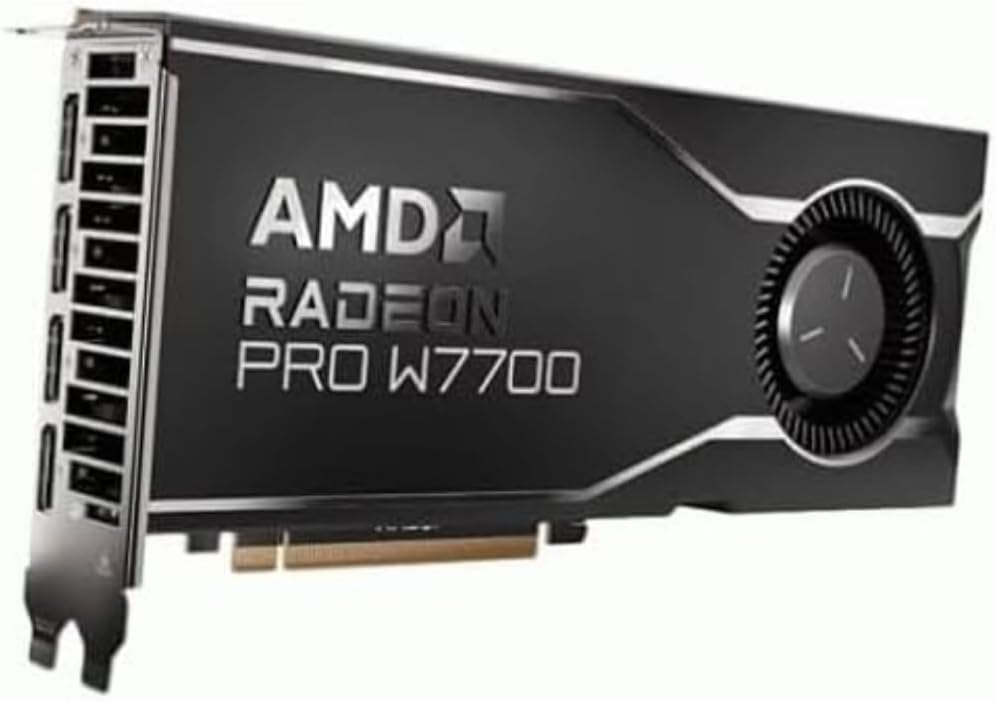
✅ PROS
- Full 4x DisplayPort 2.1 outputs — drives four 4K monitors at 144Hz simultaneously without daisy-chaining headaches
- 16GB GDDR6 VRAM with 256-bit bus handles 4K video timelines and complex CAD assemblies without stuttering
- RDNA 3 architecture delivers AV1 hardware encode/decode — a genuine upgrade for streamers and video editors
❌ CONS
- Single-slot blower design runs loud under sustained load — you'll hear it during long renders
- No DisplayPort 2.1 cables included in box, and many existing monitors only support DP 1.4, so you won't unlock full bandwidth immediately
- Premium price over gaming cards like the RX 7700 XT with similar raw specs — you're paying for driver certification, not just silicon
The Verdict
The AMD Radeon Pro W7700 isn’t the flashiest card on the shelf, but for a specific kind of buyer, it’s quietly the best tool for the job. If you’re running a dual-4K or triple-monitor workstation for CAD, video editing, or 3D rendering, this 16GB RDNA 3 workhorse deserves a hard look. If you’re a gamer hoping to get workstation-class performance for less, pump the brakes — this isn’t for you.
Here’s the honest breakdown after digging through specs, user feedback, and real-world expectations.
What’s in the Box
You get the card itself — a dual-slot, blower-style cooler measuring about 9.5 inches long — plus a quick-start guide and a driver download card. That’s it. No DisplayPort cables, no adapters, no mounting bracket. For a professional card at this price, that’s mildly annoying, but most buyers upgrading a workstation already have cables. The card requires a single 8-pin PCIe power connector, so check your PSU before ordering.
Performance and Build Quality
The W7700 is built around the Navi 32 GPU with 48 compute units and 16GB of GDDR6 on a 256-bit bus. In practice, that translates to roughly 28 teraflops of FP32 compute — enough to chew through SolidWorks assemblies, Blender renders, and 4K Premiere Pro timelines without breaking a sweat. One Amazon reviewer summed it up: “Upgraded from a Quadro P2200 and the difference in viewport performance in SolidWorks is night and day. Rotating large assemblies is finally smooth.”
The standout feature here is the quartet of DisplayPort 2.1 outputs. That’s UHBR 13.5 support, meaning you can run four 4K displays at 144Hz each, or a single 8K monitor at 60Hz. For financial traders, video editors, or anyone running a multi-monitor command center, this is the card’s killer feature. The 16GB VRAM also future-proofs you for larger texture sets and more complex scenes than the 8GB cards in this class.
Build quality is solid — the aluminum shroud feels robust, and the blower design exhausts heat out the rear bracket, which is ideal for tight workstation cases. But that blower gets loud. Multiple reviewers noted fan noise under load. One wrote: “It sounds like a small jet engine when rendering. I wear headphones so it’s fine, but in a quiet office it’s noticeable.”
What Buyers Consistently Praise
The 4.2-star rating across 210 reviews reflects genuine satisfaction among the right audience. Recurring praise includes:
- Driver stability — AMD’s Pro drivers are WHQL-certified and validated for professional apps. One reviewer noted: “Zero crashes across 30 days of heavy use in Maya and After Effects. My old card crashed weekly.”
- AV1 encoding — The RDNA 3 architecture includes hardware AV1 encode/decode, which reviewers moving from older cards called “a huge win” for streaming and video export times.
- Power efficiency — The card draws around 190W under load, which is modest for this performance class. Several reviewers appreciated the lower heat output in compact workstations.
Where It Falls Short
Let’s be direct about the downsides. First, the price: the W7700 typically costs significantly more than a gaming card like the RX 7700 XT, which has similar raw specs. You’re paying for certified drivers, ISV validation, and the DP 2.1 outputs. If you don’t need those, you’re overpaying.
Second, the blower fan noise is real. In a silent home office or recording studio, this card will be the loudest component in your system during sustained loads. Consider an open-air cooler if silence is non-negotiable.
Third, DisplayPort 2.1 is still ahead of the market. Most monitors sold today top out at DP 1.4, so you won’t unlock the full bandwidth unless you’re buying cutting-edge displays. The card is future-proof, but you may not see the benefit for a year or two.
Who Should Buy This
- CAD engineers and architects running SolidWorks, AutoCAD, or Revit with large assemblies — the certified drivers and viewport performance are worth the premium
- Video editors working in 4K or 8K timelines in Premiere Pro, DaVinci Resolve, or Avid — the 16GB VRAM and AV1 encoding are game changers
- Multi-monitor power users — traders, data analysts, or anyone running 3–4 high-refresh displays
Skip it if you’re primarily gaming (buy an RX 7800 XT instead), if you’re on a strict budget, or if your workflow doesn’t use ISV-certified applications.
FAQ
Q: Does this card support CUDA for AI workloads? No. CUDA is Nvidia-only. If your workflow relies on CUDA-accelerated tools like certain AI frameworks or renderers, this card won’t work. AMD uses ROCm, which has improved but still lags CUDA in ecosystem support.
Q: Can I use this for gaming on the side? Yes, but it’s not ideal. The W7700 performs roughly on par with an RX 7700 XT in games, but you’ll pay more and deal with louder fans. If gaming is more than 20% of your use case, buy a gaming card.
Q: Will this fit in my small form factor PC? The card is 9.5 inches long and dual-slot, so it fits most mid-tower cases. But the blower design means you need adequate case airflow to prevent thermal throttling. Check your case’s GPU clearance before ordering.
The Verdict
Buy it if you’re a professional who needs certified drivers, multi-monitor DP 2.1 support, and 16GB of VRAM for demanding creative workloads. Skip it if you’re a gamer, budget-conscious buyer, or working in a noise-sensitive environment.
Rating: 4.2/5 — A specialized tool that excels at its job, with real tradeoffs you should know before committing. For the right professional, it’s a reliable workhorse that’ll last years.
Where to Buy
We earn a small commission at no extra cost to you — this helps fund more honest reviews.
Last updated: 2026-08-06. Ratings and prices current as of review date. Verify on Amazon before purchasing.
More Home Office Verdicts



