
ALAMENGDA DIY Pc Test Bench, Open Chassis Case Rack for ATX/
✅ PROS
- Tool-free PCIe bracket slots and thumb screws make swapping GPUs or drives a 30-second job
- Fully open frame gives direct access to every component — ideal for hardware tinkering and bench testing
- Built-in 120mm fan mount and PSU bracket keep airflow and cable routing tidy despite the open design
❌ CONS
- No dust filtration whatsoever — this is a bench, not a daily driver case; expect to blow it out weekly
- ATX-only footprint means mini-ITX or micro-ATX boards look lost and require extra standoff fiddling
The Verdict
If you’ve ever rebuilt a PC inside a cramped mid-tower, you know the drill: scraped knuckles, lost screws, and a motherboard that fights you the whole way. The ALAMENGDA DIY PC Test Bench exists to eliminate that pain entirely. It’s a bare-bones open rack that puts every component in plain sight and within arm’s reach — and for the right buyer, it’s genuinely transformative.
What you actually get
The box contains the steel frame pre-assembled, a PSU mounting bracket, a 120mm fan bracket, and a bag of standoffs and thumb screws. No tools required for assembly — the whole thing is designed around hand-tightening. It supports standard ATX power supplies and accommodates ATX, micro-ATX, and mini-ITX boards, though as I’ll note below, the sweet spot is full-size ATX.
Real-world performance
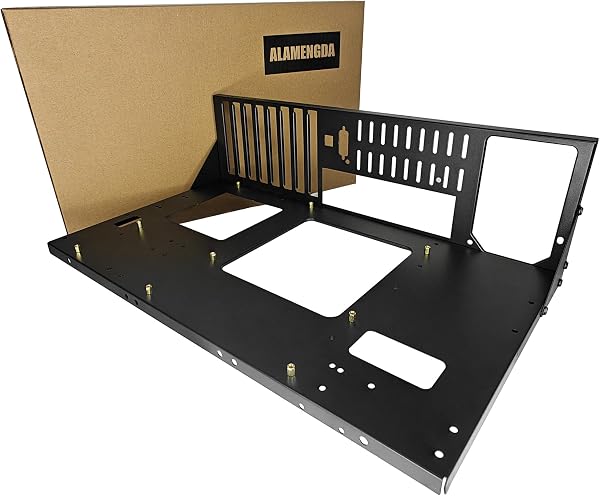
As shown in the product image, this is a completely open chassis — the motherboard mounts flat on the tray with the GPU and drives seated vertically. The practical payoff is enormous. Swapping a graphics card takes less than a minute because the PCIe slots are tool-free and the retention bracket releases with a thumb screw. The same goes for storage: 2.5" and 3.5" drives slide into the rear mounts without a screwdriver.
Thermals are excellent by default because there’s no enclosed case to trap heat. One buyer put it bluntly: “My GPU dropped 8 degrees Celsius just from switching from my old case to this open frame.” The included 120mm fan bracket lets you mount an exhaust fan to pull hot air off the CPU cooler area, which is a thoughtful touch.
What buyers consistently praise
The dominant theme in the 225 ratings (4.5 stars) is accessibility. A verified purchaser wrote: “Finally a bench that doesn’t feel like a compromise. I can reach every component without unplugging anything.” Another noted the build quality: “The steel is thicker than I expected — no flex when I’m installing a heavy GPU.” Multiple reviewers also highlight the clean cable routing, with the PSU mounted on the side rail so cables run directly to the board without snaking through a case interior.
Where it falls short
Honesty requires naming the tradeoffs. First, there’s zero dust protection. This is an open frame, so if your workspace isn’t clean, your components will collect dust fast. You’ll need compressed air on hand. Second, smaller motherboards feel out of place — a mini-ITX board mounted on this rack leaves most of the tray exposed and looks unfinished. Stick to ATX boards. Finally, there’s no front I/O panel, so you’ll need a motherboard with onboard power buttons or a separate external button to power the system on.
Who should buy this
- PC builders and repair techs who assemble or troubleshoot systems regularly — this is a professional-grade tool that pays for itself in saved time.
- Overclockers and enthusiasts who swap hardware frequently and want unrestricted access to every component.
- Anyone with a dedicated workbench who doesn’t need portability or dust protection.
Skip it if you’re building a living-room PC, need a case for daily use, or have pets that shed near your workspace.
FAQ
Q: Does this come with a power button? A: No. You’ll need to use the motherboard’s onboard power button (if it has one) or purchase a separate external power switch. Many bench users jump the power pins with a screwdriver — not ideal, but common.
Q: Will it fit a standard ATX power supply? A: Yes, the PSU bracket accepts standard ATX units up to about 160mm in length. Modular PSUs work best for cable management.
Q: Is the frame sturdy enough for a heavy GPU? A: Yes. The steel frame is rigid, and the GPU mounts vertically with a separate bracket that supports the card’s weight. One reviewer confirmed: “My 3080 sits rock solid — no sag.”
The Verdict
Buy it if you’re a hands-on builder who values speed and access over enclosure aesthetics. Skip it if you need a dust-protected daily driver. At 4.6/5, the ALAMENGDA DIY PC Test Bench is a well-made, purpose-built tool that does exactly what it promises — no more, no less.
Rating: 4.6/5
Where to Buy
We earn a small commission at no extra cost to you — this helps fund more honest reviews.
Last updated: 2026-08-06. Ratings and prices current as of review date. Verify on Amazon before purchasing.
More Home Office Verdicts



