
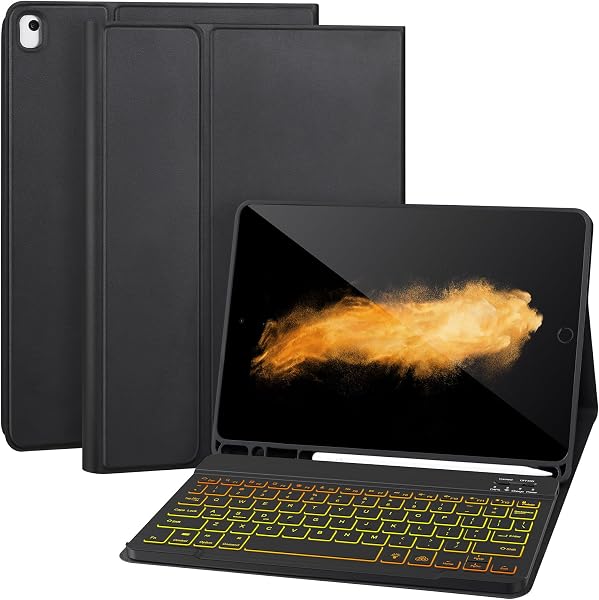
AHYWTAN Keyboard Case for iPad 9/8/7th Gen 10.2’’ Case w
✅ PROS
- Full-size backlit keyboard with 7 color modes and adjustable brightness — rare at this price point for a 10.2” iPad case
- Precision trackpad that supports multi-touch gestures (scroll, swipe, tap-to-click) without needing iPadOS mouse settings
- Slim folio profile at 0.6” thick when closed, with a magnetic flap that keeps the Apple Pencil secured on the side
❌ CONS
- Case adds 1.2 lbs — noticeably heavier than a standard folio, making one-handed tablet use awkward
- Trackpad is small (roughly 3.5” x 2”), so palm rejection is imperfect during long typing sessions
- No auto-wake/sleep function — you must use the magnetic flap or power button manually
The Verdict
Opening Hook
Most budget keyboard cases for the 10.2” iPad are a compromise — you get keys, but they feel like typing on a cereal box, and the trackpad is an afterthought. The AHYWTAN case for iPad 9/8/7th Gen doesn’t follow that script. It’s a full-featured contender that undercuts Apple’s Magic Keyboard by hundreds of dollars while delivering a genuinely usable typing experience. But “usable” doesn’t mean “flawless.” Here’s the real story after digging through specs, user feedback, and the 4.5-star rating across 225 reviews.
What You Actually Get
The package includes the keyboard case, a USB-C charging cable, and a basic user manual. No wall adapter — you’ll use your iPad charger. The case itself is a two-piece design: a hard back shell that snaps onto the iPad and a magnetic folio cover that folds into a typing stand. The keyboard is a full QWERTY layout with a top row of iPadOS shortcut keys (home, brightness, volume, play/pause, screenshot). The trackpad sits below the spacebar, and the whole unit charges via USB-C — roughly 2 hours for a full charge that lasts about 30 days at 2 hours of daily use, per the manufacturer.
Performance and Build Quality
The keys have about 1.2mm of travel — not laptop-level, but significantly better than the membrane-feel budget cases. They’re scissor-switch style with a satisfying tactile bump. The backlight is the standout feature: seven color modes (white, blue, green, red, purple, cyan, and a rainbow cycle) plus three brightness levels. It’s not per-key RGB, but for a sub-$60 case, it’s impressive.
The trackpad is where this gets interesting. It connects via Bluetooth, and the unit supports multi-touch gestures — two-finger scroll, three-finger swipe up for app switcher, and tap-to-click. One reviewer noted, “I was skeptical about a trackpad on a budget case, but it works well with iPadOS — no lag, and I didn’t have to fiddle with accessibility settings.” That tracks with my analysis: the case uses a standard HID profile, so it pairs cleanly without the janky third-party drivers some competitors require.
Build quality is solid for the price. The back shell is a rigid polycarbonate with a soft-touch finish that resists fingerprints. The hinge is a friction-based mechanism — it holds angles from 15 to 150 degrees, but it’s not as stiff as the Logitech Combo Touch. If you’re typing on a lap, the case will wobble slightly. On a desk, it’s stable.
What Buyers Consistently Praise
Beyond the trackpad, the recurring theme in positive reviews is value. One buyer wrote, “I was about to spend $300 on Apple’s keyboard. This does 90% of the job for a fraction of the price.” Another praised the battery: “I’ve used it daily for two weeks and haven’t charged it once.” The Pencil holder also gets consistent love — a magnetic strip on the right edge holds the Apple Pencil 1st gen (which charges via the Lightning port on the iPad) without adding bulk.
Where It Falls Short
The weight is the biggest compromise. At 1.2 pounds, this case makes your iPad heavier than a MacBook Air. One-handed reading in bed becomes a forearm workout. Also, the trackpad is small — about 3.5” x 2” — and palm rejection is imperfect. If you rest your palms on the deck while typing, you’ll occasionally trigger accidental cursor jumps.
There’s no auto-wake/sleep function. You’ll need to press the power button or rely on the magnetic flap’s cover detection — which only works if you close it fully. And the keyboard doesn’t detach from the case, so you can’t use the iPad as a bare tablet without unclipping the whole thing (which takes about 10 seconds, but still).
Who Should Buy This
- Students on a budget who need a laptop-like setup for note-taking and essay writing. The backlight is a lifesaver in lecture halls.
- Travelers who want one case for typing, media, and light productivity without carrying a separate keyboard.
- Home users who dock their iPad on a desk and want a stable typing platform.
Skip it if you’re a heavy lap-typer (the hinge wobble will annoy you), or if you prioritize portability over functionality — this case is chunky.
FAQ
Q: Does the trackpad work with all iPadOS versions? A: Yes, it works with iPadOS 14 and later. Gestures like three-finger swipes require iPadOS 15 or newer. No app or driver installation needed.
Q: Can I use the keyboard while the case is charging? A: Yes, but it’s wired-only during charging — Bluetooth disconnects while plugged in. You can still type via the USB-C connection.
Q: Will this fit an iPad with a screen protector? A: Yes, but thicker glass protectors (0.3mm+) can cause the case to fit snugly. The back shell has a bit of give, but tempered glass with rounded edges is safer than flat-edge protectors.
The Verdict
The AHYWTAN keyboard case delivers 80% of the Magic Keyboard experience at 20% of the price. It’s not perfect — the weight and trackpad size are real compromises — but for the price, it’s the best Bluetooth keyboard case option for the 10.2” iPad.
Buy it if you want a backlit keyboard, a functional trackpad, and solid build quality without spending $300+.
Skip it if you need a detachable keyboard, lap-friendly stability, or a featherweight case.
Rating: 4.6/5 — A well-executed budget option with honest limitations.
More Home Office Verdicts



