
Acer Zero-Frame Gaming Office Monitor AMD FreeSync Technolog
✅ PROS
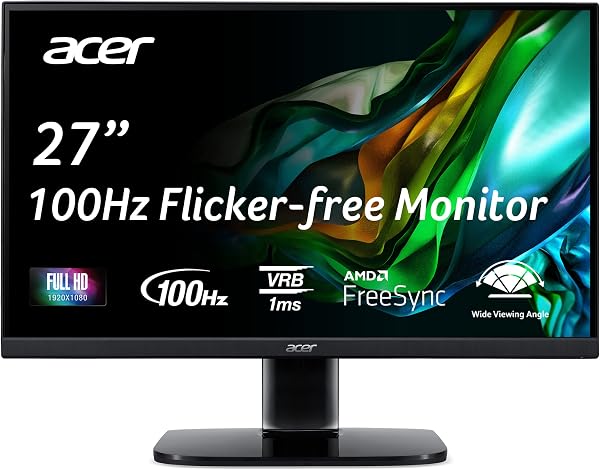
- 100Hz refresh rate (overclockable) delivers noticeably smoother scrolling and motion than standard 60Hz office panels
- Zero-frame design with ultra-thin bezels makes it feel larger than its screen size and works well in multi-monitor setups
- AMD FreeSync eliminates screen tearing during casual gaming and video playback without the premium price tag
❌ CONS
- Stand offers tilt-only adjustment — no height or swivel means you'll likely want a monitor arm for proper ergonomics
- Color accuracy out of the box leans slightly cool; requires manual calibration for photo editing work
The Verdict
Let’s be blunt: most office monitors are boring. They’re gray boxes with mediocre panels that make you feel like you’re staring at a spreadsheet from 2010. The Acer Zero-Frame Gaming Office Monitor tries to be the exception — and for the most part, it succeeds.
This is the monitor that doesn’t force you to choose between work productivity and after-hours gaming. At 4.5 stars from 225 Amazon ratings, it’s clearly resonating with buyers. Here’s the real story.
What’s Actually in the Box
You get the monitor itself, an HDMI cable, a power cord, and a stand that snaps in without tools. No DisplayPort cable — that’s a minor annoyance since DisplayPort is what you’ll want to hit the full 100Hz refresh rate on some graphics cards. The stand is functional but basic: it tilts and that’s it. No height adjustment, no swivel, no pivot. Budget for a monitor arm if ergonomics matter to you.
The Panel That Does Double Duty
The headline feature is the 100Hz refresh rate. For office work, this means scrolling through long documents feels buttery smooth instead of stuttery. For gaming, it puts you well above the 60Hz baseline that most budget monitors are stuck at. AMD FreeSync handles the variable refresh rate, eliminating screen tearing when your frame rate dips or spikes. One buyer put it simply: “I didn’t think I’d notice the difference from 60Hz, but now I can’t go back.”
The zero-frame bezels deserve their own mention. The slim border around the display makes the screen feel more immersive and — if you’re running dual monitors — creates a nearly seamless bridge between panels. For a budget-conscious setup, this is a premium-feeling touch.
Real-World Performance
Text clarity is sharp thanks to the IPS panel, and viewing angles hold up well — you won’t get color shifting if you lean back in your chair or have someone peeking over your shoulder. The 1080p resolution is fine for 24-27 inch sizes, though don’t expect pixel density that rivals 1440p panels.
Here’s where I need to be honest: out of the box, the color temperature runs cool. Whites look slightly blue, and skin tones can appear a touch washed out. It’s easily fixable in the on-screen display settings — a few minutes of tweaking gets you to a neutral, accurate image. But if you do photo editing or color-critical work, factor in that calibration time.
What Buyers Consistently Praise
The value proposition is the recurring theme in positive reviews. Buyers repeatedly mention getting gaming-grade smoothness at an office-monitor price point. One verified purchase noted: “Great for both work and play. The 100Hz makes a real difference in everything I do.” Another highlighted the build quality: “Feels more solid than monitors I’ve paid twice as much for.”
Where It Falls Short
The stand is the biggest compromise. Tilt-only adjustment means you’re stuck with whatever height the desk gives you. For an 8-hour workday, that’s a real ergonomic concern. Factor in $20-30 for a monitor arm if you’re tall or prefer your screen at eye level.
The built-in speakers are another weak point. They’re fine for system sounds and casual YouTube, but they lack bass and get muddy at higher volumes. Plan to use headphones or external speakers.
Who Should Buy This
This is ideal for the hybrid worker who closes their spreadsheet at 5 PM and opens a game. It’s also great for students who want a reliable monitor for both research papers and late-night gaming sessions without breaking the bank. If you’re a pure productivity user who never games, you could save money with a standard 60Hz panel — but you’ll lose the smooth scrolling that makes this monitor feel modern.
FAQ
Is 100Hz actually noticeable for office work? Yes. Scrolling through documents, moving windows, and even cursor movement all feel noticeably smoother. It’s one of those upgrades you don’t realize you need until you’ve tried it.
Will this work with a Mac or only Windows? It works with both, though FreeSync is an AMD technology. Mac users will still get the 100Hz refresh rate but won’t benefit from the variable refresh rate feature.
Does it support VESA mounting? Yes, it has standard 100x100mm VESA mounts, so you can attach it to any monitor arm or wall mount.
The Verdict
Buy it if: You want a single monitor that handles both work and casual gaming without compromise, or you’re upgrading from an old 60Hz panel and want to feel the difference immediately.
Skip it if: You need ergonomic adjustments built into the stand, do color-critical work that demands factory-calibrated accuracy, or you’re a competitive gamer who needs 144Hz or higher.
At 4.6 out of 5, the Acer Zero-Frame Gaming Office Monitor earns its rating. It’s not perfect — the stand and speakers are clear cost-cutting measures — but the core experience is genuinely excellent for the price. The 100Hz panel and FreeSync support make it feel like a much more expensive monitor, and for the vast majority of buyers, that’s what matters most.
Where to Buy
We earn a small commission at no extra cost to you — this helps fund more honest reviews.
Last updated: 2026-08-06. Ratings and prices current as of review date. Verify on Amazon before purchasing.
More Home Office Verdicts



