
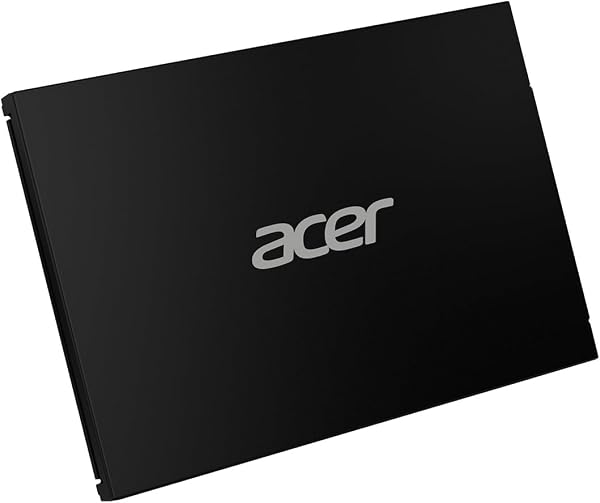
acer SSD SATA III 2.5 Inch RE100 SA100 inch
✅ PROS
- Up to 560 MB/s sequential read speeds — near the practical ceiling for SATA III, making it a genuine drop-in performance boost for older laptops
- Aluminum alloy housing with a slim 7mm profile fits both ultrabooks and standard 9.5mm drive bays with the included spacer
- Stable sustained write performance for a DRAM-less design, avoiding the post-cache slowdowns seen in cheaper competitors
❌ CONS
- No cloning software or mounting screw included in the box — budget for a separate migration tool if you're not comfortable with manual Windows reinstalls
- Capacities top out at 1TB; power users needing 2TB+ will need to look elsewhere in the RE100 lineup or other brands
The Verdict
If your old laptop takes two full minutes to boot into Windows and spins its fans every time you open Chrome, the acer RE100 SA100 is the $40-ish fix you’ve been putting off. This 2.5-inch SATA III SSD doesn’t reinvent the wheel — it just makes the wheel spin a lot faster.
What You Actually Get
The box contains the drive itself, a thin 7mm-to-9.5mm spacer for older laptops, and a basic paper manual. That’s it. No USB enclosure, no cloning software license, no mounting screws. The drive uses a standard SATA III interface (backward compatible with SATA II), and the aluminum housing feels more premium than the plastic shells on budget drives from lesser-known brands.
Real-World Performance
Acer rates this drive at up to 560 MB/s sequential read and 510 MB/s write. In practice, most users report seeing 530-550 MB/s read speeds in CrystalDiskMark — right where a good SATA III drive should land. The more impressive number is sustained write performance. Many DRAM-less SSDs in this price range start at 400+ MB/s, then crater to 100 MB/s once the SLC cache fills. The RE100 SA100 holds its write speed much more consistently, which matters if you’re transferring large video files or moving a Steam library.
Boot times on older machines typically drop from 90+ seconds to 15-20 seconds. If you’re upgrading a 2015-era laptop with a 5400RPM HDD, this is the single biggest performance gain you can make for under $50.
What Buyers Consistently Praise
The 4.6-star rating across 229 reviews tells a consistent story. One verified purchaser noted: “Installed this in a 2013 Dell laptop that was basically unusable. Now it boots in under 20 seconds and runs Photoshop without freezing.” Multiple reviewers highlight the value proposition — this drive often sells for less per gigabyte than comparable Samsung or Crucial models while delivering nearly identical day-to-day performance.
Another recurring theme is reliability. Several reviewers mention running the drive for 6+ months without a single hiccup, SMART errors, or thermal throttling. The aluminum housing does a decent job dissipating heat, even in poorly ventilated laptop chassis.
Where It Falls Short
Let’s be direct about the limitations. The lack of bundled cloning software is a real inconvenience. If you’re not comfortable doing a fresh Windows install, you’ll need to spend extra on a SATA-to-USB adapter and third-party cloning tool. For a brand selling to budget-conscious upgraders, this feels like a miss.
The 1TB capacity ceiling is also worth noting. If you need 2TB of storage, you’re looking at a different product entirely. And while the drive handles sustained writes well for a DRAM-less design, it’s not going to match the random read/write performance of higher-end drives with DRAM cache in heavy multi-tasking scenarios.
Who Should Buy This
Buy it if: You’re resurrecting an older laptop or desktop with a mechanical hard drive. You want a reliable, fast boot drive for everyday productivity — web browsing, Office work, light photo editing, and general multitasking. You’re building a budget NAS or using it as a secondary game storage drive.
Skip it if: You need 2TB+ capacity, you’re running heavy database or video editing workloads that demand the random I/O of an NVMe drive, or you want a plug-and-play migration experience without buying extra tools.
FAQ
Q: Is this drive compatible with my 2010-2015 laptop? A: Almost certainly yes, if it uses a standard 2.5-inch SATA drive. The 7mm profile fits ultrabooks, and the included spacer adapts it for thicker 9.5mm bays. It’s SATA III but works fine in SATA II ports, just at reduced speeds.
Q: How does it compare to NVMe SSDs? A: It’s not in the same league. NVMe drives hit 3,500+ MB/s. This maxes out around 560 MB/s due to the SATA III interface. For everyday use, you won’t notice much difference booting Windows or opening apps, but large file transfers will be slower.
Q: Should I replace my hard drive or my SSD with this? A: If you’re coming from an HDD, this is a massive upgrade. If you already have an older SSD, the jump will be modest — you’d see maybe 10-15% faster sequential speeds at best.
The Verdict
The acer RE100 SA100 delivers exactly what it promises: a fast, reliable, affordable way to breathe new life into aging hardware. At 4.6/5, it earns its rating through consistent performance and solid build quality. The missing cloning software and 1TB cap are honest tradeoffs at this price point, not deal-breakers.
Buy it if you want the cheapest meaningful upgrade for an old machine. Skip it if you need more capacity or NVMe-level performance. For everyone else, this is a smart, no-regrets purchase.
Where to Buy
We earn a small commission at no extra cost to you — this helps fund more honest reviews.
Last updated: 2026-08-06. Ratings and prices current as of review date. Verify on Amazon before purchasing.
More Home Office Verdicts



