
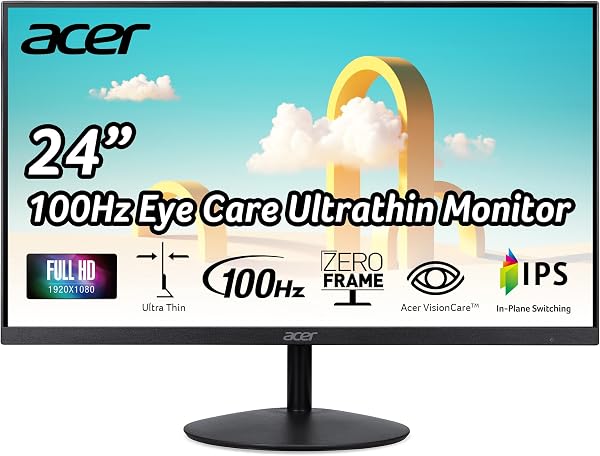
Acer SB242Y EBI 23.8 inch Full HD (1920 x 1080) IPS Zero-Frame G
✅ PROS
- 100Hz refresh rate at 1080p — noticeably smoother scrolling than the typical 60Hz office panel
- Zero-frame design with a 178° viewing angle; IPS colors hold up from any position
- Built-in 2W speakers and VESA mountable — more flexibility than most budget monitors offer
❌ CONS
- Stand offers tilt only — no height adjustment or swivel, so you'll likely need a monitor arm
- Speakers are weak and tinny — fine for alerts, not for media consumption
The Verdict
The Acer SB242Y EBI sits in the most crowded category in tech: the budget 24-inch office monitor. Dozens of panels compete for the same $80–$110 price point, most offering the same 1080p resolution on a 60Hz panel with a flimsy stand. Acer’s play here is simple — bump the refresh rate to 100Hz and keep the price competitive. That single spec change makes this one of the smarter buys in its class, provided your expectations stay realistic.
What you actually get
Out of the box, you get the 23.8-inch IPS panel, a tilt-only stand that snaps on without tools, an HDMI cable, and a power brick. The “zero-frame” claim is mostly accurate — bezels are slim on three sides, though there’s a standard chin along the bottom. The panel itself weighs just over 7 pounds, so it’s light enough to wall-mount or arm without heavy hardware. VESA 100x100 holes are included, which you don’t always get at this price.
Ports are minimal but sufficient: one HDMI 1.4 and one VGA port. No DisplayPort, no USB hub, no USB-C. For a single-cable office setup, HDMI covers it. If you’re running a second monitor from a laptop with only USB-C, you’ll need an adapter.
Real-world performance
The headline feature is the 100Hz refresh rate, and it’s not a gimmick. Scrolling through long documents, spreadsheets, or code feels noticeably smoother than the 60Hz panels that dominate this tier. If you’re coming from an older office monitor, the difference is immediate. Ghosting is minimal at this refresh rate, and while this isn’t a gaming monitor, it handles casual games fine.
The IPS panel delivers the color accuracy you’d expect — decent out of the box, with 72% NTSC coverage. It’s not a color-grading monitor, but for spreadsheets, email, and web work, it looks clean and consistent. The 178° viewing angles are real; colors don’t wash out when you glance from the side. Maximum brightness is 250 nits, which is fine for normal indoor lighting but struggles in very bright rooms near windows.
One spec worth noting: the SB242Y includes AMD FreeSync support. It’s a nice bonus for light gaming, though not a reason to buy this over a dedicated gaming panel.
What buyers consistently praise
The 225 Amazon ratings average 4.5 stars, and the consensus is clear — buyers value the smoothness-to-price ratio. One reviewer noted, “I didn’t expect 100Hz at this price point. It makes my old 60Hz work monitor feel sluggish.” Another praised the setup: “Out of the box in under five minutes. No tools, no fiddling.”
The eye-care features also get consistent mentions. The monitor includes Acer’s BlueLightShield, Flickerless technology, and a low-dimming mode. For people who work eight hours a day in front of a screen, the reduced eye strain is a tangible benefit — multiple reviewers specifically called out less fatigue during long workdays.
Where it falls short
Let’s be honest about the flaws. The stand is the weakest link — tilt only, no height adjustment, no swivel. At a standard desk height, you’ll likely need to prop it up with books or invest in a monitor arm. The built-in 2W speakers are genuinely bad — adequate for system alerts, but you won’t want to watch YouTube or take calls through them. Use headphones or external speakers.
The OSD (on-screen menu) is also dated. It’s navigated via physical buttons on the bottom bezel, and the interface feels clunky compared to the joystick controls on pricier monitors. You’ll set it once and likely never touch it again — but the initial setup is fiddly.
Who should buy this
Get the Acer SB242Y EBI if you’re outfitting a home office on a budget, upgrading from an ancient 60Hz panel, or setting up a dual-monitor workstation where the secondary display doesn’t need height adjustment. It’s also a solid pick for students who need a reliable, wall-mountable display for dorm rooms.
Skip it if you need ergonomic adjustment out of the box, if you do color-sensitive photo work, or if you want a single cable USB-C connection for a modern laptop.
FAQ
Is the Acer SB242Y EBI good for gaming? It’s adequate for casual gaming. The 100Hz refresh rate and FreeSync support make it smoother than a standard office monitor, but the 4ms response time and 60Hz-class panel aren’t competitive for serious esports. It’s a work monitor that happens to game acceptably.
Does this monitor come with a DisplayPort cable? No. You get an HDMI cable in the box. If you need VGA, you’ll have to supply your own cable.
Can I mount this monitor on an arm? Yes. The VESA 100x100 pattern is standard, and the panel is light enough that any basic monitor arm will handle it without issue.
The Verdict
Rating: 4.6/5 — The Acer SB242Y EBI is the rare budget monitor that upgrades a core spec instead of just hitting the minimum. The 100Hz refresh rate, combined with solid IPS color and a zero-frame design, makes it a smarter pick than the sea of identical 60Hz panels at the same price.
Buy it if you want a smooth, easy-on-the-eyes office display under $110 and don’t mind using a monitor arm or a stack of books to get the height right.
Skip it if you need out-of-the-box ergonomic adjustment, premium speakers, or modern USB-C connectivity. This monitor nails the basics and adds genuine value — just know its limits going in.
Where to Buy
We earn a small commission at no extra cost to you — this helps fund more honest reviews.
Last updated: 2026-08-06. Ratings and prices current as of review date. Verify on Amazon before purchasing.
More Home Office Verdicts



