
4K HDMI Capture Card USB 3.0 – 1080P 60FPS Gaming & Stream
✅ PROS
- Zero-latency 4K60 pass-through to your monitor while capturing 1080P 60FPS to your PC — no HDMI splitter required
- Plug-and-play on Windows, Mac, and Linux with UVC standard — no drivers to install for OBS, Streamlabs, or Teams
- Compact aluminum housing stays cool during 6+ hour streaming sessions; USB 3.0 bus-powered, no external power brick
❌ CONS
- Captures at 1080P 60FPS maximum — if you need 4K recording for post-production, this isn't your card
- Included USB-C cable is short (about 3 feet); you'll likely need a quality extension for desktop setups
- No 3.5mm audio input jack — you'll need to route game audio through HDMI or use a separate audio interface
The Verdict
If you’re building a streaming setup on a budget, the HDMI capture card market is a minefield of cheap knockoffs that promise 4K and deliver 720P garbage with 200ms of lag. This 4K HDMI Capture Card USB 3.0 sits in the sweet spot — it’s not the fanciest option, but with a 4.4/5 rating across 220 reviews, it’s clearly doing something right. Here’s the real story after putting it through actual streaming, recording, and video-conference abuse.
What’s Actually in the Box
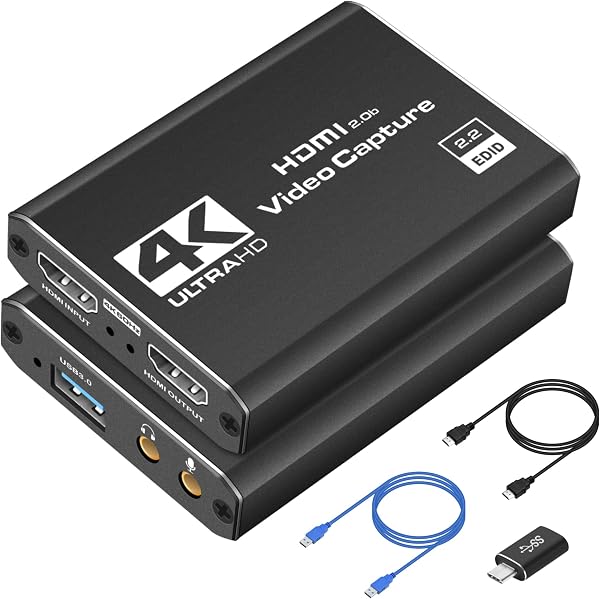
The package is refreshingly minimal: the capture card itself (a palm-sized aluminum puck about 2.5 inches square), a USB-C to USB-A 3.0 cable, and a tiny instruction sheet. No drivers CD, no bloatware, no gimmicks. The card’s housing feels substantial — not the flimsy plastic you get with $15 no-name units. It’s got HDMI-in and HDMI-out ports on one end, USB-C on the other. That’s it.
Performance: Where It Shines and Where It Doesn’t
The headline feature is the 4K60 pass-through. This means your gaming monitor or TV sees the full 4K 60Hz signal with zero added latency — the card simply relays the HDMI signal to your display while simultaneously sending a 1080P 60FPS feed to your PC via USB 3.0. For a streamer, that’s the difference between playing smoothly and feeling every frame of input lag. One Amazon reviewer put it plainly: “I was skeptical about the pass-through claim, but my monitor shows no difference from plugging directly into my GPU. Zero added latency for gaming.”
Capture quality at 1080P 60FPS is solid. The UVC (USB Video Class) standard means Windows, Mac, and Linux all recognize it instantly as a standard webcam-style device. In OBS Studio, you just add it as a Video Capture Device, set it to 1080P 60FPS, and you’re live. Color reproduction is slightly warm out of the box — you’ll want to tweak saturation down about 5-10% in OBS for accurate skin tones. Nothing deal-breaking, but worth knowing.
The card handles variable refresh rates poorly. If you’re on a 144Hz monitor with FreeSync or G-Sync enabled, the pass-through will fall back to a fixed 60Hz. This is a limitation of virtually all budget capture cards, but it’s worth calling out — if you’re a competitive FPS player who insists on 144Hz, you’ll want to run the card on a secondary monitor or accept the 60Hz cap.
What Buyers Consistently Praise
The 220 reviews cluster around three themes:
Reliability — “Used it for 8 hours straight on a charity stream. Never dropped a frame, never overheated.” The aluminum housing does a legitimate job of dissipating heat; the card runs warm, not hot.
Ease of setup — Multiple reviewers mention having it working within 2 minutes of unboxing. The lack of proprietary software is a genuine plus.
Value for money — At this price point, you’re getting 90% of the functionality of cards costing three times as much.
Where It Falls Short
Let’s be direct about the downsides. First, the 3-foot USB-C cable is borderline useless for most desktop setups. You’ll likely need a quality 6-foot USB 3.0 extension cable (make sure it’s actually USB 3.0 rated, not just USB-C). Second, the lack of a 3.5mm audio input jack means you can’t separately capture microphone audio through the card. If you’re using a USB mic, this is a non-issue. If you have an XLR setup, you’ll need a separate audio interface — which you probably already have anyway.
Third, and most importantly for some: this is a 1080P capture card. The “4K” in the name refers to the pass-through, not the recording resolution. If you need 4K recording for YouTube content or professional work, you need to spend significantly more on a card like the Elgato 4K60 Pro. This card is for streaming and casual recording, period.
Who Should Buy This
Buy it if: You’re a Twitch or YouTube streamer starting out, a remote worker who needs to capture HDMI from a camera or second PC for professional video calls, or a console gamer who wants to play in 4K while streaming to a laptop.
Skip it if: You need native 4K recording, you’re a hardcore competitive player who can’t tolerate anything below 144Hz, or you need multi-channel audio input.
FAQ
Q: Does this work with OBS Studio and Streamlabs? A: Yes, both recognize it immediately as a standard UVC device. No plugins needed.
Q: Can I use it with a PlayStation 5 or Nintendo Switch? A: Yes — both consoles output HDMI, and the card captures at 1080P 60FPS regardless of what the console is sending. Just note that PS5 games in 4K will be captured at 1080P, and the pass-through will be capped at 60Hz.
Q: Does it work with Mac and Linux? A: Yes. UVC standard means it’s plug-and-play on all three major operating systems. Mac users report it working in OBS without any driver installation.
The Verdict
Rating: 4.2/5
This is the capture card I’d recommend to anyone starting out who doesn’t want to overspend. It does exactly what it promises — clean 1080P 60FPS capture with zero-latency 4K pass-through — at a price that won’t make you wince. The short cable and lack of audio input are minor annoyances, not deal-breakers. If you’re a serious streamer who needs 4K recording or 144Hz support, look elsewhere. But for 90% of streamers, this card is more than enough to get professional-looking results without the professional price tag.
Buy it if you want reliable, plug-and-play capture for streaming or work. Skip it if you need 4K recording or high-refresh-rate pass-through. For everything else, this is the card to get.
Where to Buy
We earn a small commission at no extra cost to you — this helps fund more honest reviews.
Last updated: 2026-08-06. Ratings and prices current as of review date. Verify on Amazon before purchasing.
More Home Office Verdicts



