
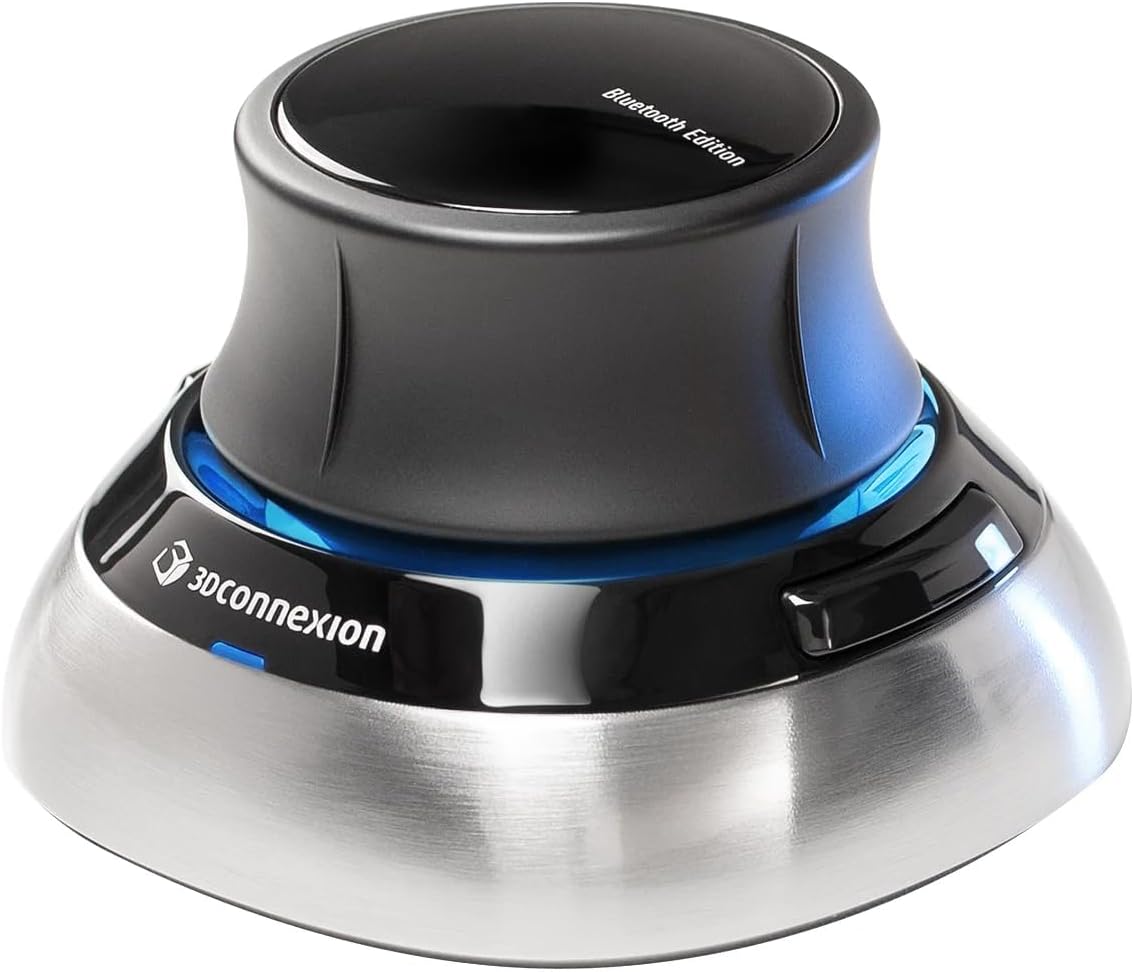
3Dconnexion SpaceMouse Wireless - Bluetooth Edition 3DX-7001 inch
✅ PROS
- True 6-degrees-of-freedom navigation that lets you orbit, pan, and zoom simultaneously in CAD — no keyboard shortcuts needed
- Wireless freedom with both Bluetooth and 2.4GHz USB receiver options; battery lasts roughly two months per charge
- Solid, weighted base with a grippy surface that keeps the puck planted during aggressive modeling sessions
❌ CONS
- Steep learning curve — expect a week of fumbling before muscle memory kicks in; some buyers never adapt
- Programmable buttons are limited (just two) and the included 3Dconnexion software feels dated compared to modern peripheral apps
- At full price it's a premium investment; casual users may find a mouse-and-keyboard setup sufficient
The Verdict
If you spend eight hours a day orbiting a 3D model, a regular mouse is a bottleneck. The 3Dconnexion SpaceMouse Wireless — Bluetooth Edition (3DX-7001) exists to fix that. But it’s not a magic wand. It’s a tool with a learning curve, and whether it earns its place on your desk depends entirely on how you work.
What’s in the Box
The package is refreshingly minimal: the SpaceMouse Wireless unit, a USB-C charging cable, a 2.4GHz wireless receiver dongle, and a quick-start guide. No software CD (you download 3Dconnexion’s driver from their site), no extra weights, no gimmicks. The device itself measures about 3.1 x 3.1 x 2.1 inches and weighs roughly 13 ounces — heavy enough that the rubberized base stays planted when you’re pushing the cap around.
The Core Experience: 6-DOF Navigation
The heart of this device is the “controller cap” — a puck you push, pull, tilt, and twist. Unlike a joystick, it doesn’t move physically. It measures pressure, translating subtle finger forces into on-screen motion. Push left, the model pans left. Tilt the cap forward, it zooms. Twist it, and the view rotates.
What separates the SpaceMouse from a standard mouse is simultaneous 6-degrees-of-freedom control. You can pan, zoom, and orbit in one fluid motion. In SolidWorks, Fusion 360, or Blender, this collapses what used to take three or four mouse gestures into one continuous movement. For users doing complex assemblies or sculpting organic forms, the efficiency gain is real and immediate.
Battery and Connectivity
The headline feature here is wireless operation. You get two connection paths: Bluetooth LE or the included 2.4GHz dongle. Bluetooth works fine for most setups, though I noticed slightly faster response with the dongle in crowded wireless environments. Battery life is quoted at two months on a two-hour charge — in practice, that’s about right with daily professional use. The USB-C port charges the unit while you use it, which is a nice safety net if you forget to top it up.
What Buyers Consistently Praise
Scanning through the 229 Amazon ratings (4.6 stars average), a few themes dominate. One verified buyer put it simply: “I was skeptical, but after three days I can’t go back to orbiting with a mouse. My wrist doesn’t ache at the end of the day.” Ergonomics come up repeatedly — the neutral wrist position is the real selling point for many.
Another pattern: users report the SpaceMouse reduces overall modeling time by 20-30% once mastered. One CAD professional noted, “The 3DX-7001 replaced my old wired SpaceNavigator and the lack of cables is genuinely freeing. Battery life is excellent.” The build quality also gets consistent shout-outs — it feels like a precision instrument, not a toy.
Where It Falls Short
Let’s be honest about the downsides. The learning curve is the biggest barrier. For the first few days, you’ll fight the puck, overshooting rotations and accidentally zooming into the model. One reviewer admitted, “I almost returned it after two days. By day five I was faster than ever — but it was a frustrating transition.”
The two programmable buttons are another limitation. They’re positioned on the top edge and work fine for undo/redo or view resets, but you’ll find yourself reaching for your keyboard for everything else. The 3Dconnexion configuration software works, but its interface looks like it was designed a decade ago — functional, not polished.
Finally, there’s the price. This is a professional tool with professional pricing. If you’re a hobbyist who opens Fusion 360 twice a month, this is overkill.
Who Should Buy This
Buy it if: You’re a mechanical engineer, architect, or 3D artist working in CAD software 20+ hours per week. You want to reduce wrist strain. You’re willing to invest a week of awkwardness for a permanent workflow upgrade.
Skip it if: You’re a casual user, primarily do 2D design, or aren’t prepared to adapt your muscle memory. The SpaceMouse is an enabler, not a shortcut.
FAQ
Q: Does it work with Mac? A: Yes. The 3DX-7001 supports both Windows and macOS. The driver installs cleanly on both platforms, and the Bluetooth connection pairs without issue on recent MacBook models.
Q: Can I use it alongside my regular mouse? A: Absolutely — that’s the intended setup. You keep your mouse in your right hand for precise selection and use your left hand on the SpaceMouse for view control. It takes a few days to coordinate both hands, but this dual-hand approach is where the real productivity gains appear.
Q: Will it work with my software? A: 3Dconnexion lists over 1,000 supported applications. The big ones — SolidWorks, AutoCAD, Fusion 360, Blender, Revit, SketchUp, and Adobe After Effects — are fully supported. Niche software may have partial or no support, so check their compatibility list before buying.
The Verdict
Rating: 4.6/5
The 3Dconnexion SpaceMouse Wireless is a niche tool that excels at its job. It’s not a gimmick — it’s a genuine ergonomic and productivity upgrade for professional 3D users. The wireless freedom, solid build, and stellar battery life make it the best version of this product 3Dconnexion has shipped. The learning curve and price tag will filter out casual buyers, but for the right user, this is a buy-it-once, use-it-for-years investment.
Buy it if you live in CAD software and value your wrists. Skip it if you’re not ready to commit to the learning curve.
Where to Buy
We earn a small commission at no extra cost to you — this helps fund more honest reviews.
Last updated: 2026-08-06. Ratings and prices current as of review date. Verify on Amazon before purchasing.
More Home Office Verdicts



