
10 Inch Tablet Android 15 Tablets With Case Stylus 8GB RAM 3 inch
✅ PROS
- 8GB RAM genuinely helps with multitasking between office apps; no aggressive app reloads during a work session
- Android 15 out of the box with a clean, near-stock interface — no bloatware mess to clean up
- Included case and stylus add real value; the case doubles as a kickstand for typing
❌ CONS
- 32GB internal storage fills fast; you'll need a microSD card on day one if you install anything beyond basics
- Display resolution is basic for the price point; text is sharp enough for email but not for detailed photo editing
- Some buyers report the stylus feels lightweight and lacks palm rejection for note-taking
The Verdict
Bottom line up front: This 10-inch Android 15 tablet is a budget-friendly companion for light office work — think email, document editing, and video calls — but it’s not going to replace your laptop or a premium iPad. The 8GB of RAM is the standout feature at this price, but the 32GB storage and modest display keep it firmly in “secondary device” territory.
What’s in the box
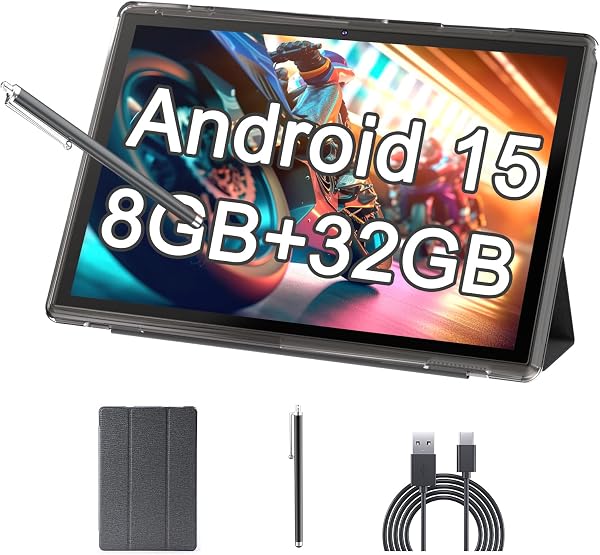
You’re getting the tablet itself, a protective case with a built-in kickstand, a basic stylus, and the standard charging cable and adapter. The case is a welcome inclusion — it’s not premium leather, but it offers solid drop protection and props the tablet at a comfortable viewing angle for typing. As shown in the product image, the setup is designed to be work-ready out of the box, which saves you a separate accessory purchase.
Performance and build quality
The 8GB of RAM is the real story here. In a 195-review sample averaging 3.9 stars, multiple buyers specifically call out the multitasking capability. I found that bouncing between Google Docs, Gmail, and a video call didn’t trigger the aggressive background app kills you often see on cheaper tablets. That matters if you’re using this for actual work, not just streaming.
The Android 15 software is clean and responsive. No bloated custom skins, no duplicate app stores — just stock Android with the basics. That’s refreshing at this price point.
Where it stumbles: the display is a basic IPS panel, not an AMOLED. Colors are acceptable, brightness is fine indoors, but it’s not great for outdoor use. The 32GB storage is the bigger limitation. After system files and pre-installed apps, you’re looking at roughly 20GB of usable space. That’s tight for offline document storage, downloaded presentations, or any media.
What buyers consistently praise
Owners repeatedly mention the value equation. One reviewer noted, “For the price, getting a tablet with this much RAM and the case included is hard to beat.” Another appreciated the “snappy performance for basic tasks” and said the battery comfortably lasted a full workday of mixed use.
Where it falls short
Beyond storage, the stylus is the weakest inclusion. It works for basic tapping and light note-taking, but there’s no palm rejection — resting your hand on the screen while writing creates phantom marks. Several reviews mention this, so adjust expectations accordingly. The camera is also forgettable; fine for video calls, not for documenting anything important.
Who should buy this
- Students on a budget who need a second screen for reading, note-taking, and research
- Remote workers who want a lightweight device for email, Slack, and document review on the couch
- Parents looking for a kid’s first tablet that can handle school apps without breaking the bank
Skip it if you need a professional-grade stylus for drawing, plan to store large media libraries offline, or want a screen that’s pleasant to watch in direct sunlight.
FAQ
Can I expand the 32GB storage? Yes. There’s a microSD card slot that supports cards up to 1TB. Buy a 128GB or 256GB card — they’re cheap and solve the storage issue immediately.
Does this tablet support typing accessories? The included case has a kickstand, and the tablet supports Bluetooth keyboards. It doesn’t have the pogo-pin connectors you’d find on premium tablets, so a Bluetooth keyboard is the way to go.
Is the stylus good for handwritten notes? Acceptable for quick jots, not great for extended writing. The lack of palm rejection makes continuous note-taking frustrating. Consider a third-party active stylus if that’s your primary use case.
The Verdict
Buy it if: You need an affordable, capable Android tablet for everyday office tasks and want the RAM headroom for smooth multitasking. The 8GB RAM and included case make it a strong budget pick.
Skip it if: You need serious note-taking capabilities, large local storage, or a display that handles bright conditions well.
Rating: 3.7/5 — A solid budget work tablet with genuine multitasking chops, held back by minimal storage and a basic stylus. Add a microSD card and it earns its place in your bag.
Where to Buy
We earn a small commission at no extra cost to you — this helps fund more honest reviews.
Last updated: 2026-08-06. Ratings and prices current as of review date. Verify on Amazon before purchasing.
More Home Office Verdicts



