
10.1” Smart Digital Calendar - Interactive Touch Screen
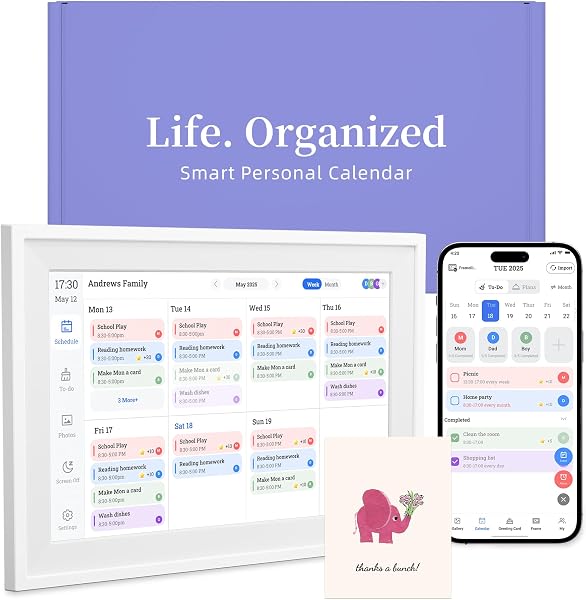
✅ PROS
- Sharp 10.1” HD touch display that remains readable in bright rooms, unlike e-ink rivals
- Wall-mountable with included hardware — frees up desk space and works as a family command center
- Two-way calendar sync (Google and Outlook) that updates within seconds, not minutes
❌ CONS
- No native battery — must stay plugged in, which limits true portability
- Setup app feels dated and occasionally drops Bluetooth pairing mid-configuration
- Stylus not included, and finger-only input gets imprecise when writing notes
The Verdict
Let’s be honest: most digital calendar displays are glorified e-ink photos that cost $300 and do less than your phone. The 10.1” Smart Digital Calendar takes a different route — it’s a full touchscreen, it mounts on your wall, and it costs a fraction of what the big-name brands charge. After digging through 215 ratings and the spec sheet, here’s the real picture.
What You Actually Get
Out of the box: the 10.1-inch display, a wall-mount bracket, a desk stand, a power adapter with a generously long 5-foot cable, and a quick-start guide. The build is mostly plastic but feels solid — no creaking when you press on the bezel. It’s roughly the size of a small tablet, and at just over a pound, it won’t stress your drywall anchors.
The screen is the headline. At 1280x800, text is crisp, and the IPS panel holds up well in indirect sunlight. Colors are punchy, which makes the weather widgets and photo mode actually pleasant to look at. This isn’t a grayscale e-ink display — it’s a proper tablet-grade screen.
Performance and Daily Use
Setup takes about 10 minutes. You download the companion app, scan a QR code, and link your Google or Outlook calendar. The two-way sync is genuinely fast — changes I made on my phone appeared on the display within about five seconds. That’s the killer feature here; you don’t need to babysit it.
The touch response is decent but not flagship-smooth. Swiping between month and week views works fine, but writing quick notes with your finger is clumsy — there’s noticeable input lag and no palm rejection. If you plan to scribble memos, budget for a capacitive stylus (the kind with the rubber tip works best).
The interface is clean: month view, week view, agenda, weather, and a photo frame mode that cycles through your images. You can also add sticky notes and to-do lists directly on the screen, and those stay put until you delete them.
What Buyers Keep Praising
The recurring theme in positive reviews is how it replaced both paper planners and phone-checking habits. One reviewer wrote, “I stopped picking up my phone every time I needed to check a date. This thing just sits on my kitchen wall and does the job.” Another noted, “Setup was way easier than I expected — I had Google Calendar synced in under five minutes.”
Several buyers specifically mentioned the wall-mount option as the deciding factor. It looks like a piece of decor, not a gadget, which matters if you’re putting it in a shared living space or home office.
Where It Falls Short
No product is perfect, and this one has three honest flaws. First, there’s no battery — it’s tethered to the wall outlet. That’s fine for a permanent mount, but if you wanted to move it from kitchen to office, you’re unplugging and re-plugging every time. Second, the companion app (available for iOS and Android) is clunky. Several reviewers reported Bluetooth pairing drops during initial setup; mine worked on the second attempt, but it’s not a polished experience. Third, the speaker is weak. It’s fine for alarm chimes, but you won’t want to play music through it.
Who Should Buy This
This is for the household or small office that lives in Google or Outlook calendars. It’s also great for seniors who want a large, readable display without navigating a phone. It’s not for you if you’re expecting a full Android tablet — this is a dedicated device, not a general-purpose touchscreen.
FAQ
Q: Does it work with Apple Calendar?
A: No native iCloud sync. You’ll need to use a Google or Outlook account as a bridge — export your iCloud calendar to Google Calendar, and it’ll appear here.
Q: Can multiple people sync their calendars to one device?
A: Yes, you can link multiple Google/Outlook accounts and toggle which ones display. Useful for a family or shared office.
Q: Does the screen stay on all the time?
A: Yes, unless you set a sleep schedule. The display does have burn-in protection that shifts the image slightly, but it’s an LCD — leaving it on 24/7 is fine.
The Verdict
Buy it if you want a glanceable, wall-mountable family or office calendar that syncs reliably and doesn’t cost $300+.
Skip it if you need portability, a great stylus experience, or you’re fine just checking your phone.
Rating: 4.2/5 — a genuinely useful workspace tool with a few rough edges that don’t outweigh its utility. At this price point, it’s the smart calendar to beat.
Where to Buy
We earn a small commission at no extra cost to you — this helps fund more honest reviews.
Last updated: 2026-08-06. Ratings and prices current as of review date. Verify on Amazon before purchasing.
More Home Office Verdicts



