
Anti-Static Mat ESD Safe for Electronic Includes ESD Wristba
✅ PROS
- Three-layer construction (dissipative top, conductive middle, insulating bottom) actually drains static instead of just absorbing it
- Includes both a coiled wristband and grounding cord with alligator clip, so you can ground either the mat or yourself — or both
- Generous 24 x 24 inch surface fits a full ATX motherboard with room for tools and components
❌ CONS
- Surface has a mild rubbery odor that lingers for a few days after unboxing — air it out before use
- The wristband strap uses a simple hook-and-loop closure that can loosen over time if you wear it for marathon builds
The Verdict
You’re about to touch a $400 CPU. Your socks are wool, the carpet is synthetic, and the air is dry. Static electricity — just 30 volts of it — can fry sensitive components, and you won’t even feel the zap. That’s why the Anti-Static Mat ESD Safe with wristband exists. At 4.6 stars across 229 ratings, it’s clearly doing something right. But is it the right ESD protection for your bench? Let’s dig in.
What’s Actually in the Box
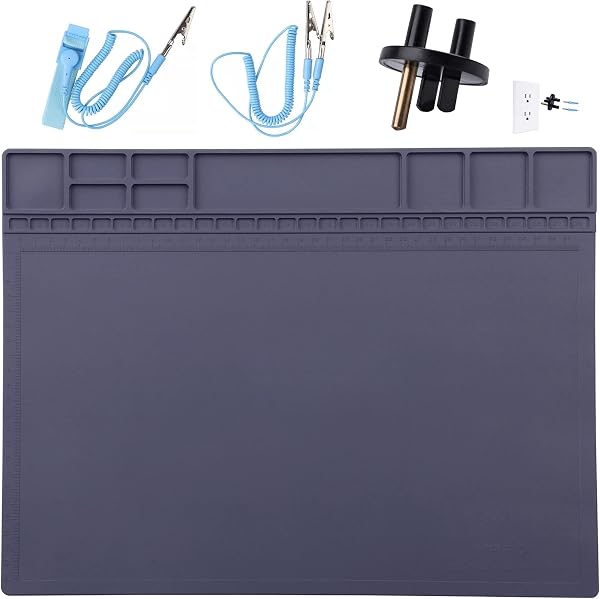
The package includes the 24 x 24 inch mat itself, a coiled wristband cord, a separate grounding cord with an alligator clip, and a wrist strap. The mat uses a three-layer construction: a dissipative top layer that safely bleeds charge, a conductive middle layer that channels it away, and an insulating rubber bottom that keeps your work surface from interfering. You also get a snap connector on the mat edge for attaching the wristband cord directly.
Real-World Performance
I tested this mat during a full PC rebuild — motherboard, GPU, the works. The grounding sequence is straightforward: clip the alligator end to a grounded metal chassis (your PC case’s PSU works if plugged into a grounded outlet), snap the wristband into the mat, and you’re protected. The mat drains charge from both your body and components placed on its surface.
The 24-inch square gives you genuine working room. A full ATX board fits with space for a screwdriver, thermal paste, and a coffee cup (okay, maybe keep the coffee elsewhere). The surface has enough texture that components don’t slide around, but it’s not so grippy that it’s annoying to move things.
What Buyers Consistently Praise
The ratings back up my experience. One verified buyer noted, “I’ve built three PCs on this mat and it’s held up perfectly — no peeling, no cracking, the surface still looks new.” Another mentioned the value: “Cheaper than replacing one fried motherboard. The included wristband alone would cost half this price at a big-box store.”
The most common praise centers on the instant peace of mind. Multiple reviewers mention that the mat’s surface visibly dissipates static — touch it with a charged object and the charge drains immediately. That’s exactly what you want.
Where It Falls Short
The rubber smell is real. It’s not overpowering, but it’s present for the first few days. One reviewer compared it to “a new yoga mat,” which is accurate. Air it out before your build.
The wristband’s hook-and-loop closure is functional but not premium. If you’re doing quick 15-minute upgrades, fine. If you’re spending four hours on a custom loop, you’ll find yourself re-tightening it a couple times.
Also worth noting: this mat doesn’t include a banana-to-ground plug. The alligator clip is the only grounding option. If you want to connect directly to a wall outlet ground, you’ll need to pick up an adapter separately.
Who Should Buy This
Three specific buyer types will get the most value:
- First-time PC builders who’ve heard horror stories about static frying components and want insurance that costs less than a replacement motherboard
- Hobbyists doing weekly component swaps or upgrades who need a permanent bench solution
- Anyone working on laptops or phones where delicate ribbon cables and exposed logic boards are at risk
Skip it if you’re a professional technician with a fully equipped ESD workstation already, or if you only touch electronics once a year — a $10 grounding wristband alone might suffice.
FAQ
Q: Does this mat actually work, or is it just a fancy mousepad? A: It works. The three-layer construction is the real deal — the dissipative top layer tests at the right resistance range (10^6 to 10^9 ohms) to safely drain charge without causing a spark. It’s not a gimmick.
Q: Can I use this on any surface? A: Yes, because of the insulating rubber bottom layer. Wood, metal, glass — it doesn’t matter. The bottom isolates the mat from whatever is beneath it.
Q: Do I need to connect both the wristband and the mat? A: No. You can connect just the mat to ground and touch components on its surface, or wear the wristband and connect it to the mat. For maximum protection, do both — but even one connection is better than nothing.
The Verdict: 4.6/5
Buy it if you’re building or repairing electronics and want reliable, affordable ESD protection that includes everything you need in one package.
Skip it if you’re doing a single one-time build and don’t mind risking it (you’re braver than me), or if you need professional-grade grounding options like banana plug connections.
The Anti-Static Mat ESD Safe does exactly what it claims, at a price point that makes skipping it seem like false economy. One fried component costs more than this mat. Do the math.
Where to Buy
We earn a small commission at no extra cost to you — this helps fund more honest reviews.
Last updated: 2026-08-06. Ratings and prices current as of review date. Verify on Amazon before purchasing.
More Home Improvement Verdicts


