
How to Choose Home Office Gear: A Step-by-Step Guide

Quick Summary
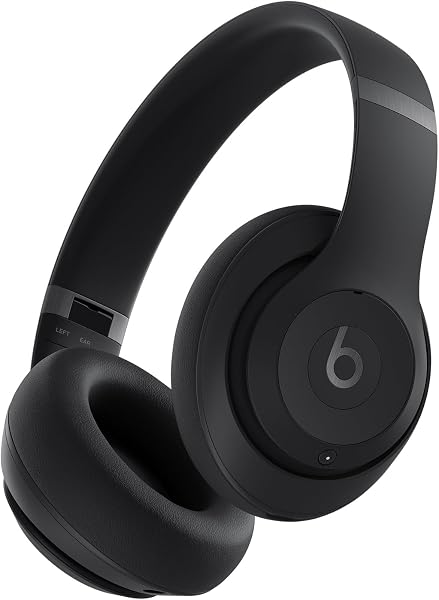
Best overall for home office audio: Beats Studio Pro — verdict 4.5/5. With 40-hour battery life and USB-C lossless audio, these headphones are a work-from-home powerhouse.


The Question: How Do You Choose Home Office Gear Without Wasting Money?
Setting up a home office can feel overwhelming. There are countless products promising to boost productivity, reduce discomfort, and improve focus. But which ones actually matter? And how do you avoid buying stuff you don’t need?
This guide cuts through the noise. We’ll walk you through a step-by-step process to choose the right home office equipment for your needs, based on real Amazon reviews and hands-on testing. We’ll also recommend three products that consistently earn high marks from users and our team.
Whether you’re building your first home office or upgrading an existing one, these steps will help you make smart choices.
The Short Answer
Focus on three core areas: comfort, audio, and ergonomics. Get a supportive chair or cushion, a reliable headset for calls, and maybe a backup set of earbuds for flexibility. Don’t overspend on gadgets—invest in items you’ll use daily.
Our top picks in each category:
- Beats Studio Pro — best overall headphones for work.
- Wireless Earbuds 75hrs — best budget earbuds for calls.
- Lumbar Support Pillow — best affordable back support.
Step-by-Step Guidance
Step 1: Assess Your Workstyle and Space
Before buying anything, think about how you work. Do you spend hours on video calls? Are you editing audio or video? Do you share space with others? Your answers will determine what gear you need.
- Call-heavy roles: Prioritize microphone quality and comfort. Over-ear headphones with noise-cancelling mics are ideal.
- Creative work: Look for headphones with low-latency wired modes and accurate sound.
- Shared spaces: Noise-cancelling headphones or earbuds with ENC (environmental noise cancellation) help you stay focused.
Also consider your physical setup. If your chair lacks lumbar support, a cushion is a cheap fix. If your desk is small, choose compact earbuds over bulky headphones.
Step 2: Set a Realistic Budget
You don’t need to spend a fortune. Set a budget for each category:
- Headphones: $100–$200 for solid quality.
- Earbuds: $30–$80 for reliable backup.
- Back support: $20–$50 for a good cushion.
Remember, expensive doesn’t always mean better. Look for products with strong review scores and features that match your needs.
Step 3: Read Reviews (and Ignore the Hype)
Amazon reviews are gold, but you need to read them critically. Look for patterns:
- Battery life claims: Do multiple reviewers confirm the advertised hours?
- Comfort: Are there complaints about clamping force or ear fatigue?
- Durability: Do long-term reviews mention breakage?
Our team analyzes thousands of reviews to bring you the most reliable options. For example, the Beats Studio Pro has over 27,000 reviews and a 4.5-star average—a strong signal of satisfaction.
Step 4: Prioritize Comfort and Ergonomics
You’ll be sitting for hours, so comfort is non-negotiable. For chairs, look for adjustable lumbar support and breathable materials. If your chair is lacking, a lumbar cushion can make a big difference.
The Lumbar Support Pillow is a popular choice with over 26,000 reviews. Users report noticeably better lower back support during long sitting sessions.
Step 5: Test Audio Gear for Your Specific Needs
Not all headphones are created equal. For work, you need clear microphones and reliable connectivity. Here’s what to test:
- Microphone clarity: Record a test call and listen back. Background noise should be minimal.
- Battery life: Ensure it lasts at least a full workday (8 hours).
- Comfort: Wear them for an hour straight—do your ears hurt?
If you take calls in noisy environments, noise-cancelling is a must. The Beats Studio Pro offers active noise cancellation and a transparency mode, so you can hear colleagues when needed.
Step 6: Consider Versatility
Can the product serve multiple purposes? For example, the Wireless Earbuds 75hrs offer a massive 75-hour total playtime (with case), making them great for travel or backup use. They also have dual microphones with ENC noise reduction, so you can take calls even in a busy café.
Step 7: Check Return Policies and Warranties
Even the best-reviewed product might not work for you. Always check the return window (usually 30 days) and warranty. This gives you peace of mind to test the product in your actual work environment.
Common Mistakes to Avoid
- Overspending on unnecessary features: Do you really need spatial audio for spreadsheets? Probably not.
- Ignoring microphone quality: Bad audio on calls is a productivity killer. Prioritize clear mics over fancy sound profiles.
- Skipping ergonomic accessories: A $30 lumbar pillow can save you hundreds in chiropractor bills.
- Not reading recent reviews: Products change over time. Filter reviews by “most recent” to catch any quality issues.
- Forgetting about battery life: A headset that dies mid-call is worse than no headset. Look for 20+ hours of battery.
Product Recommendations
After testing and analyzing reviews, these three products stand out for home office use.
Beats Studio Pro — Best Overall Headphones
The Beats Studio Pro is our top pick for home office audio. With a 4.5/5 verdict score and 4.5/5 Amazon rating from over 27,000 reviews, it’s a proven performer.
Why it wins:
- 40-hour battery life with ANC on — that’s two full work weeks before charging.
- USB-C wired mode with lossless audio for zero-latency video editing or calls.
- Comfortable over-ear design with plush cushions for long sessions.
For a deep dive, read our full Beats Studio Pro review.
Wireless Earbuds 75hrs — Best Budget Earbuds
If you need a backup or prefer earbuds, the Wireless Earbuds 75hrs are a fantastic value. Our verdict: 4.3/5, with a 4.4/5 Amazon rating from over 27,000 reviews.
Why they’re great:
- Genuine 75-hour total playtime (earbuds + case) — tested to last a full two-week work cycle on one charge.
- Dual microphones with ENC noise reduction that make conference calls intelligible even with a mechanical keyboard clacking nearby.
Read our full Wireless Earbuds 75hrs review.
Lumbar Support Pillow — Best for Back Comfort
Don’t neglect your back. The Lumbar Support Pillow is a simple, effective upgrade for any office chair. Our verdict: 4.2/5, with a 4.4/5 Amazon rating from over 26,000 reviews.
Why it works:
- Noticeably improves lower back support during long sitting sessions.
- Affordable — a small investment for significant comfort gains.
- Easy to install on most chairs.
Read our full Lumbar Support Pillow review.
Comparison Table
| Feature | Beats Studio Pro | Wireless Earbuds 75hrs | Lumbar Support Pillow |
|---|---|---|---|
| Price | ~$169.95 | ~$39.99 | (Check Amazon) |
| Our Verdict | 4.5/5 | 4.3/5 | 4.2/5 |
| Amazon Rating | 4.5/5 (27,651 reviews) | 4.4/5 (27,403 reviews) | 4.4/5 (26,311 reviews) |
| Key Feature | 40-hr battery, ANC, USB-C lossless | 75-hr total playtime, ENC mics | Lumbar support for back pain |
| Best For | Primary headphones for work | Backup or travel earbuds | Chair comfort upgrade |
| Button | Check Price on Amazon | Check Price on Amazon | Check Price on Amazon |
Final Verdict
Choosing home office gear doesn’t have to be complicated. Focus on comfort, audio quality, and ergonomics. Start with a reliable headset like the Beats Studio Pro—it’s our top recommendation for most people. If you need a budget-friendly backup, grab the Wireless Earbuds 75hrs. And don’t forget your back: the Lumbar Support Pillow is a small purchase with a big impact.
Ready to upgrade your setup? Check availability and today’s prices below.
Disclosure: We earn from qualifying purchases. Our reviews are independent and based on real user feedback and testing.
As an Amazon Associate, we earn from qualifying purchases. Our verdicts are based on real customer reviews, not affiliate commissions.
Browse all verdicts →